cancel
Showing results for 
Search instead for 
Did you mean: 

The Power BI Data Visualization World Championships is back! Get ahead of the game and start preparing now! Learn more

Reply
DanCasSan
Helper V
Helper V

Row_Number in column with DAX

Dear community:


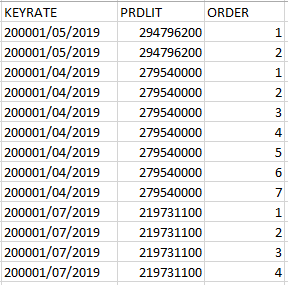
I need your support. I want to perform an equivalency of the SQL ROW_NUMBER function on one of my tables in Power BI; basically, do what I put in the image. This equivalence should be as a column and not a measure.


ROW_NUMBER.PNG


Thanks for your support!


Cheers,

1 ACCEPTED SOLUTION
V-lianl-msft
Community Support
Community Support

Hi @DanCasSan ,


You can add an index column in query editor first.

Then use the rankx function to create the calculated column.

Rank =
RANKX (
    FILTER (
        'Table',
        'Table'[KEYRATE] = EARLIER ( 'Table'[KEYRATE] )
            && 'Table'[PRDLIT] = EARLIER ( 'Table'[PRDLIT] )
    ),
    'Table'[Index],
    ,
    ASC
)

Test_rankx.PNG

Sample .pbix 


Best Regards,
Liang
If this post helps, then please consider Accept it as the solution to help the other members find it more quickly.

View solution in original post

3 REPLIES 3
V-lianl-msft
Community Support
Community Support

Hi @DanCasSan ,


You can add an index column in query editor first.

Then use the rankx function to create the calculated column.

Rank =
RANKX (
    FILTER (
        'Table',
        'Table'[KEYRATE] = EARLIER ( 'Table'[KEYRATE] )
            && 'Table'[PRDLIT] = EARLIER ( 'Table'[PRDLIT] )
    ),
    'Table'[Index],
    ,
    ASC
)

Test_rankx.PNG

Sample .pbix 


Best Regards,
Liang
If this post helps, then please consider Accept it as the solution to help the other members find it more quickly.

amitchandak
Super User
Super User

@DanCasSan 
For Rank Refer these links

https://radacad.com/how-to-use-rankx-in-dax-part-1-of-3-calculated-columns

https://radacad.com/how-to-use-rankx-in-dax-part-2-of-3-calculated-measures
https://radacad.com/how-to-use-rankx-in-dax-part-3-of-3-the-finale


Refer Rank by sub Category both in 1 and 2 article and use dense option in the last argument of RankX You have also use breaking ties option

Share with Power BI Enthusiasts: Full Power BI Video (20 Hours) YouTube
Microsoft Fabric Series 60+ Videos YouTube
Microsoft Fabric Hindi End to End YouTube
edhans
Super User
Super User

I'm not aware of a way to put an index in a column in DAX. without a unique value to sort on. In Power Query, you just use the Add Column ribbon, then Index Column.


if you can rank your data and create an index that way, see this post 


The problem is your data doesn't have a unique field, and row numbers aren't really a concept in a DAX table like they can be in SQL or Power Query.


Did I answer your question? Mark my post as a solution!
Did my answers help arrive at a solution? Give it a kudos by clicking the Thumbs Up!

DAX is for Analysis. Power Query is for Data Modeling


Proud to be a Super User!

MCSA: BI Reporting

Helpful resources

Announcements
Power BI DataViz World Championships

Power BI Dataviz World Championships

The Power BI Data Visualization World Championships is back! Get ahead of the game and start preparing now!

December 2025 Power BI Update Carousel

Power BI Monthly Update - December 2025

Check out the December 2025 Power BI Holiday Recap!

FabCon Atlanta 2026 carousel

FabCon Atlanta 2026

Join us at FabCon Atlanta, March 16-20, for the ultimate Fabric, Power BI, AI and SQL community-led event. Save $200 with code FABCOMM.