cancel
Showing results for 
Search instead for 
Did you mean: 

Try your skills in the Power BI Dataviz World Championship! Round one ends June 26. Join now

Reply
jones
Regular Visitor

Row Level security

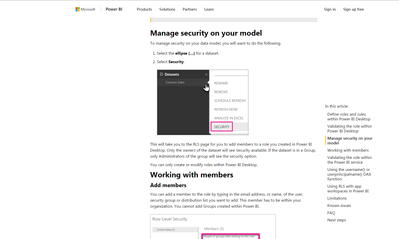
Dear all, I am trying to configue the RLS according to the documentantion in Power Bi Website
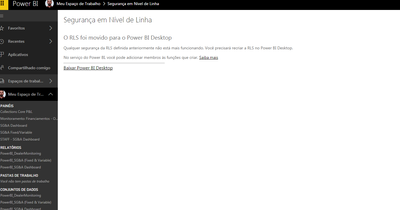
Following the procedures described at the site, it appears the message: "The RLS was moved to Power BI Desktop".
I want to know at the power BI desktop how to conifigue the rls. Is there somebody to help me?

tks a lot

1 ACCEPTED SOLUTION
vickyprudhvi
Helper IV
Helper IV

HI,

Please go to below link. It has complete detail on RLS in pbix file

https://powerbi.microsoft.com/en-us/documentation/powerbi-admin-rls/


View solution in original post

6 REPLIES 6
vickyprudhvi
Helper IV
Helper IV

HI,

Please go to below link. It has complete detail on RLS in pbix file

https://powerbi.microsoft.com/en-us/documentation/powerbi-admin-rls/


SiteSiteMy caseMy caseMy caseMy case


HI,  that's the point. I was trying to do exactly what is on teh website.

but it appeared the message. (check images to better comprehension).

I think the documentation is not updated.


tks

,

First you need to create RLS in PowerBi Desktop and then publish the file to PowerBI Services.

You can find security option in Datasets tab.

Vicky, did you see the images that i send.

I've already done the rls, published, but when i go to security option, it appear a mesage telling: "The RLS  was moved to Power Bi Desktop" Please check the images.


tks

Anonymous
Not applicable

@jones,

Based on your description, you have done everything described in the "Define roles and rules within Power BI Desktop" part of this blog, and you have published the PBIX file to Power BI Service, but you are not able to add role member in Power BI Service.

I test the scenario as yours, but I can't reproduce your issue. Would you mind sharing me your PBIX file?

Regards,

Lydia

Is it only for Service? can i use Row level security in PBIRS?

Helpful resources

Announcements
Fabric Data Days is here Carousel

Data Days 2026

Don't miss out on Data Days, June 15 through August 7. Learn Fabric, Power BI, SQL, AI and more.

Power BI DataViz World Championships carousel

Power BI DataViz World Championships - June 2026

A new Power BI DataViz World Championship is coming this June! Don't miss out on submitting your entry.