Join us at FabCon Atlanta from March 16 - 20, 2026, for the ultimate Fabric, Power BI, AI and SQL community-led event. Save $200 with code FABCOMM.
Register now!The Power BI Data Visualization World Championships is back! Get ahead of the game and start preparing now! Learn more
Hi ,
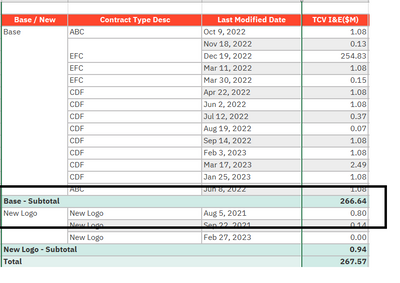
I need help to show row level total for particulr column for example as show below:
I just wanted to show total at row level only for first column that is BASE/NEW
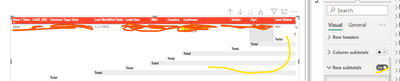
but when i am turning on row level total its showing me total at each column , that i dont need .
Let me know if there is any soluntion for thsi
Solved! Go to Solution.
@PowerBI_User23 I believe that under Row subtotals there is a toggle for Per row level that you can turn on and then select the row you want.
Hi @Greg_Deckler Thankyou for the reply .
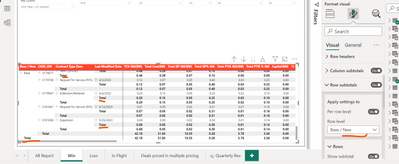
I have tried that option but its still showing the other total of the column , you can see in the below picture .
@PowerBI_User23 I believe that under Row subtotals there is a toggle for Per row level that you can turn on and then select the row you want.
Hi,
Did that work for you. I can see the toggle button but there is no action when we are trying to select different row levels
Thansk, Anusha
Hi @apuchakayala , No its working for me , it still showing me total level for each column
Yeah I was expecting it to show on only the column that I wanted , but it still showing on all columns.
The Power BI Data Visualization World Championships is back! Get ahead of the game and start preparing now!
| User | Count |
|---|---|
| 38 | |
| 35 | |
| 33 | |
| 32 | |
| 29 |
| User | Count |
|---|---|
| 132 | |
| 90 | |
| 78 | |
| 66 | |
| 65 |