Don't miss your chance to take the Fabric Data Engineer (DP-600) exam for FREE! Find out how by attending the DP-600 session on April 23rd (pacific time), live or on-demand.
Learn moreNext up in the FabCon + SQLCon recap series: The roadmap for Microsoft SQL and Maximizing Developer experiences in Fabric. All sessions are available on-demand after the live show. Register now
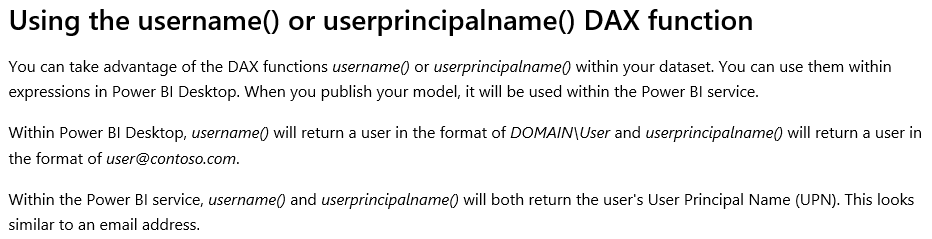
Hey! I had created Row Level Security in the power BI Desktop as : [Email] = username().
I had done this so that RLS is applied dynamically. I am a little confues with what the following sentence means.
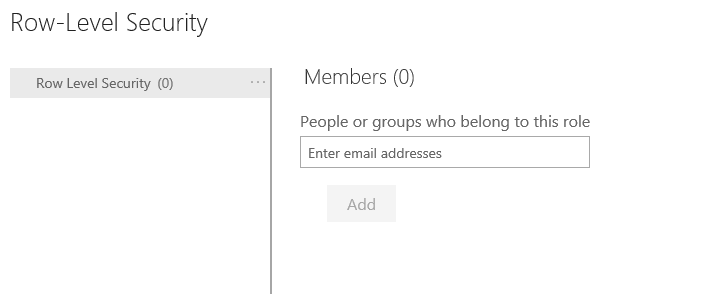
It says that when I publish it, it iwll be used within the Power BI Service. Does that mean I do not have to add any members unser Dataset -> Security -> Add members column in the Power BI Service?
Thank you in advance!
Solved! Go to Solution.
Hi @Anonymous
It is necessary to add any members under Dataset -> Security -> Add members column in the Power BI Service when you use "usename( )" or "userprincipalname( )" in power bi desktop.
It is a little misunderstanding for you about "usename( )" or "userprincipalname( )" in RLS.
I would suggest reading the blog, which just gives some explanations around when and how deploying it to the Power BI Service.
http://radacad.com/dynamic-row-level-security-with-power-bi-made-simple
Best Regards
Maggie
Hi @Anonymous
It is necessary to add any members under Dataset -> Security -> Add members column in the Power BI Service when you use "usename( )" or "userprincipalname( )" in power bi desktop.
It is a little misunderstanding for you about "usename( )" or "userprincipalname( )" in RLS.
I would suggest reading the blog, which just gives some explanations around when and how deploying it to the Power BI Service.
http://radacad.com/dynamic-row-level-security-with-power-bi-made-simple
Best Regards
Maggie
If you have recently started exploring Fabric, we'd love to hear how it's going. Your feedback can help with product improvements.
A new Power BI DataViz World Championship is coming this June! Don't miss out on submitting your entry.
Share feedback directly with Fabric product managers, participate in targeted research studies and influence the Fabric roadmap.
| User | Count |
|---|---|
| 48 | |
| 45 | |
| 41 | |
| 20 | |
| 17 |
| User | Count |
|---|---|
| 69 | |
| 63 | |
| 32 | |
| 31 | |
| 23 |