Advance your Data & AI career with 50 days of live learning, dataviz contests, hands-on challenges, study groups & certifications and more!
Get registeredGet Fabric Certified for FREE during Fabric Data Days. Don't miss your chance! Request now
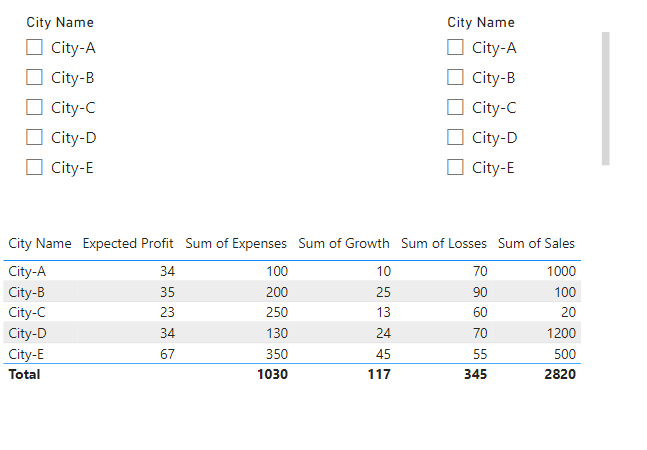
@NaeemShahzad123 Create 2 separate, disconnected tables for your slicers where you have one column and a row per city name. You can then construct a measure that is essentially a Complex Selector like this: The Complex Selector - Microsoft Power BI Community. Specifically in your case something along the lines of:
Selector Measure =
VAR __City1 = SELECTEDVALUE('Slicer1'[Column])
VAR __City2 = SELECTEDVALUE('Slicer2'[Column])
VAR __RowCity = MAX('Table'[City Name])
VAR __Result = IF( __RowCity IN { __City1, __City2 }, 1, 0
RETURN
__Result
Then filter your visualization using the Filters pane and this measure set to 1.
Advance your Data & AI career with 50 days of live learning, contests, hands-on challenges, study groups & certifications and more!
Check out the October 2025 Power BI update to learn about new features.