Join us at FabCon Atlanta from March 16 - 20, 2026, for the ultimate Fabric, Power BI, AI and SQL community-led event. Save $200 with code FABCOMM.
Register now!The Power BI Data Visualization World Championships is back! Get ahead of the game and start preparing now! Learn more
Hello,
I have an issue with the custom visual the Road map.
Here is the data:
| Time | Rodzaj | Latitude | Longitude | Kod CN |
| 2,00 | Wysylka | 52.237049 | 21.017532 | 111111111 |
| 1,00 | Wysylka | 42.25860 | 4.16595 | 111111111 |
| 2,00 | Pochodzenie | 52.237049 | 21.017532 | 111111111 |
| 1,00 | Pochodzenie | 51.509865, | 0 | 111111111 |
| 2,00 | Wysylka | 52.237049 | 21.017532 | 222222222 |
| 1,00 | Wysylka | 32.78493 | -79.92257 | 222222222 |
| 2,00 | Pochodzenie | 52.237049 | 21.017532 | 222222222 |
| 1,00 | Pochodzenie | 32.78493 | -79.92257 | 222222222 |
Here is the input to the map:
I put "Time" in Timestamp
Latitute in Latitude
Longtitute in Longtitude
Color Legen - "Kod CN"
Dash Legend -"Rodzaj"
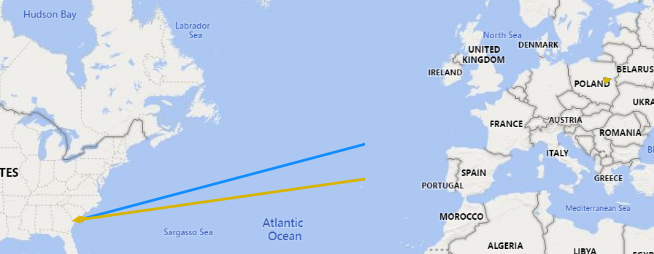
What I would expect is for the map to show me:
4 different lines in total - 2 dash types in two colours.
I would also expect for all the lines to end in Warsaw:
52.237049 21.017532
However, the map currently looks as attached.
Thanks for any tips.
Hi @Anonymous ,
Have you watched below vedio?
https://www.youtube.com/watch?v=ywYF7tYBsy0.
Best Regards,
Jay
Community Support Team _ Jay Wang
If this post helps, then please consider Accept it as the solution to help the other members find it more quickly.
Hi,
thanks for your input - I did watch it and then tried to apply it to my data, with the mentioned result.
The Power BI Data Visualization World Championships is back! Get ahead of the game and start preparing now!
| User | Count |
|---|---|
| 39 | |
| 38 | |
| 38 | |
| 28 | |
| 27 |
| User | Count |
|---|---|
| 124 | |
| 88 | |
| 73 | |
| 66 | |
| 65 |