cancel
Showing results for 
Search instead for 
Did you mean: 

The Power BI Data Visualization World Championships is back! Get ahead of the game and start preparing now! Learn more

Reply
momihaila
Frequent Visitor

Rolling calculation for filtered data

Hi all,


I am fairly new to Power BI and I want to build a NPS dashboard. I have the detailed data at questionnaire level and I am struggling to get rolling kpi's.


I managed to get 2Months rolling count of number of respondents with this:

aa rol1 = CALCULATE(COUNT(CallCenter_Interact[INT ID]), DATESINPERIOD(CallCenter_Interact[End of Month]


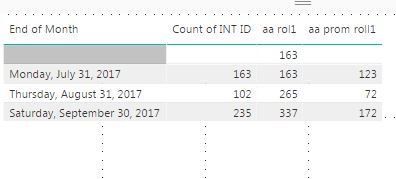
However, if I want to calculated the 2M rolling number of Promoters the formula only returns the total for each month :

aa prom roll1 = CALCULATE(COUNT(CallCenter_Interact[INT ID]),FILTER(CallCenter_Interact, CallCenter_Interact[NPS Segment]="Promoter")


See below he results I am currently getting. How am I supposed to filter the kpi and still get 2M rolling?


PowerBI.JPG

1 ACCEPTED SOLUTION

@momihaila

Thanks for posting those details, which makes your requirement crystal clear. You can try a measure as

aa prom roll1 =
CALCULATE (
    COUNTAX (
        FILTER ( CallCenter_Interact, CallCenter_Interact[NPS Segment] = "Promoter" ),
        CallCenter_Interact[INT ID]
    ),
    DATESINPERIOD (
        CallCenter_Interact[End of Month],
        LASTDATE ( CallCenter_Interact[End of Month] ),
        -2,
        MONTH
    )
)

Capture.PNG

View solution in original post

4 REPLIES 4
Eric_Zhang
Microsoft Employee
Microsoft Employee

@momihaila

What if you put the same condition to the second measure?

aa prom roll1 =
CALCULATE (
    COUNT ( CallCenter_Interact[INT ID] ),
    FILTER ( CallCenter_Interact, CallCenter_Interact[NPS Segmnt] = "Promoter" ),
    DATESINPERIOD condition in your first measure here
)

If it is not your case, please post some sample data and the expected output.

@Eric_Zhang


I just realised I didn't paste it all, I already had the same condition for the second measure but still didn't work.

So, the formulas I currently have are:


aa rol1 = CALCULATE(COUNT(CallCenter_Interact[INT ID]), DATESINPERIOD(CallCenter_Interact[End of Month], LASTDATE(CallCenter_Interact[End of Month]),-2, Month)) - this one is working


aa prom roll1 = CALCULATE(COUNT(CallCenter_Interact[INT ID]),FILTER(CallCenter_Interact, CallCenter_Interact[NPS Segment]="Promoter"), DATESINPERIOD(CallCenter_Interact[End of Month], LASTDATE(CallCenter_Interact[End of Month]),-2, Month)) - this one doesn't return 2M rolling


This is what I should get:

EOMRespondersaa rol1Promotersaa prom roll1
31-Jul-178855
31-Aug-1771549
30-Aug-1751226


This is a sample of the data:

INT IDEnd of MonthNPS SegmentData apel
60347729839/30/2017 0:00Promoter9/27/2017 0:00
60347657499/30/2017 0:00Promoter9/27/2017 0:00
60308178928/31/2017 0:00Promoter8/9/2017 0:00
60308174398/31/2017 0:00Promoter8/9/2017 0:00
60308087428/31/2017 0:00Promoter8/9/2017 0:00
60307518148/31/2017 0:00Promoter8/9/2017 0:00
60306334767/31/2017 0:00Promoter7/5/2017 0:00
60306316677/31/2017 0:00Promoter7/28/2017 0:00
60306293177/31/2017 0:00Promoter7/5/2017 0:00
60306284497/31/2017 0:00Promoter7/5/2017 0:00
60306269897/31/2017 0:00Promoter7/7/2017 0:00
60345543299/30/2017 0:00Detractor9/27/2017 0:00
60345401489/30/2017 0:00Detractor9/27/2017 0:00
60310618988/31/2017 0:00Detractor8/23/2017 0:00
60306921027/31/2017 0:00Detractor7/20/2017 0:00
60347957959/30/2017 0:00Neutral9/27/2017 0:00
60311161138/31/2017 0:00Neutral8/23/2017 0:00
60311061678/31/2017 0:00Neutral8/23/2017 0:00
60306369757/31/2017 0:00Neutral7/20/2017 0:00
60306314797/31/2017 0:00Neutral7/26/2017 0:00


Thanks!

Hi @momihaila,


You may refer to my solution here.


Hope this helps.


Untitled.png


Regards,
Ashish Mathur
http://www.ashishmathur.com
https://www.linkedin.com/in/excelenthusiasts/

@momihaila

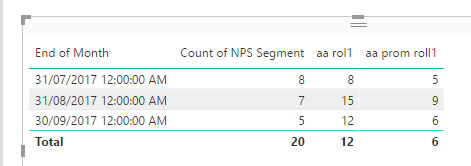
Thanks for posting those details, which makes your requirement crystal clear. You can try a measure as

aa prom roll1 =
CALCULATE (
    COUNTAX (
        FILTER ( CallCenter_Interact, CallCenter_Interact[NPS Segment] = "Promoter" ),
        CallCenter_Interact[INT ID]
    ),
    DATESINPERIOD (
        CallCenter_Interact[End of Month],
        LASTDATE ( CallCenter_Interact[End of Month] ),
        -2,
        MONTH
    )
)

Capture.PNG

Helpful resources

Announcements
Power BI DataViz World Championships

Power BI Dataviz World Championships

The Power BI Data Visualization World Championships is back! Get ahead of the game and start preparing now!

December 2025 Power BI Update Carousel

Power BI Monthly Update - December 2025

Check out the December 2025 Power BI Holiday Recap!

FabCon Atlanta 2026 carousel

FabCon Atlanta 2026

Join us at FabCon Atlanta, March 16-20, for the ultimate Fabric, Power BI, AI and SQL community-led event. Save $200 with code FABCOMM.