cancel
Showing results for 
Search instead for 
Did you mean: 

Learn from the best! Meet the four finalists headed to the FINALS of the Power BI Dataviz World Championships! Register now

Reply
KG1
Resolver I
Resolver I

Rolling Sum Calculation

KG1_0-1644311913979.png

Hi I need to replicate the WIP weeks formula in Powerbi


Can anyone please advise how I would go about this?


Thank you in advance

1 ACCEPTED SOLUTION
Anonymous
Not applicable

Hi @KG1 ,


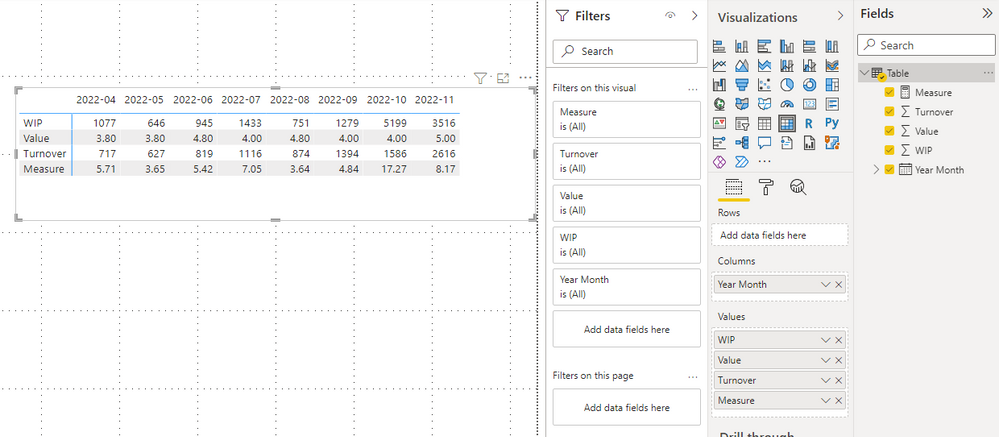
Please check this measure

Measure =
VAR _3months =
    DATESINPERIOD ( 'Table'[Year Month], MAX ( 'Table'[Year Month] ), -3, MONTH )
VAR _sum1 =
    CALCULATE ( SUM ( 'Table'[Value] ), _3months )
VAR _sum2 =
    CALCULATE ( SUM ( 'Table'[Turnover] ), _3months )
RETURN
    _sum1 * SUM ( 'Table'[WIP] ) / _sum2

vstephenmsft_0-1644904176869.png


Best Regards,

Stephen Tao


If this post helps, then please consider Accept it as the solution to help the other members find it more quickly.

View solution in original post

4 REPLIES 4
Anonymous
Not applicable

Hi @KG1 ,


Please check this measure

Measure =
VAR _3months =
    DATESINPERIOD ( 'Table'[Year Month], MAX ( 'Table'[Year Month] ), -3, MONTH )
VAR _sum1 =
    CALCULATE ( SUM ( 'Table'[Value] ), _3months )
VAR _sum2 =
    CALCULATE ( SUM ( 'Table'[Turnover] ), _3months )
RETURN
    _sum1 * SUM ( 'Table'[WIP] ) / _sum2

vstephenmsft_0-1644904176869.png


Best Regards,

Stephen Tao


If this post helps, then please consider Accept it as the solution to help the other members find it more quickly.

@Anonymous 


Sorry to bother you again but I cant get the measure to calculate correctly.


I now have the data used in the measure split into 3 tables

KG1_0-1649239369841.pngKG1_1-1649239394230.png

Here is the measure I have used 

Calc =
VAR _3months =
DATESINPERIOD ( 'Date Table'[Month / Year], MAX ( 'Date Table'[Month / Year] ), -3, MONTH )
VAR _sum1 =
CALCULATE ( SUM ( 'WIP Weeks'[WIP Weeks] ), _3months )
VAR _sum2 =
CALCULATE ( SUM ( 'WIP & T/O'[Value]), FILTER('WIP & T/O', 'WIP & T/O'[Type] = "Contract Turnover" ), _3months )
RETURN
_sum1 * (calculate([Sum WIP] ) / _sum2)
 
Here is the result
KG1_2-1649239457731.png


This is what the result Should be


KG1_3-1649239507255.png

I can't work out what I am doing wrong


Thank you in advance 


NB: Please only use from July onwards as the measure calculates the last 3 months and I have added in any data pre April 21

Brilliant thanks so much Stephen

Greg_Deckler
Community Champion
Community Champion

@KG1 Maybe: https://community.powerbi.com/t5/Quick-Measures-Gallery/Rolling-Weeks/m-p/391694#M128


Follow on LinkedIn
@ me in replies or I'll lose your thread!!!
Instead of a Kudo, please vote for this idea
Become an expert!: Enterprise DNA
External Tools: MSHGQM
YouTube Channel!: Microsoft Hates Greg
Latest book!:
DAX For Humans

DAX is easy, CALCULATE makes DAX hard...

Helpful resources

Announcements
Join our Fabric User Panel

Join our Fabric User Panel

Share feedback directly with Fabric product managers, participate in targeted research studies and influence the Fabric roadmap.

February Power BI Update Carousel

Power BI Monthly Update - February 2026

Check out the February 2026 Power BI update to learn about new features.

FabCon Atlanta 2026 carousel

FabCon Atlanta 2026

Join us at FabCon Atlanta, March 16-20, for the ultimate Fabric, Power BI, AI and SQL community-led event. Save $200 with code FABCOMM.