Join us at FabCon Atlanta from March 16 - 20, 2026, for the ultimate Fabric, Power BI, AI and SQL community-led event. Save $200 with code FABCOMM.
Register now!The Power BI Data Visualization World Championships is back! Get ahead of the game and start preparing now! Learn more
Hello,
I'm fairly new to PBI Desktop and I'm struggling with a "rolling quarter" implementation in PBI...
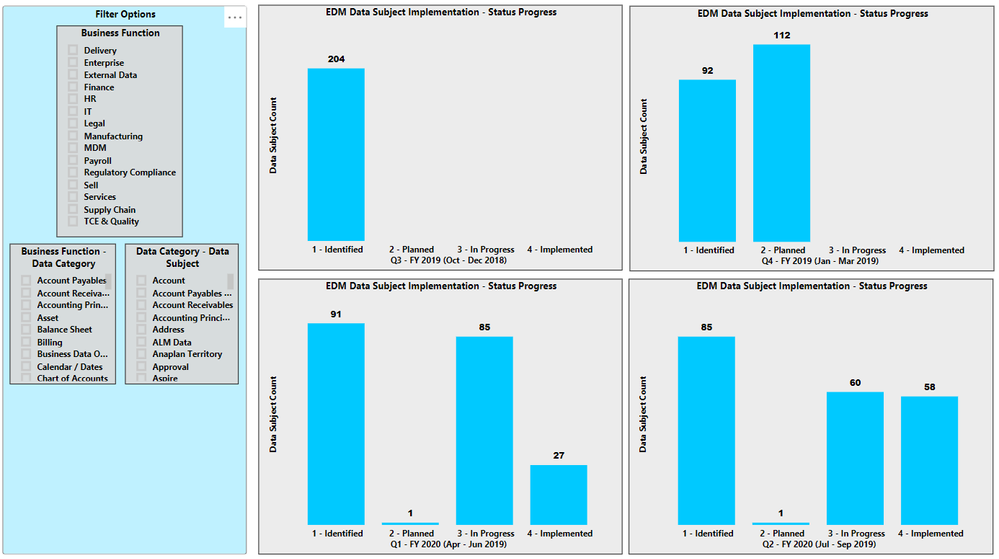
I have 4 graphs that show the status progess of Data Subject implementation in our database at the end of each quarter. The data comes from an excel spreadsheet.
The spreadsheet currently contains the data as shown in the screen capture. I.e. Business Function, Data Category, Data Subject, and the 4 quarters.
When the data for the end of Q3 - FY2020 becomes available, the spreadsheet needs to be updated and the PBI Graphs then should show Q4 - FY2019 through Q3 - FY2020.
What is the best way to organize the spreadsheet and apply this to the PBI graphs?
Hi @Anonymous ,
Have you solved your problem?
If you have solved, please always accept the replies making sense as solution to your question so that people who may have the same question can get the solution directly.
If you still need help, please share some data sample and your desired output so that we could help further on it.
Best Regards,
Cherry
@Anonymous - In your Date table, you can add a "Relative Quarter" column, which will indicate "how many quarters ago" any date falls into. You will need to apply some logic to determine what is the most recent closed quarter. Then, in your visuals, you can filter based on the relative quarter.
The Power BI Data Visualization World Championships is back! Get ahead of the game and start preparing now!
| User | Count |
|---|---|
| 38 | |
| 36 | |
| 33 | |
| 33 | |
| 29 |
| User | Count |
|---|---|
| 132 | |
| 86 | |
| 85 | |
| 68 | |
| 64 |