cancel
Showing results for 
Search instead for 
Did you mean: 

Next up in the FabCon + SQLCon recap series: The roadmap for Microsoft SQL and Maximizing Developer experiences in Fabric. All sessions are available on-demand after the live show. Register now

Reply
Anonymous
Not applicable

Rolling 90 Days sum from a table having multiple occurances of a date with different values

Hi Folks,


I am working on a req to create Rolling 90 Days sum from a table which have multiple occurances for same date.my req is I want to get sum of first all the values for every date first(example Sum of all values on the second column  for feb 1 in below snip and similarly for every other date also.) I have a measure for this  :

Measure_2 = sumx(values(date from calender table),
                '_Measure Table'[column 2])

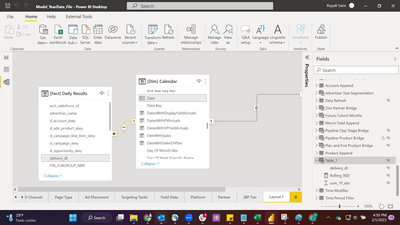
PBIROO_0-1675297978980.png


Issue:  I got the sum of values for each day from the measure I mentioned above but now I am trying to work on another measure which shoud get me the sum of last 90 days for every date.

Measure_2 = sumx(values(date from calender table),
                '_Measure Table'[column 2])
 
Measure3 =
var result = calculate([Measure_2],
Datesinperiod('[Dim] Calendar'[Date],
max('[Dim] Calendar'[Date]),-90,DAY
))
return result
 
but this measure gives me cummulative sum and it is not what i want.can Someone please help?
 
PBIROO_1-1675299062704.png

Thanks in advance


1 ACCEPTED SOLUTION
Anonymous
Not applicable

Hi @Anonymous ,

I have created a simple sample, please refer to my pbix file to see if it helps you.

Create measures.


Measure = var _90=MAX('Table'[date])+90
var _minindex=MINX(FILTER(ALL('Table'),'Table'[date]=SELECTEDVALUE('Table'[date])),'Table'[Index])
return
IF(_minindex=SELECTEDVALUE('Table'[Index]),1,0)
Measure2 = 
var _90days=MAX('Table 2'[Date])+90
return
SUMX(FILTER(ALL('Table'),'Table'[date]<=_90days&&'Table'[date]>=SELECTEDVALUE('Table 2'[Date])&&[Measure]<>0),'Table'[value])


vpollymsft_0-1675848881401.png


How to Get Your Question Answered Quickly 


If it does not help, please provide more details with your desired output and pbix file without privacy information (or some sample data) .


Best Regards
Community Support Team _ Polly

If this post helps, then please consider Accept it as the solution to help the other members find it more quickly.


View solution in original post

2 REPLIES 2
Ashish_Mathur
Super User
Super User

Hi,

Share data in a format that can be pasted in an MS Excel file and show the expected result very clearly.


Regards,
Ashish Mathur
http://www.ashishmathur.com
https://www.linkedin.com/in/excelenthusiasts/
Anonymous
Not applicable

Hi @Anonymous ,

I have created a simple sample, please refer to my pbix file to see if it helps you.

Create measures.


Measure = var _90=MAX('Table'[date])+90
var _minindex=MINX(FILTER(ALL('Table'),'Table'[date]=SELECTEDVALUE('Table'[date])),'Table'[Index])
return
IF(_minindex=SELECTEDVALUE('Table'[Index]),1,0)
Measure2 = 
var _90days=MAX('Table 2'[Date])+90
return
SUMX(FILTER(ALL('Table'),'Table'[date]<=_90days&&'Table'[date]>=SELECTEDVALUE('Table 2'[Date])&&[Measure]<>0),'Table'[value])


vpollymsft_0-1675848881401.png


How to Get Your Question Answered Quickly 


If it does not help, please provide more details with your desired output and pbix file without privacy information (or some sample data) .


Best Regards
Community Support Team _ Polly

If this post helps, then please consider Accept it as the solution to help the other members find it more quickly.
 

Helpful resources

Announcements
New to Fabric survey Carousel

New to Fabric Survey

If you have recently started exploring Fabric, we'd love to hear how it's going. Your feedback can help with product improvements.

Power BI DataViz World Championships carousel

Power BI DataViz World Championships - June 2026

A new Power BI DataViz World Championship is coming this June! Don't miss out on submitting your entry.

Join our Fabric User Panel

Join our Fabric User Panel

Share feedback directly with Fabric product managers, participate in targeted research studies and influence the Fabric roadmap.

March Power BI Update Carousel

Power BI Community Update - March 2026

Check out the March 2026 Power BI update to learn about new features.