cancel
Showing results for 
Search instead for 
Did you mean: 

The Power BI Data Visualization World Championships is back! Get ahead of the game and start preparing now! Learn more

Reply
dommyw277
Helper IV
Helper IV

Right or Mid Return Amount of Characters

Hi, im trying to create a custom column to return the month , not having much luck, heres my column:

[Month_Type] Azure July 2022 

I just want to get the month in another column please

1 ACCEPTED SOLUTION
Samarth_18
Community Champion
Community Champion

Hi @dommyw277 


You could create a column as below:-

month_col =
SWITCH (
    TRUE (),
    CONTAINSSTRING ( table[_column], "January" ), "January",
    CONTAINSSTRING ( table[_column], "February" ), "February",
    CONTAINSSTRING ( table[_column], "March" ), "March",
    CONTAINSSTRING ( table[_column], "April" ), "April",
    CONTAINSSTRING ( table[_column], "May" ), "May",
    CONTAINSSTRING ( table[_column], "June" ), "June",
    CONTAINSSTRING ( table[_column], "July" ), "July",
    CONTAINSSTRING ( table[_column], "August" ), "August",
    CONTAINSSTRING ( table[_column], "September" ), "September",
    CONTAINSSTRING ( table[_column], "October" ), "October",
    CONTAINSSTRING ( table[_column], "November" ), "November",
    CONTAINSSTRING ( table[_column], "December" ), "December"
)

Best Regards,
Samarth

If this post helps, please consider accepting it as the solution to help the other members find it more quickly.
Appreciate your Kudos!!
Connect on Linkedin

View solution in original post

4 REPLIES 4
JorgePinho
Solution Sage
Solution Sage

Can you show me the original column?

Samarth_18
Community Champion
Community Champion

Hi @dommyw277 


You could create a column as below:-

month_col =
SWITCH (
    TRUE (),
    CONTAINSSTRING ( table[_column], "January" ), "January",
    CONTAINSSTRING ( table[_column], "February" ), "February",
    CONTAINSSTRING ( table[_column], "March" ), "March",
    CONTAINSSTRING ( table[_column], "April" ), "April",
    CONTAINSSTRING ( table[_column], "May" ), "May",
    CONTAINSSTRING ( table[_column], "June" ), "June",
    CONTAINSSTRING ( table[_column], "July" ), "July",
    CONTAINSSTRING ( table[_column], "August" ), "August",
    CONTAINSSTRING ( table[_column], "September" ), "September",
    CONTAINSSTRING ( table[_column], "October" ), "October",
    CONTAINSSTRING ( table[_column], "November" ), "November",
    CONTAINSSTRING ( table[_column], "December" ), "December"
)

Best Regards,
Samarth

If this post helps, please consider accepting it as the solution to help the other members find it more quickly.
Appreciate your Kudos!!
Connect on Linkedin

JorgePinho
Solution Sage
Solution Sage

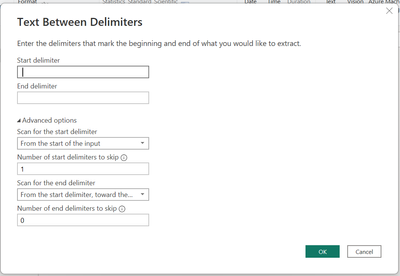
Select that column and then go to Add Column > Extract > Text Between Delimiters.

JorgePinho_0-1675157153341.png

On the Start and End delimiter insert a space.

Then open advanced options and change "Number of start delimiters to skip" to 1.


Thans, this is what it gives me though


textpowerbiright.JPG

Helpful resources

Announcements
Power BI DataViz World Championships

Power BI Dataviz World Championships

The Power BI Data Visualization World Championships is back! Get ahead of the game and start preparing now!

December 2025 Power BI Update Carousel

Power BI Monthly Update - December 2025

Check out the December 2025 Power BI Holiday Recap!

FabCon Atlanta 2026 carousel

FabCon Atlanta 2026

Join us at FabCon Atlanta, March 16-20, for the ultimate Fabric, Power BI, AI and SQL community-led event. Save $200 with code FABCOMM.