A new Data Days event is coming soon!
This time we’re going bigger than ever. Fabric, Power BI, SQL, AI and more. We're covering it all. You won't want to miss it.
Learn more- Power BI forums
- Get Help with Power BI
- Desktop
- Service
- Report Server
- Power Query
- Mobile Apps
- Developer
- DAX Commands and Tips
- Custom Visuals Development Discussion
- Health and Life Sciences
- Power BI Spanish forums
- Translated Spanish Desktop
- Training and Consulting
- Instructor Led Training
- Dashboard in a Day for Women, by Women
- Galleries
- Data Stories Gallery
- Themes Gallery
- Contests Gallery
- QuickViz Gallery
- Quick Measures Gallery
- Visual Calculations Gallery
- Notebook Gallery
- Translytical Task Flow Gallery
- TMDL Gallery
- R Script Showcase
- Webinars and Video Gallery
- Ideas
- Custom Visuals Ideas (read-only)
- Issues
- Issues
- Events
- Upcoming Events
Level up your Power BI skills this month - build one visual each week and tell better stories with data! Get started
- Power BI forums
- Forums
- Get Help with Power BI
- Desktop
- Return value based on max date within date range
- Subscribe to RSS Feed
- Mark Topic as New
- Mark Topic as Read
- Float this Topic for Current User
- Bookmark
- Subscribe
- Printer Friendly Page


- Mark as New
- Bookmark
- Subscribe
- Mute
- Subscribe to RSS Feed
- Permalink
- Report Inappropriate Content
Return value based on max date within date range
I have a fact table, consisting of:
Item
Cost component (an item can have more than one cost component)
Date
Amount
And i have a date table too.
Each time when the price for an item is updated, this results in one or more new entries in the fact table (depending on the number of cost components for the specific item).
I need a measure that returns the cost (per component) for an item at a certain date. The measure needs to check the date in the fact table and has to return the cost for the latest date for that item in the fact table which is not later than this certain date.
For example: I need cost prices as per 31 December 2016
Item 1 has entries for March 31 2016, June 15 2016, November 11 2016, February 15 2017
Item 2 has entry for December 31 2016
Item 3 has entries for June 15 2016 and February 15 2017
The measure has to select the underlined dates (in the end it has to calculate the cost price for that date)
I have been puzzling a lot but havent been able to find the solution yet. Can anyone help me out?
Solved! Go to Solution.
- Mark as New
- Bookmark
- Subscribe
- Mute
- Subscribe to RSS Feed
- Permalink
- Report Inappropriate Content
HI @TheoM,
According to your description, you want get the amount of nearest date, right?
If this is a case, you can modify the formula and use the amount instead the component:
nearstDate =
var current_Item=LASTNONBLANK('fact'[Item No],[Item No])
var Nearest_Date_before = MAXX(FILTER(ALLSELECTED('fact'),[Item No]=current_Item&&[Date]<=LASTDATE(ALLSELECTED('CALENDAR'[Date]))),[Date])
return
Nearest_Date_before

LastCost =
var current_Item=LASTNONBLANK('fact'[Item No],[Item No])
return
LOOKUPVALUE('fact'[Amount],[Item No],current_Item,[Date],[nearstDate])
Then add a slicer to filter on date to let the formula works.
Regards,
Xiaoxin Sheng

- Mark as New
- Bookmark
- Subscribe
- Mute
- Subscribe to RSS Feed
- Permalink
- Report Inappropriate Content
Hi @TheoM,
According to your description, you want to get the nearest date of the selected calendar date, right?
If this is a case, you can refer to below sample.
Fact table.
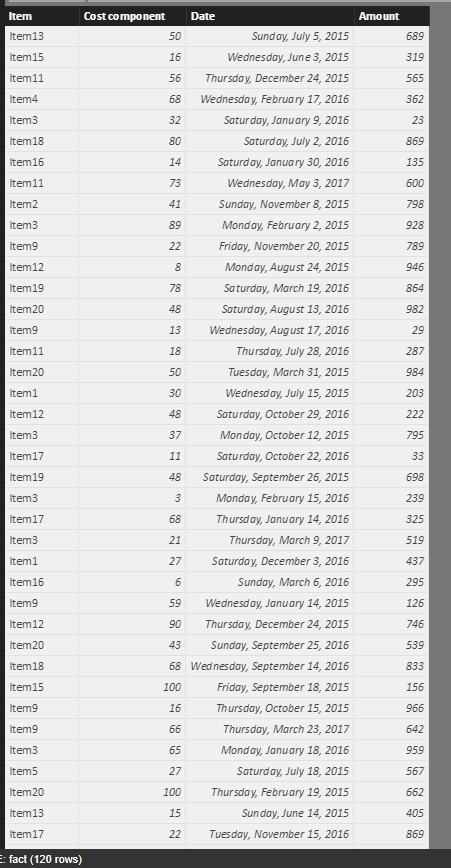
Measures:
nearstDate =
var current_Item=LASTNONBLANK('fact'[Item],[Item])
var Nearest_Date_before = MAXX(FILTER(ALLSELECTED('fact'),[Item]=current_Item&&[Date]<=LASTDATE(ALLSELECTED('CALENDAR'[Date]))),[Date])
return
Nearest_Date_before

LastCost =
var current_Item=LASTNONBLANK('fact'[Item],[Item])
return
LOOKUPVALUE('fact'[Cost component],[Item],current_Item,[Date],[nearstDate])
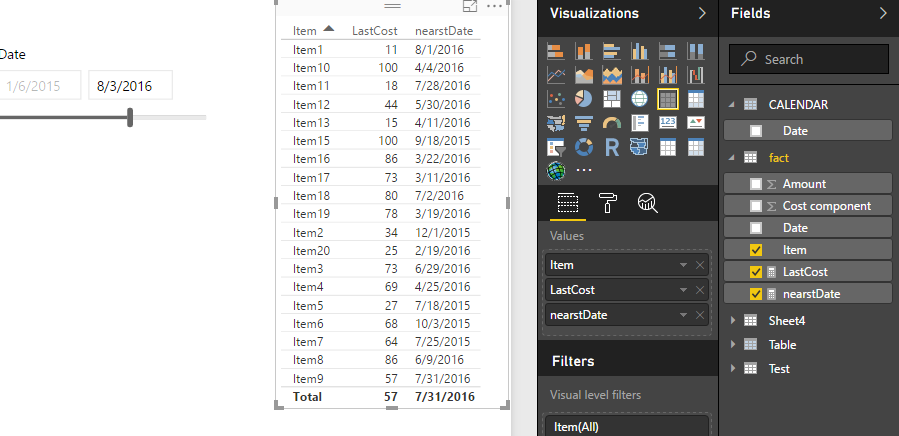
If above not help, can you provide some sample data to analysis?
Regards,
Xiaoxin Sheng
- Mark as New
- Bookmark
- Subscribe
- Mute
- Subscribe to RSS Feed
- Permalink
- Report Inappropriate Content
Hi @Anonymous
The date i want to select is the date equal to or before the selected calendar date, so I could skip half of your code, but it was very helpful! I succeeded in returning the right date from the fact table. I dit not yet succeed to return the correct prices, because the fact table contains several rows that need to be returned (per item there can be 1 or more amounts, appending on the number of cost components for an item (material, wages, machine cost etc). I think an extra argument in de lookupvalues formula will do the job but i havent had the time to fix that. I will keep you informed, Thanks so far
- Mark as New
- Bookmark
- Subscribe
- Mute
- Subscribe to RSS Feed
- Permalink
- Report Inappropriate Content
- Mark as New
- Bookmark
- Subscribe
- Mute
- Subscribe to RSS Feed
- Permalink
- Report Inappropriate Content
Hi @Anonymous
I don't know how to upload data, so I attached a few screenshots.
This is what my fact table looks like. Note that a change of the amount of any of the components leads to a new entry for all components.
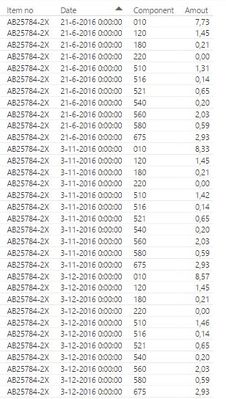
The cost price consists of one or more components and I need a measure to sum the amounts of those records in which the date is the latest date on or before the selected date from the calendar. I have aleady a measure to determine this date:
Relevant date =
var CurrentItem = LASTNONBLANK(FactTable[Item];FactTable[Item])
return
MAXX(FILTER(ALLSELECTED(FactTable);FactTable[Item]=CurrentItem&&FactTable[Date]<=LASTDATE(ALLSELECTED(Calendar[Date])));FactTable[Date])
I didn't succeed to create a measure which selects the amout where the date matches the relevant date.
With this measure the output should look like this:

I hope you can help me out.
Best regard,
Theo
- Mark as New
- Bookmark
- Subscribe
- Mute
- Subscribe to RSS Feed
- Permalink
- Report Inappropriate Content
HI @TheoM,
According to your description, you want get the amount of nearest date, right?
If this is a case, you can modify the formula and use the amount instead the component:
nearstDate =
var current_Item=LASTNONBLANK('fact'[Item No],[Item No])
var Nearest_Date_before = MAXX(FILTER(ALLSELECTED('fact'),[Item No]=current_Item&&[Date]<=LASTDATE(ALLSELECTED('CALENDAR'[Date]))),[Date])
return
Nearest_Date_before

LastCost =
var current_Item=LASTNONBLANK('fact'[Item No],[Item No])
return
LOOKUPVALUE('fact'[Amount],[Item No],current_Item,[Date],[nearstDate])
Then add a slicer to filter on date to let the formula works.
Regards,
Xiaoxin Sheng
- Mark as New
- Bookmark
- Subscribe
- Mute
- Subscribe to RSS Feed
- Permalink
- Report Inappropriate Content
Hi @Anonymous
That does the job! The formula works perfectly. Thanks
Theo
- Mark as New
- Bookmark
- Subscribe
- Mute
- Subscribe to RSS Feed
- Permalink
- Report Inappropriate Content
Hi @TheoM,
Actually, I think you can add variable to store current components and add it to 'lookupvalue' formula to filter more detailed.
I'm glad to know that the formula helps for you.
Regards,
Xiaoxin Sheng


- Mark as New
- Bookmark
- Subscribe
- Mute
- Subscribe to RSS Feed
- Permalink
- Report Inappropriate Content
Hi @TheoM! I'm still relatively new to this but hopefully this works!
Cost at max date within date range =
CALCULATE(
MINX('Fact Table'[Cost]),
FILTER(
ALLSELECTED('Date Table'[Date]),
'Date Table'[Date] = MAX('Date Table'[Date]),
VALUES('Fact Table'[Item]))
The first filter should make sure that only the latest date is selected, and the VALUES will make sure that it does this for each item individually! I hope this works! If it doesn't let me know, maybe we can work it out together!
Helpful resources

Power BI Monthly Update - April 2026
Check out the April 2026 Power BI update to learn about new features.

Data Days 2026 coming soon!
Sign up to receive a private message when registration opens and key events begin.

New to Fabric Survey
If you have recently started exploring Fabric, we'd love to hear how it's going. Your feedback can help with product improvements.

Power BI DataViz World Championships - June 2026
A new Power BI DataViz World Championship is coming this June! Don't miss out on submitting your entry.

| User | Count |
|---|---|
| 36 | |
| 29 | |
| 29 | |
| 21 | |
| 18 |


| User | Count |
|---|---|
| 71 | |
| 45 | |
| 33 | |
| 24 | |
| 23 |


