Join us at FabCon Atlanta from March 16 - 20, 2026, for the ultimate Fabric, Power BI, AI and SQL community-led event. Save $200 with code FABCOMM.
Register now!Get Fabric Certified for FREE during Fabric Data Days. Don't miss your chance! Request now
Hello,
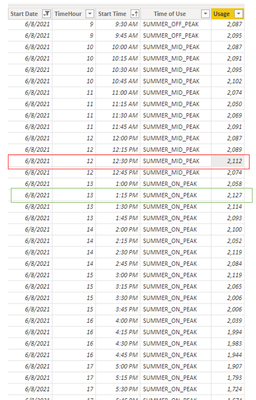
I have a fact table that has kW usage recorded every 15 minutes. What I am trying to do is to output the corresponding time that the max value has occurred based on the slicer selection from a list of dates that is related to another table. There can be multiple times in the day that the kW usage is the same, which I would like to have both time occurrences displayed. The Time of Use column is the Season Slicer, which description below.
Season
KW_Table
Based on the slicer selection of Summer On Peak, I would like to have a column in the table with the first row for 6/8/2021 to output 1:15 PM (Green Box). Should the user select only Summer Mid Peak as the slicer, the output will show 12:30 PM (Red Box). Should they select both Summer Mid & Off Peak as a slicer, the output will show 1:15pm since that is the max usage during that time frame.
Measure
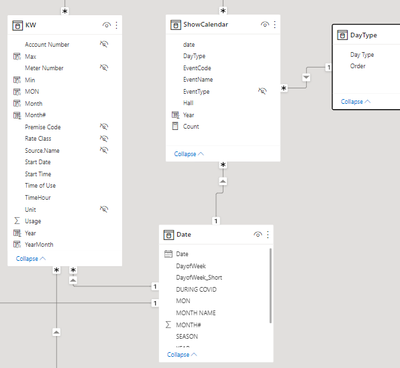
kW_Max =CALCULATE( MAX(KW[Usage]), RELATEDTABLE(ShowCalendar))
Relationship Table
Please advise and many thanks.
Solved! Go to Solution.
Hi @Anonymous ,
Here are the steps you can follow:
1. Create measure.
Flag =
var _select=SELECTEDVALUE('Table'[Time of Users])
return
IF(
MAX('Table'[Usage])=
MAXX(FILTER(ALL('Table'),'Table'[Time of Users]=_select),[Usage]),1,0)
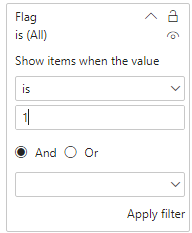
2. Place [Flag]in Filters, set is=1, apply filter.
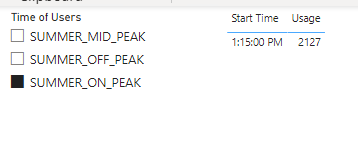
3. Result:
If you need pbix, please click here.
Best Regards,
Liu Yang
If this post helps, then please consider Accept it as the solution to help the other members find it more quickly
Hi @Anonymous ,
Here are the steps you can follow:
1. Create measure.
Flag =
var _select=SELECTEDVALUE('Table'[Time of Users])
return
IF(
MAX('Table'[Usage])=
MAXX(FILTER(ALL('Table'),'Table'[Time of Users]=_select),[Usage]),1,0)
2. Place [Flag]in Filters, set is=1, apply filter.
3. Result:
If you need pbix, please click here.
Best Regards,
Liu Yang
If this post helps, then please consider Accept it as the solution to help the other members find it more quickly
Check out the November 2025 Power BI update to learn about new features.
Advance your Data & AI career with 50 days of live learning, contests, hands-on challenges, study groups & certifications and more!