Join us at FabCon Atlanta from March 16 - 20, 2026, for the ultimate Fabric, Power BI, AI and SQL community-led event. Save $200 with code FABCOMM.
Register now!Learn from the best! Meet the four finalists headed to the FINALS of the Power BI Dataviz World Championships! Register now
Hi all,
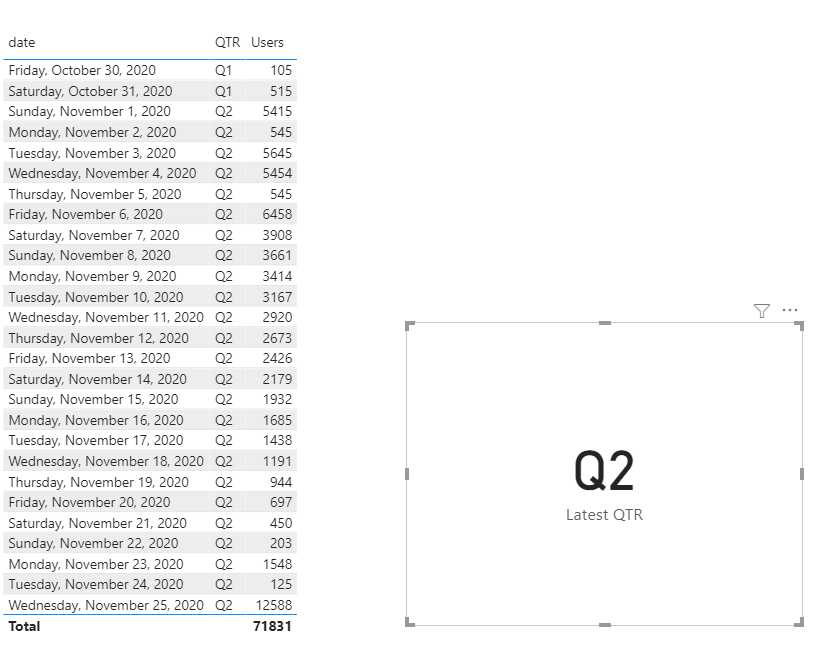
I am trying to create a DAX mesure that will return the current quarter. my data looks like this:
Ive tried a bunch of different ways but nothing is working. the Dax would return the QTR of the latest date. so since the latested date is this data set is 11/25/20 the result should be Q2. what is the best approach to accomplish this?
thank you!!
| date | QTR | Users |
| 10/30/2020 | Q1 | 105 |
| 10/31/2020 | Q1 | 515 |
| 11/1/2020 | Q2 | 5415 |
| 11/2/2020 | Q2 | 545 |
| 11/3/2020 | Q2 | 5645 |
| 11/4/2020 | Q2 | 5454 |
| 11/5/2020 | Q2 | 545 |
| 11/6/2020 | Q2 | 6458 |
| 11/7/2020 | Q2 | 3908 |
| 11/8/2020 | Q2 | 3661 |
| 11/9/2020 | Q2 | 3414 |
| 11/10/2020 | Q2 | 3167 |
| 11/11/2020 | Q2 | 2920 |
| 11/12/2020 | Q2 | 2673 |
| 11/13/2020 | Q2 | 2426 |
| 11/14/2020 | Q2 | 2179 |
| 11/15/2020 | Q2 | 1932 |
| 11/16/2020 | Q2 | 1685 |
| 11/17/2020 | Q2 | 1438 |
| 11/18/2020 | Q2 | 1191 |
| 11/19/2020 | Q2 | 944 |
| 11/20/2020 | Q2 | 697 |
| 11/21/2020 | Q2 | 450 |
| 11/22/2020 | Q2 | 203 |
| 11/23/2020 | Q2 | 1548 |
| 11/24/2020 | Q2 | 125 |
| 11/25/2020 | Q2 | 12588 |
Solved! Go to Solution.
Hi @FatBlackCat30 ,
Try this measure,
Latest QTR =
CALCULATE(MAX('Table'[QTR]),Filter(all('Table'),'Table'[date]=MAX('Table'[date])))
Let me know if you have any questions.
If this solves your issues, please mark it as the solution, so that others can find it easily. Kudos 👍are nice too.
Nathaniel
Proud to be a Super User!
@FatBlackCat30 , if you want to select a date(slicer) datesqtd can help. If you do want to select then stop your date calendar on today.
With date calendar and date in slicer
QTD Sales = CALCULATE(SUM(Sales[Sales Amount]),DATESQTD(('Date'[Date])))
Last QTD Sales = CALCULATE(SUM(Sales[Sales Amount]),DATESQTD(dateadd('Date'[Date],-1,QUARTER)))
Last complete QTD Sales = CALCULATE(SUM(Sales[Sales Amount]),DATESQTD( ENDOFQUARTER(dateadd('Date'[Date],-1,QUARTER))))
Last to last QTD Sales = CALCULATE(SUM(Sales[Sales Amount]),DATESQTD(dateadd('Date'[Date],-2,QUARTER)))
Else you need qtr start date in the calendar
Try like
Measure =
var _min = minx(allselected('Date') , 'Date'[Qtr Start Date]) //refer to blog to get this
var _min = maxx(allselected('Date') , 'Date'[Date])
return
calculate(countrows('Table'), Filter('Date', 'Date'[Date] >=_min && 'Date'[Date] <=_max ))
Measure =
var _min = minx(allselected('Date') , 'Date'[Qtr Start Date]) //refer to blog to get this
var _min = maxx(allselected('Date') , 'Date'[Date])
return
calculate(countrows('Table'), Filter('Table', 'Table'[Date] >=_min && 'Table'[Date] <=_max ))
For Qtr Start Date
Creating Financial Calendar - From Any Month
https://community.powerbi.com/t5/Community-Blog/Creating-Financial-Calendar-Decoding-Date-and-Calend...
thank you @Nathaniel_C & @amitchandak both exellent solutions. I almost had it working, I just missed a small part
@FatBlackCat30 , if you want to select a date(slicer) datesqtd can help. If you do want to select then stop your date calendar on today.
With date calendar and date in slicer
QTD Sales = CALCULATE(SUM(Sales[Sales Amount]),DATESQTD(('Date'[Date])))
Last QTD Sales = CALCULATE(SUM(Sales[Sales Amount]),DATESQTD(dateadd('Date'[Date],-1,QUARTER)))
Last complete QTD Sales = CALCULATE(SUM(Sales[Sales Amount]),DATESQTD( ENDOFQUARTER(dateadd('Date'[Date],-1,QUARTER))))
Last to last QTD Sales = CALCULATE(SUM(Sales[Sales Amount]),DATESQTD(dateadd('Date'[Date],-2,QUARTER)))
Else you need qtr start date in the calendar
Try like
Measure =
var _min = minx(allselected('Date') , 'Date'[Qtr Start Date]) //refer to blog to get this
var _min = maxx(allselected('Date') , 'Date'[Date])
return
calculate(countrows('Table'), Filter('Date', 'Date'[Date] >=_min && 'Date'[Date] <=_max ))
Measure =
var _min = minx(allselected('Date') , 'Date'[Qtr Start Date]) //refer to blog to get this
var _min = maxx(allselected('Date') , 'Date'[Date])
return
calculate(countrows('Table'), Filter('Table', 'Table'[Date] >=_min && 'Table'[Date] <=_max ))
For Qtr Start Date
Creating Financial Calendar - From Any Month
https://community.powerbi.com/t5/Community-Blog/Creating-Financial-Calendar-Decoding-Date-and-Calend...
Hi @FatBlackCat30 ,
Try this measure,
Latest QTR =
CALCULATE(MAX('Table'[QTR]),Filter(all('Table'),'Table'[date]=MAX('Table'[date])))
Let me know if you have any questions.
If this solves your issues, please mark it as the solution, so that others can find it easily. Kudos 👍are nice too.
Nathaniel
Proud to be a Super User!
Share feedback directly with Fabric product managers, participate in targeted research studies and influence the Fabric roadmap.
Check out the February 2026 Power BI update to learn about new features.
| User | Count |
|---|---|
| 52 | |
| 51 | |
| 35 | |
| 15 | |
| 14 |
| User | Count |
|---|---|
| 92 | |
| 75 | |
| 41 | |
| 26 | |
| 25 |