
Join us at FabCon Atlanta from March 16 - 20, 2026, for the ultimate Fabric, Power BI, AI and SQL community-led event. Save $200 with code FABCOMM.
Register now!The Power BI Data Visualization World Championships is back! Get ahead of the game and start preparing now! Learn more
hello,
I'm trying to create a measure which should retun the max of a value in the selected time period and also return the corresponding date on which that max value appeared.
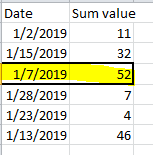
Below is the screenshot of the sample data and highlighted row is the outcome I expect as separate measures.
The time period selected is Jan 2019. I was able to create a measure to return the max of value but not able to get the corresponding date. Please help! Thank you!
Solved! Go to Solution.
Assuming you have a date table, you can do the following:
Max = max (Table1[Value] )
Date of Max =
Var __SelectedMax =
CALCULATE(
MAX( Table1[Value]),
ALLSELECTED(DimDate)
)
RETURN
CALCULATE(
VALUES(DimDate[Date]),
FILTER(
ALL( DimDate),
[Max] = __SelectedMax )
)and if you are so inclined you can put it all together for a card:
Measure for a Card = "Max of "&[Max]&" Occured on "& [Date of Max]
Thanks a lot for the solution. It served my purpose as well.
Try this calculated measure:
Assuming you have a date table, you can do the following:
Max = max (Table1[Value] )
Date of Max =
Var __SelectedMax =
CALCULATE(
MAX( Table1[Value]),
ALLSELECTED(DimDate)
)
RETURN
CALCULATE(
VALUES(DimDate[Date]),
FILTER(
ALL( DimDate),
[Max] = __SelectedMax )
)and if you are so inclined you can put it all together for a card:
Measure for a Card = "Max of "&[Max]&" Occured on "& [Date of Max]
The Power BI Data Visualization World Championships is back! Get ahead of the game and start preparing now!
Check out the November 2025 Power BI update to learn about new features.
| User | Count |
|---|---|
| 59 | |
| 46 | |
| 42 | |
| 23 | |
| 18 |
| User | Count |
|---|---|
| 193 | |
| 123 | |
| 99 | |
| 67 | |
| 49 |