cancel
Showing results for 
Search instead for 
Did you mean: 

Get Fabric Certified for FREE during Fabric Data Days. Don't miss your chance! Request now

Reply
pgd
Frequent Visitor

Return difference between two dates if criteria matches

My dashboard linked to a SharePoint list. The sharepoint list has the following columns: the barcode value on the library book, who checked out the library book, the time they checked out the library book, the genre of library book, etc. 


I want to do a cycle time metric. I want to calcuate the time between when the library book was checked out (and scanned out of inventory) and when it was checked back in (the next time it appears scanned in the inventory). I need some type of unique identifier so that I can see when the book comes back to the library. I also need some type of formula that looks for the unique value and returns the difference between the check-out and check-in dates. Does anyone know the best way to approach this? 


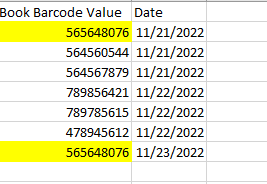
Expected Results

The first time the book with barcode 565648076 appears is when it was checked out (on 11/21). The next time the barcode apperas is when it was checked back in (on 11/23). I want to return the difference between these two dates (only when the barcode matches). 

pgd_0-1669230038277.png


1 ACCEPTED SOLUTION
v-zhangti
Community Support
Community Support

Hi, @pgd 


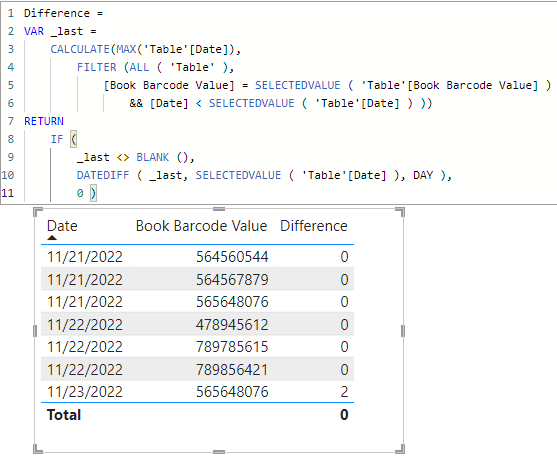
If you want to try to solve the problem with Measure, you can try the following methods.
Measure:

Difference = 
VAR _last =
    CALCULATE(MAX('Table'[Date]), 
        FILTER (ALL ( 'Table' ),
            [Book Barcode Value] = SELECTEDVALUE ( 'Table'[Book Barcode Value] )
                && [Date] < SELECTEDVALUE ( 'Table'[Date] ) ))
RETURN
    IF (
        _last <> BLANK (),
        DATEDIFF ( _last, SELECTEDVALUE ( 'Table'[Date] ), DAY ),
        0 )

vzhangti_0-1669367191513.png

Is this the result you expect?

Best Regards,

Community Support Team _Charlotte

If this post helps, then please consider Accept it as the solution to help the other members find it more quickly.

View solution in original post

2 REPLIES 2
v-zhangti
Community Support
Community Support

Hi, @pgd 


If you want to try to solve the problem with Measure, you can try the following methods.
Measure:

Difference = 
VAR _last =
    CALCULATE(MAX('Table'[Date]), 
        FILTER (ALL ( 'Table' ),
            [Book Barcode Value] = SELECTEDVALUE ( 'Table'[Book Barcode Value] )
                && [Date] < SELECTEDVALUE ( 'Table'[Date] ) ))
RETURN
    IF (
        _last <> BLANK (),
        DATEDIFF ( _last, SELECTEDVALUE ( 'Table'[Date] ), DAY ),
        0 )

vzhangti_0-1669367191513.png

Is this the result you expect?

Best Regards,

Community Support Team _Charlotte

If this post helps, then please consider Accept it as the solution to help the other members find it more quickly.

ryan_mayu
Super User
Super User

@pgd 

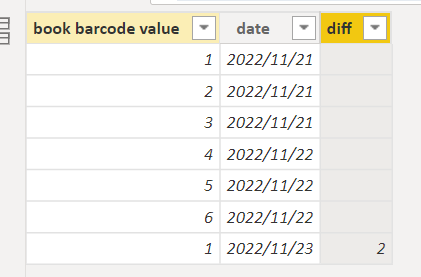
you can create a column

diff = 
var _last= maxx(FILTER('Table','Table'[book barcode value]=EARLIER('Table'[book barcode value])&& 'Table'[date]<EARLIER('Table'[date])),'Table'[date])
return if (ISBLANK(_last),BLANK(),'Table'[date]-_last)

1.PNG


Did I answer your question? Mark my post as a solution!

Proud to be a Super User!


Helpful resources

Announcements
November Power BI Update Carousel

Power BI Monthly Update - November 2025

Check out the November 2025 Power BI update to learn about new features.

Fabric Data Days Carousel

Fabric Data Days

Advance your Data & AI career with 50 days of live learning, contests, hands-on challenges, study groups & certifications and more!

FabCon Atlanta 2026 carousel

FabCon Atlanta 2026

Join us at FabCon Atlanta, March 16-20, for the ultimate Fabric, Power BI, AI and SQL community-led event. Save $200 with code FABCOMM.

Top Solution Authors
Top Kudoed Authors