Join us at FabCon Atlanta from March 16 - 20, 2026, for the ultimate Fabric, Power BI, AI and SQL community-led event. Save $200 with code FABCOMM.
Register now!The Power BI Data Visualization World Championships is back! Get ahead of the game and start preparing now! Learn more
Hi,
I am struggling with the following.
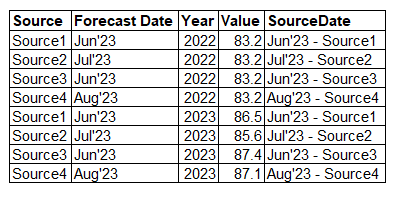
I have a table like this:
I have created a measure with the 2023 YoY growth of Value for every Source.
And another measure with the average YoY growth of all the sources.
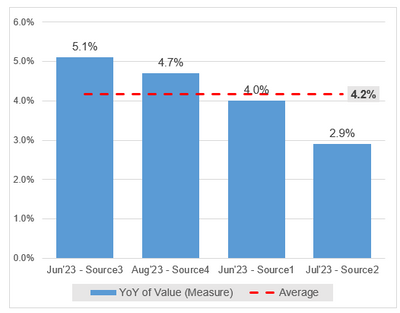
I want to created a visual like this:
To have the label only on the last point of the average line, I want to create a measure called e.g. "Average Point". So I need to return the "SourceDate" value for the Source with the lowest growth (I will have the chart sorted by YoY, descending).
I thought this would be easy, I've done this already with CALCULATE, a measure and a filter for the last quarter. But in this case, I've tried different solutions and it does not work.
Thanks a lot for your help!
Solved! Go to Solution.
@mgarcianxp , for line you can use constant line in analytics pane with fx , you can use a measure
consider Index function
Power BI Index function: Top/Bottom Performer by name and value- https://youtu.be/HPhzzCwe10U
@mgarcianxp , for line you can use constant line in analytics pane with fx , you can use a measure
consider Index function
Power BI Index function: Top/Bottom Performer by name and value- https://youtu.be/HPhzzCwe10U
Thank you!! it worked perfectly!
The Power BI Data Visualization World Championships is back! Get ahead of the game and start preparing now!
| User | Count |
|---|---|
| 38 | |
| 36 | |
| 33 | |
| 30 | |
| 28 |
| User | Count |
|---|---|
| 128 | |
| 88 | |
| 79 | |
| 67 | |
| 62 |