cancel
Showing results for 
Search instead for 
Did you mean: 

The Power BI Data Visualization World Championships is back! Get ahead of the game and start preparing now! Learn more

Reply
Anonymous
Not applicable

Return Date if condition is True

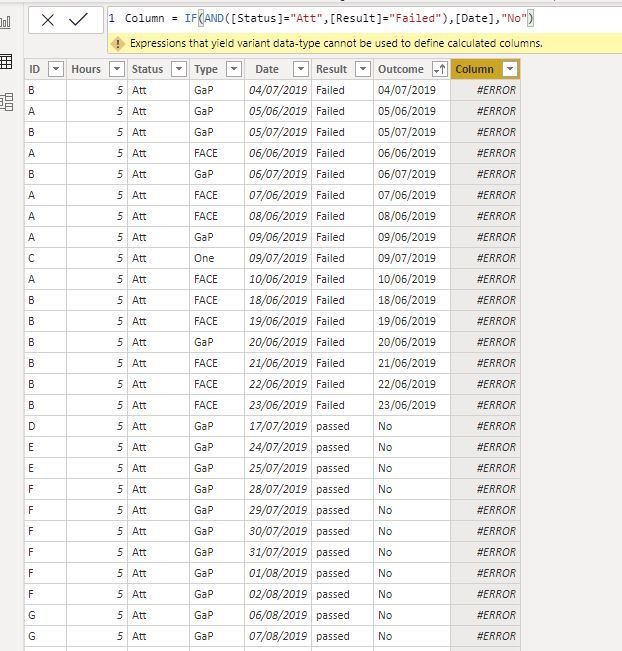
I would like to return Failed Date if, Please see sample data and my Dax formula and error message Capture.JPG


@Greg_Deckler 

2 REPLIES 2
Mariusz
Community Champion
Community Champion

Hello @moeconsult

You need to format your date as text as.

IF( 1=1, FORMAT( [Date], "DD/MM/YYYY" ), "No" )

Best regards
Mariusz

If this post helps,then please consider accepting it as the solution.

Please feel free to connect with me.
Linkedin

ibarrau
Super User
Super User

Hello. Try adding the table name in your code as the syntax expects. As 'Table'[Column]. You cannot use [columnname]. They are reserved for measurements and not for columns.

So try:

IF (AND( TableName[Status] = "Att", TableName[Result] = "Failed"), TableName[Date], "No" )

I hope this help,


If this post helps, then please consider Accept it as the solution to help the other members find it more quickly.

Happy to help!

LaDataWeb Blog

Helpful resources

Announcements
Power BI DataViz World Championships

Power BI Dataviz World Championships

The Power BI Data Visualization World Championships is back! Get ahead of the game and start preparing now!

December 2025 Power BI Update Carousel

Power BI Monthly Update - December 2025

Check out the December 2025 Power BI Holiday Recap!

FabCon Atlanta 2026 carousel

FabCon Atlanta 2026

Join us at FabCon Atlanta, March 16-20, for the ultimate Fabric, Power BI, AI and SQL community-led event. Save $200 with code FABCOMM.