cancel
Showing results for 
Search instead for 
Did you mean: 

View all the Fabric Data Days sessions on demand. View schedule

Reply
Anonymous
Not applicable

Retrive Value between Changing Dates

Hi Everyone


Having some difficulties getting this one to work. I am trying to add a calculated column in DAX that will look at item numbers in a sales table and a change log table to retrieve what the status code was at the time of the order. The second table below, with the title 'Status Code at time of Order' is what I need to be for my end result. 

Thanks


Change Log

ItemStatus CodeModified Date
1A2020-01-01
1B2020-01-15
1A2020-01-20
1C2020-01-29


SalesTable

(Need to add  'Status Code at time of Order' in Calcuated DAX Column)

ItemOrder DateStatus Code at time of Order
12020-01-06A
12020-01-13A
12020-01-17B
12020-01-25A
12020-01-29C


1 ACCEPTED SOLUTION
Ashish_Mathur
Super User
Super User

Hi,

Write this calculated column formula in the Sales Table.

Hope this helps.

=LOOKUPVALUE(Change_log[Status Code],Change_log[Item],Sales[Item],Change_log[Modified Date],CALCULATE(MAX(Change_log[Modified Date]),FILTER(Change_log,Change_log[Item]=EARLIER(Sales[Item])&&Change_log[Modified Date]<=EARLIER(Sales[Order Date]))))

Hope this helps.

Untitled.png


Regards,
Ashish Mathur
http://www.ashishmathur.com
https://www.linkedin.com/in/excelenthusiasts/

View solution in original post

3 REPLIES 3
Ashish_Mathur
Super User
Super User

Hi,

Write this calculated column formula in the Sales Table.

Hope this helps.

=LOOKUPVALUE(Change_log[Status Code],Change_log[Item],Sales[Item],Change_log[Modified Date],CALCULATE(MAX(Change_log[Modified Date]),FILTER(Change_log,Change_log[Item]=EARLIER(Sales[Item])&&Change_log[Modified Date]<=EARLIER(Sales[Order Date]))))

Hope this helps.

Untitled.png


Regards,
Ashish Mathur
http://www.ashishmathur.com
https://www.linkedin.com/in/excelenthusiasts/
Anonymous
Not applicable

Much appreciated @Ashish_Mathur! One other piece to this that I had found was that with duplicate dates and separate timestamps - once those were tripped out as well your solution worked perfectly. 

parry2k
Super User
Super User

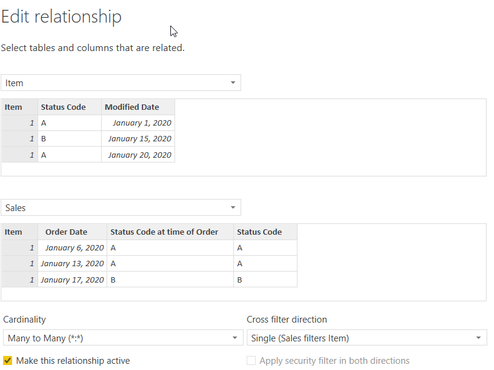
@Anonymous set relationship between your change log and sales table on item , it will be many to many relationship, sales order filtering items table, like below (in my example change log table is called item)


image.png


Add following DAX for column


Status Code = 
VAR __recentStatus = 
CALCULATE ( 
    MAX ( 'Item'[Status Code] ), 
    TOPN ( 
        1, 
        FIlTER ( 
            VALUES ( 'Item'[Modified Date] ), 
            'Item'[Modified Date] <= EARLIER ( Sales[Order Date] ) 
        ), 
        'Item'[Modified Date], 
        DESC 
    ) 
)

RETURN __recentStatus


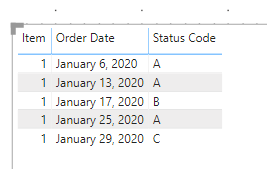
and here is the output

image.png


Subscribe to the @PowerBIHowTo YT channel for an upcoming video on List and Record functions in Power Query!!

Learn Power BI and Fabric - subscribe to our YT channel - Click here: @PowerBIHowTo

If my solution proved useful, I'd be delighted to receive Kudos. When you put effort into asking a question, it's equally thoughtful to acknowledge and give Kudos to the individual who helped you solve the problem. It's a small gesture that shows appreciation and encouragement! ❤


Did I answer your question? Mark my post as a solution. Proud to be a Super User! Appreciate your Kudos 🙂
Feel free to email me with any of your BI needs.

Helpful resources

Announcements
November Power BI Update Carousel

Power BI Monthly Update - November 2025

Check out the November 2025 Power BI update to learn about new features.

Fabric Data Days Carousel

Fabric Data Days

Advance your Data & AI career with 50 days of live learning, contests, hands-on challenges, study groups & certifications and more!

FabCon Atlanta 2026 carousel

FabCon Atlanta 2026

Join us at FabCon Atlanta, March 16-20, for the ultimate Fabric, Power BI, AI and SQL community-led event. Save $200 with code FABCOMM.

Top Solution Authors
Top Kudoed Authors