Get certified for free when you join Fabric Data Days 2026 and dive into Fabric, Power BI, SQL, AI, and other essential data skills.
Join nowData Days is here! Join us now for 60+ days of learning, challenges, and connection. Learn more
Hi,
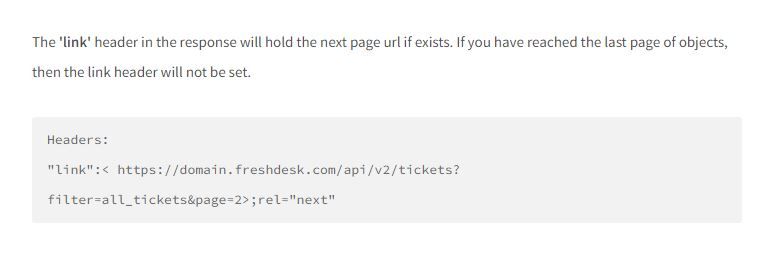
I'm currently calling an API from FreshDesk to retrieve a list of tickets. The API only returns max 100 records due to pagination, but it mentions it would have a 'link' header defined in the response that contains the next page link. The info from this API is at https://developers.freshdesk.com/api/#pagination and the relevent info is:
I created a function that would access the API and return me the headers. Below is a code snippet from that function:
response = Web.Contents(url),
body = Json.Document(response),
headers = Value.Metadata(response)
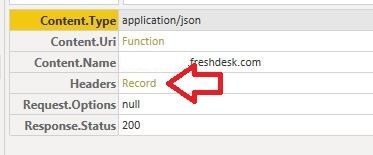
I invoked the function and initially I got:
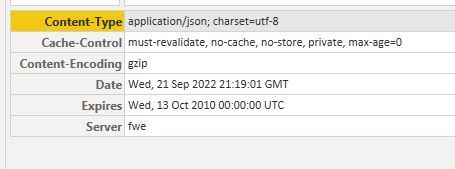
I clicked on the "Record" link (red arrow) to reveal the headers and I see the following:
However I can't find the "link" header that FreshDesk mentioned. I was wondering how do I retrieve this header?
Jason
Solved! Go to Solution.
Hi @jasonyeung87 ,
There is a similar thread here, and presumably there should still be some limitations.
Solved: Retrieve API response headers
Hope it helps.
Best Regards,
Gao
Community Support Team
If there is any post helps, then please consider Accept it as the solution to help the other members find it more quickly. If I misunderstand your needs or you still have problems on it, please feel free to let us know. Thanks a lot!
How to get your questions answered quickly -- How to provide sample data
Hi @jasonyeung87 ,
There is a similar thread here, and presumably there should still be some limitations.
Solved: Retrieve API response headers
Hope it helps.
Best Regards,
Gao
Community Support Team
If there is any post helps, then please consider Accept it as the solution to help the other members find it more quickly. If I misunderstand your needs or you still have problems on it, please feel free to let us know. Thanks a lot!
How to get your questions answered quickly -- How to provide sample data
Hi @Anonymous ,
thanks for your help. It looks like I'll create a custom connector for this.
I tried using a different method to fetch the records in the pages (e.g. https://www.youtube.com/watch?v=vhr4w5G8bRA). I managed to get this to work in Power BI Desktop but it doesn't allow me to setup data refresh when I published the report to Power BI Service. (Power BI Service doesn't support refresh of this data source).
Jason
Don't miss out on Data Days, June 15 through August 7. Learn Fabric, Power BI, SQL, AI and more.
Check out the May 2026 Power BI update to learn about new features.
| User | Count |
|---|---|
| 23 | |
| 23 | |
| 20 | |
| 18 | |
| 14 |
| User | Count |
|---|---|
| 58 | |
| 51 | |
| 41 | |
| 30 | |
| 24 |