cancel
Showing results for 
Search instead for 
Did you mean: 

The Power BI Data Visualization World Championships is back! Get ahead of the game and start preparing now! Learn more

Reply
gduobaite
Helper III
Helper III

Retrieve values from another table

Hi all, 


I have two tables (Table & Table(2)) related through "z_score_rnd" column.

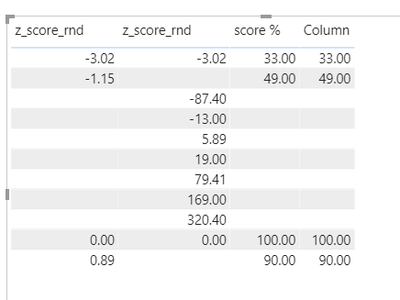
I need to show "100" (number) value in "score %" colum for the scores, which are >=4 or <=-4 from Table(2).

Is it possible to get "if z_score_rdn >=4 or <=-4, then score % = 100, else show values from Table1 score% column".


I tried:


Column  = IF('Table2'[z_score_rnd]>=4 || 'Table2'[z_score_rnd]<=-4, 100)


If I would only know how to implement false value (false should be all remained % values from Table1, "score %" column)...


Please see attached pbix file. 

https://www.dropbox.com/t/sQuwN2DmUUxbsqHi


1 ACCEPTED SOLUTION

Hi @gduobaite ,

You can create this column:


Column =
IF (
     ( [z_score_rnd] >= 4
        || [z_score_rnd] <= -4 )
        && [z_score_rnd] IN DISTINCT ( 'Table (2)'[z_score_rnd] ),
    100,
    [score %]
)


re.png

Attached the file in the below, hopes to help you.


Best Regards,
Community Support Team _ Yingjie Li
If this post helps, then please consider Accept it as the solution to help the other members find it more quickly.

View solution in original post

5 REPLIES 5
gduobaite
Helper III
Helper III

I tried:

Column  = IF('Table2'[z_score_rnd]>=4 || 'Table2'[z_score_rnd]<=-4, 100)

If I would only know how to implement false value (false should be all remained % values from Table1, "score %")...

Hi @gduobaite ,

You can create this column:


Column =
IF (
     ( [z_score_rnd] >= 4
        || [z_score_rnd] <= -4 )
        && [z_score_rnd] IN DISTINCT ( 'Table (2)'[z_score_rnd] ),
    100,
    [score %]
)


re.png

Attached the file in the below, hopes to help you.


Best Regards,
Community Support Team _ Yingjie Li
If this post helps, then please consider Accept it as the solution to help the other members find it more quickly.

amitchandak
Super User
Super User

@gduobaite , I am not able to get any logic to connect to the table, can you explain, what is logic we have join these two.

Share with Power BI Enthusiasts: Full Power BI Video (20 Hours) YouTube
Microsoft Fabric Series 60+ Videos YouTube
Microsoft Fabric Hindi End to End YouTube

@amitchandak,

in Table1 there are scores ("score") with its value in % form ("score %").


Let's say probability to have a malaria is -3.02, that mean its 33 % below populiation avg. If score is 0,89, then you have 90 % chance to sick above population avg. BUT whole scores are in Table2, not in Table1 (there are scores only between -4 and 1, while Table2 handles 19, -87.4 and so on.)


So I need to have a column with % values from the Table1 WITH the 100 % values if score from Table2 is >=4 or <=-4.


I very hope it explained a little more..

vanessafvg
Super User
Super User

you will need to add your pbix to dropbox or something similar so we can download from there.


If I took the time to answer your question and I came up with a solution, please mark my post as a solution and /or give kudos freely for the effort 🙂 Thank you!

Proud to be a Super User!


Helpful resources

Announcements
Power BI DataViz World Championships

Power BI Dataviz World Championships

The Power BI Data Visualization World Championships is back! Get ahead of the game and start preparing now!

December 2025 Power BI Update Carousel

Power BI Monthly Update - December 2025

Check out the December 2025 Power BI Holiday Recap!

FabCon Atlanta 2026 carousel

FabCon Atlanta 2026

Join us at FabCon Atlanta, March 16-20, for the ultimate Fabric, Power BI, AI and SQL community-led event. Save $200 with code FABCOMM.

Top Solution Authors