I have a bar showing the average of five different variables.
I then wrote measures to show the percentile associated with those specific averages, written as follows:
Num 1 Percentiles Measure = IF([Num 1 AVERAGE Measure]<=1, 1, IF([Num 1 AVERAGE Measure]<=1.5, 2,IF([Num 1 AVERAGE Measure]<=3, 4.5, IF([Num 1 AVERAGE Measure]>3, 6, "Unknown"))))
I want the percentiles to show up in the tooltip...but only for the variable that they are associated with.
So when I hover over "Num 1", I want "Num 1 Percentile Measure" to appear in the tooltip.
When I hover over "Num 2", I want "Num 2 Percentile Measure" to appear in the tooltip.
Is this possible?
As of now, I get all of them (just showing two as an example) for every single bar that I hover over.
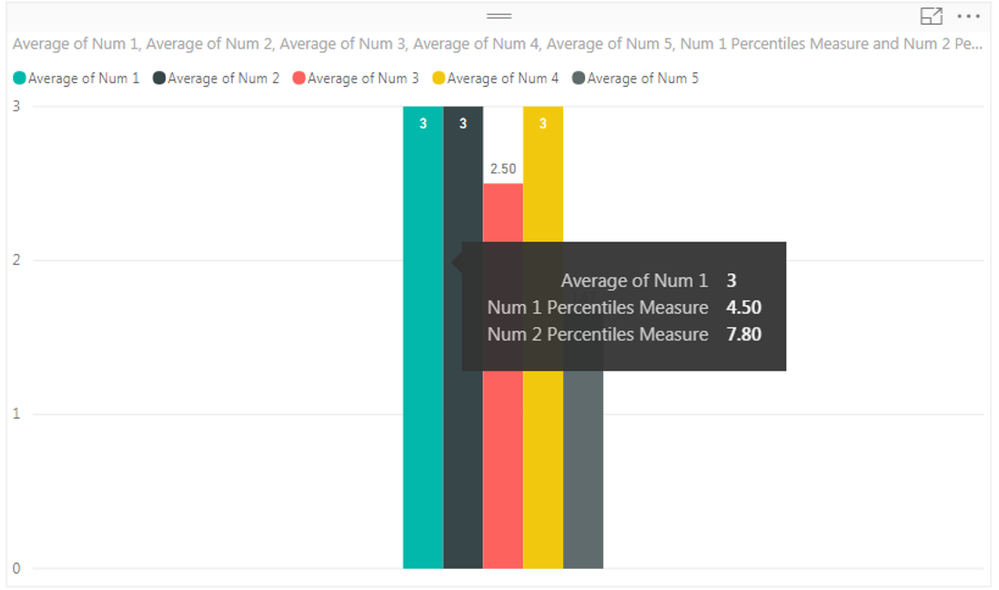
So for the above picture, because I am hovering over Average of Num 1, I dont want "Num 2 Percentile Measure" to show up.
But I dragged that measure into my tooltip, because when I hover over Average of Num 2, I do want it to appear.
Any help would be appreciated!
Thanks (:


