This is best Fabric, Power BI, SQL and AI community event. How do we know? The last event sold out! Save €200 with code FABCMTY200.
Register nowA new Data Days event is coming soon! This time we’re going bigger than ever. Fabric, Power BI, SQL, AI and more. Don't miss out.
Hi,
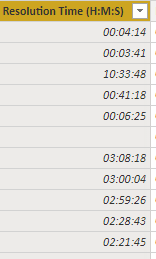
I have created the below Calculated Column to Convert Resolution time ( Datatype is Text) to convert in minutes. The data with sample is in fig-2
@Anonymous can you re-paste the image, don't see anything with original post.
Subscribe to the @PowerBIHowTo YT channel for an upcoming video on List and Record functions in Power Query!!
Learn Power BI and Fabric - subscribe to our YT channel - Click here: @PowerBIHowTo
If my solution proved useful, I'd be delighted to receive Kudos. When you put effort into asking a question, it's equally thoughtful to acknowledge and give Kudos to the individual who helped you solve the problem. It's a small gesture that shows appreciation and encouragement! ❤
Did I answer your question? Mark my post as a solution. Proud to be a Super User! Appreciate your Kudos 🙂
Feel free to email me with any of your BI needs.
Ideally, my request :
1. Have a Data in below format HH:MM:SS while extracting from excel, in Power BI it is extracted in Text format and Could not able to convert Data Type in same format. For example in Excel it is in 0:08:45 when it get extracted it is -12/31/1899 12:08:45 tried to convert in Duration format shows error.
Please help with a DAX to get the same format and could able to calcualte Average Duartion
Hi @Anonymous ,
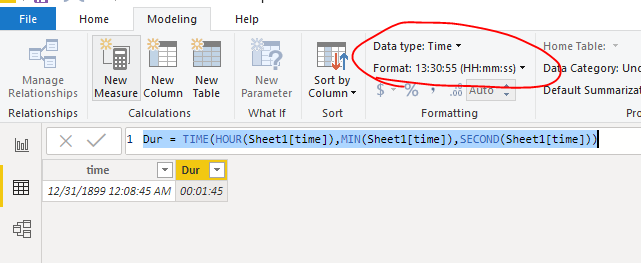
To create a calculated column and set the format of it as below
Dur = TIME(HOUR(Sheet1[time]),MIN(Sheet1[time]),SECOND(Sheet1[time]))
Pbix as attached.
Hi,
This is doent works if the time cross 99 Hrs it converts to blank. PFA
Check out the May 2026 Power BI update to learn about new features.
Sign up to receive a private message when registration opens and key events begin.
If you have recently started exploring Fabric, we'd love to hear how it's going. Your feedback can help with product improvements.
| User | Count |
|---|---|
| 32 | |
| 25 | |
| 23 | |
| 22 | |
| 13 |
| User | Count |
|---|---|
| 61 | |
| 47 | |
| 27 | |
| 24 | |
| 19 |