cancel
Showing results for 
Search instead for 
Did you mean: 

The Power BI Data Visualization World Championships is back! Get ahead of the game and start preparing now! Learn more

Reply
Anonymous
Not applicable

Resize axis width in stacked bar chart

How can I resize the axis where the names are? I'm using a stacked bar chart, I just want to adjust the names


2017-10-31 12_09_21-Advertiser events revenue control V5 - Power BI Desktop.png

4 REPLIES 4
Anonymous
Not applicable

Bit Late to the party here... but it's the "Maximum Size" option under Y axis section in Format. Increase/Decrease as necessary. 

Anonymous
Not applicable

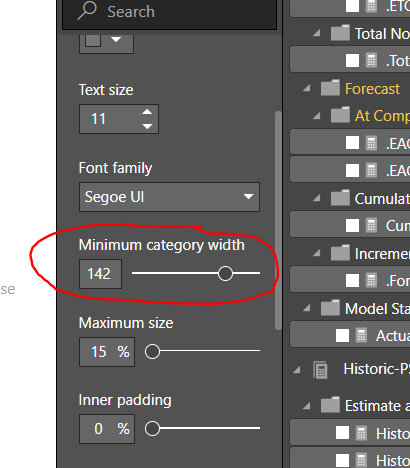
Under Y axix - reduce the padding size and/or increase the "Minimum Category Width"

Capture.PNG

Eric_Zhang
Microsoft Employee
Microsoft Employee


@Anonymous wrote:

How can I resize the axis where the names are? I'm using a stacked bar chart, I just want to adjust the names


2017-10-31 12_09_21-Advertiser events revenue control V5 - Power BI Desktop.png


@Anonymous

It is not supported at this moment, you can submit your request at Power BI ideas and vote it up.

Anonymous
Not applicable

doesn't exist right? It is a basic function that I thought it was somewhere. Thanks for your  help.

Helpful resources

Announcements
Power BI DataViz World Championships

Power BI Dataviz World Championships

The Power BI Data Visualization World Championships is back! Get ahead of the game and start preparing now!

December 2025 Power BI Update Carousel

Power BI Monthly Update - December 2025

Check out the December 2025 Power BI Holiday Recap!

FabCon Atlanta 2026 carousel

FabCon Atlanta 2026

Join us at FabCon Atlanta, March 16-20, for the ultimate Fabric, Power BI, AI and SQL community-led event. Save $200 with code FABCOMM.