Join us at FabCon Atlanta from March 16 - 20, 2026, for the ultimate Fabric, Power BI, AI and SQL community-led event. Save $200 with code FABCOMM.
Register now!The Power BI Data Visualization World Championships is back! It's time to submit your entry. Live now!
Hello folks,
I'm struggling with some data I need to "shape". Basically I have a table with a single row for each support ticket that is raised. The row has a "Date Created" field and a "Date Resolved" field. To allow me to use the data more easily I'd like to be able to have a duplicate row for each day that the ticket remains open.
The original table is:
Ticket Number Date Created Date Resolved Agent Name
135118 01/03/2017 05/03/2017 Michael
135119 09/03/2017 10/03/2017 Stuart
The new table should be:
Ticket Number Date Created Date Resolved Agent Name
135118 01/03/2017 05/03/2017 Michael
135119 09/03/2017 10/03/2017 Stuart
Has anyone got any ideas on the best way to achieve this?
Thanks!
Bailey
Solved! Go to Solution.
Hi @Anonymous,
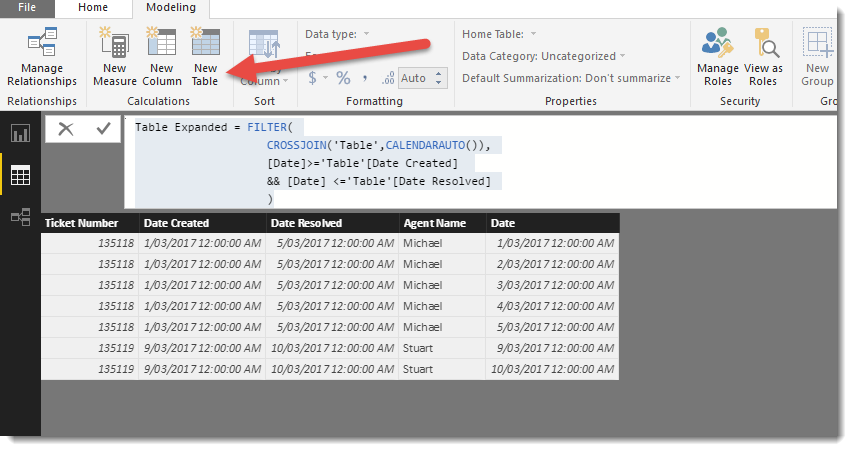
You could try creating a New Table in DAX and use the following code
Table Expanded = FILTER(
CROSSJOIN('Table',CALENDARAUTO()),
[Date]>='Table'[Date Created]
&& [Date] <='Table'[Date Resolved]
)
Hi @Anonymous,
You could try creating a New Table in DAX and use the following code
Table Expanded = FILTER(
CROSSJOIN('Table',CALENDARAUTO()),
[Date]>='Table'[Date Created]
&& [Date] <='Table'[Date Resolved]
)
Thanks Phil! Perfect! It almost looks too simple but it works perfectly. Thanks again for taking the time to provide me with an answer.
The Power BI Data Visualization World Championships is back! It's time to submit your entry.
Check out the January 2026 Power BI update to learn about new features.
| User | Count |
|---|---|
| 61 | |
| 49 | |
| 30 | |
| 25 | |
| 23 |
| User | Count |
|---|---|
| 129 | |
| 104 | |
| 56 | |
| 39 | |
| 31 |