cancel
Showing results for 
Search instead for 
Did you mean: 

We've captured the moments from FabCon & SQLCon that everyone is talking about, and we are bringing them to the community, live and on-demand. Starts on April 14th. Register now

Reply
Anonymous
Not applicable

Reshape data

Hello folks,


I'm struggling with some data I need to "shape". Basically I have a table with a single row for each support ticket that is raised. The row has a "Date Created" field and a "Date Resolved" field. To allow me to use the data more easily I'd like to be able to have a duplicate row for each day that the ticket remains open.


The original table is:


Ticket Number   Date Created   Date Resolved   Agent Name

135118                01/03/2017     05/03/2017       Michael

135119                09/03/2017     10/03/2017       Stuart


The new table should be:


Ticket Number   Date Created   Date Resolved   Agent Name

135118                01/03/2017     05/03/2017       Michael

135118                01/03/2017     05/03/2017       Michael

135118                01/03/2017     05/03/2017       Michael

135118                01/03/2017     05/03/2017       Michael

135118                01/03/2017     05/03/2017       Michael

135119                09/03/2017     10/03/2017       Stuart

135119                09/03/2017     10/03/2017       Stuart


Has anyone got any ideas on the best way to achieve this?


Thanks!


Bailey


1 ACCEPTED SOLUTION
Phil_Seamark
Microsoft Employee
Microsoft Employee

Hi @Anonymous,


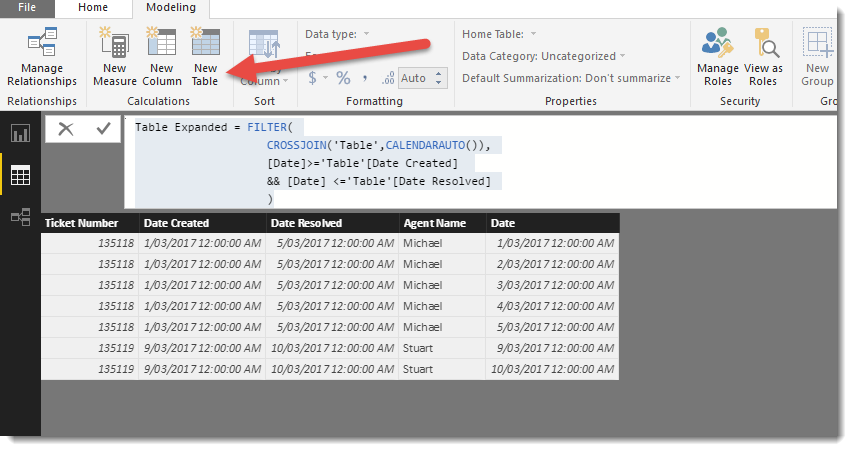
You could try creating a New Table in DAX and use the following code


Table Expanded = FILTER(
                    CROSSJOIN('Table',CALENDARAUTO()),
                    [Date]>='Table'[Date Created] 
                    && [Date] <='Table'[Date Resolved]
                    )

new table2.png


To learn more about DAX visit : aka.ms/practicalDAX

Proud to be a Datanaut!

View solution in original post

2 REPLIES 2
Phil_Seamark
Microsoft Employee
Microsoft Employee

Hi @Anonymous,


You could try creating a New Table in DAX and use the following code


Table Expanded = FILTER(
                    CROSSJOIN('Table',CALENDARAUTO()),
                    [Date]>='Table'[Date Created] 
                    && [Date] <='Table'[Date Resolved]
                    )

new table2.png


To learn more about DAX visit : aka.ms/practicalDAX

Proud to be a Datanaut!

Anonymous
Not applicable

@Phil_Seamark


Thanks Phil! Perfect! It almost looks too simple but it works perfectly. Thanks again for taking the time to provide me with an answer.

Helpful resources

Announcements
New to Fabric survey Carousel

New to Fabric Survey

If you have recently started exploring Fabric, we'd love to hear how it's going. Your feedback can help with product improvements.

Power BI DataViz World Championships carousel

Power BI DataViz World Championships - June 2026

A new Power BI DataViz World Championship is coming this June! Don't miss out on submitting your entry.

Join our Fabric User Panel

Join our Fabric User Panel

Share feedback directly with Fabric product managers, participate in targeted research studies and influence the Fabric roadmap.

March Power BI Update Carousel

Power BI Community Update - March 2026

Check out the March 2026 Power BI update to learn about new features.