I'm trying to build an interactive heat map custom visual using R and the heatmaply package.
The R script is:
source('./r_files/flatten_HTML.r')

############### Library Declarations ###############
libraryRequireInstall("heatmaply");
####################################################

################### Actual code ####################

p <- Values %>%
  heatmaply(Values, k_col = 2, k_row = 2,
            scale_fill_gradient_fun = scale_fill_gradient2(low = "light blue", mid = "light blue", high = "black", midpoint = 1),
            dendrogram = FALSE)

internalSaveWidget(p, 'out.html');
####################################################
The overall pipeline is working fine, i.e. the custom visual will display the out.html widget in a report page. The problem is that the data coming into 'Values' from Power BI is in the wrong structure, so the heatmap isn't correct. How do I reshape 'Values' in R?
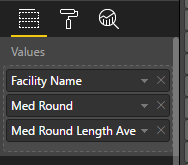
In Power BI, the data is in 3 columns:
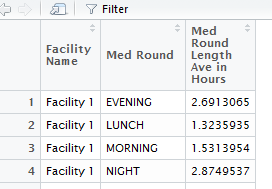
In R this looks like:
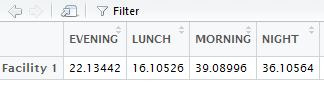
For this to work in heatmaply, it needs to be reshaped to look like this:
in R, I can do this using dataframes and xtabs, but i have no idea how to do this using the 'Values' argument that pulls the data in from Power BI. I don't really undertsand what the %>% does, or what 'Values' actually is once it is inside R - is it a dataframe? I tried to reshape 'Values' using something like:
p <- Values %>%
  Values_reshaped <- as.data.frame.matrix(xtabs(Values[3] ~ Values[1] + Values[2], Values))
  heatmaply(Values_reshaped, k_col = 2, k_row = 2,
            scale_fill_gradient_fun = scale_fill_gradient2(low = "light blue", mid = "light blue", high = "black", midpoint = 1),
            dendrogram = FALSE)
But got errors in Power BI
======================

Error in model.frame.default(formula = Values[3] ~ Values[1] + Values[2],  :
  invalid type (list) for variable 'Values[3]'
Calls: as.data.frame.matrix ... xtabs -> eval -> eval -> <Anonymous> -> model.frame.default
Execution halted


Stack Trace:
Microsoft.PowerBI.ExploreServiceCommon.ScriptHandlerException: R script error.
etc...
At this point I feel like I'm going off road. Any pointers welcome!
If only the native R visual in Power BI supported interactive heatmaps....


