Don't miss your chance to take exam DP-600 or DP-700 on us!
Request nowLearn from the best! Meet the four finalists headed to the FINALS of the Power BI Dataviz World Championships! Register now
Hi everyone!
I need some help with this issue,
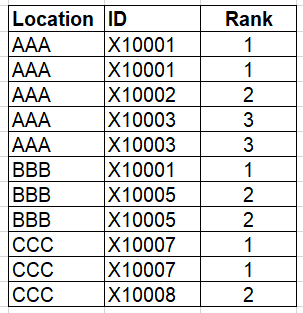
I have a table with Location and ID and I want to reset the rankx when both values change.
I tried to use this formula but it's not working:
Rank = RANKX(Filter('Table','Table'[Location]=EARLIER('Table'[Location])&&'Table'[ID]=EARLIER('Table'[ID])),ID,,DESC,DENSE)
Solved! Go to Solution.
Hi @Stephy_99 ,
Please try below steps:
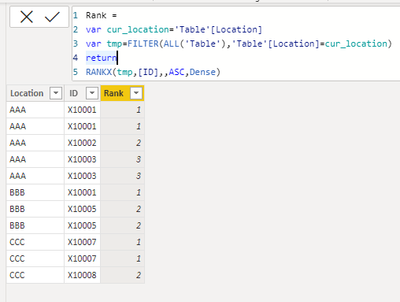
Add a new column with below dax formula
Rank =
VAR cur_location = 'Table'[Location]
VAR tmp =
FILTER ( ALL ( 'Table' ), 'Table'[Location] = cur_location )
RETURN
RANKX ( tmp, [ID],, ASC, DENSE )
Please refer the attached .pbix file.
Best regards,
Community Support Team_ Binbin Yu
If this post helps, then please consider Accept it as the solution to help the other members find it more quickly.
Hi @Stephy_99 ,
Please try below steps:
Add a new column with below dax formula
Rank =
VAR cur_location = 'Table'[Location]
VAR tmp =
FILTER ( ALL ( 'Table' ), 'Table'[Location] = cur_location )
RETURN
RANKX ( tmp, [ID],, ASC, DENSE )
Please refer the attached .pbix file.
Best regards,
Community Support Team_ Binbin Yu
If this post helps, then please consider Accept it as the solution to help the other members find it more quickly.
@Stephy_99 , Try like
Rank = RANKX(Filter('Table','Table'[Location]=EARLIER('Table'[Location])),[ID],,DESC,DENSE)
If this does not help
Can you share sample data and sample output in table format? Or a sample pbix after removing sensitive data.
| User | Count |
|---|---|
| 50 | |
| 40 | |
| 32 | |
| 14 | |
| 13 |
| User | Count |
|---|---|
| 83 | |
| 71 | |
| 37 | |
| 27 | |
| 24 |