Join us at FabCon Atlanta from March 16 - 20, 2026, for the ultimate Fabric, Power BI, AI and SQL community-led event. Save $200 with code FABCOMM.
Register now!The Power BI Data Visualization World Championships is back! Get ahead of the game and start preparing now! Learn more
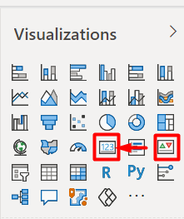
Requirement Visualization in Card 🙏
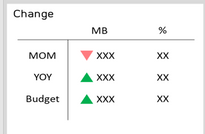
1. I want the up and down triangle symbols like in the KPIs to be placed on the card.
Example
I hope you reply soon!
Solved! Go to Solution.
Hi @Choosri
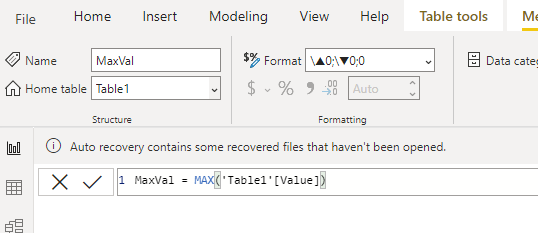
You can use Custom Formatting to do this - see my sample file for examples. Select the value being displayed in the Card then in the Ribbon enter this into theh Format area
\▲0;\▼0;0
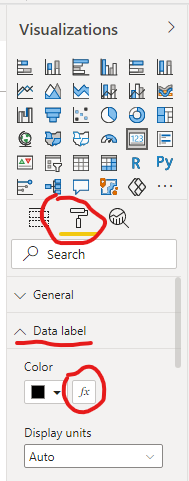
If you want color then set the Conditional Formatting on the card.
Further reading on Custom Format Strings
Custom Formatting Strings in Power BI • My Online Training Hub
Regards
Phil
Proud to be a Super User!
Hi @Choosri
You can use Custom Formatting to do this - see my sample file for examples. Select the value being displayed in the Card then in the Ribbon enter this into theh Format area
\▲0;\▼0;0
If you want color then set the Conditional Formatting on the card.
Further reading on Custom Format Strings
Custom Formatting Strings in Power BI • My Online Training Hub
Regards
Phil
Proud to be a Super User!
Thank you very much >< 😍
The Power BI Data Visualization World Championships is back! Get ahead of the game and start preparing now!
| User | Count |
|---|---|
| 40 | |
| 37 | |
| 35 | |
| 34 | |
| 27 |
| User | Count |
|---|---|
| 136 | |
| 99 | |
| 73 | |
| 66 | |
| 65 |