cancel
Showing results for 
Search instead for 
Did you mean: 

The Power BI Data Visualization World Championships is back! Get ahead of the game and start preparing now! Learn more

Reply
Arkalex5
New Member

Reporting the inverse

Hi all,


I'm new to PowerBi and really enjoying getting to know it.


As a teacher, I'm using it to inform us of student information.


I want to be able to run a report that will leave me a list of all the students who haven't registered one of my filters in a particular week. It's easy to list all who have but I want the report to cancel out those students and leave the ones who haven't. 

Can anyone help me with the measure please?


Thanks

1 ACCEPTED SOLUTION
Anonymous
Not applicable

Hi  @Arkalex5 ,


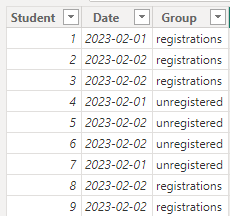
I created some data:

You might consider using Filters for your Visual settings:

vyangliumsft_0-1698299304664.png


Here are the steps you can follow:

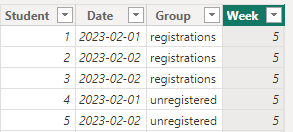
1. Create calculated column.

Week =
WEEKNUM('Table'[Date],1)

vyangliumsft_1-1698299304666.png

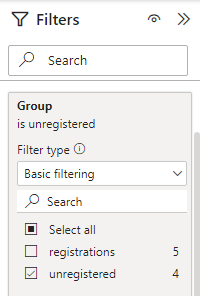
2. After clicking Visual and selecting Filters on the right, you can filter the fields you specify.

For example, [Group] - Filter type : Basic filtering - select the data you want to display (e.g. Unregistered).

vyangliumsft_2-1698299329168.png

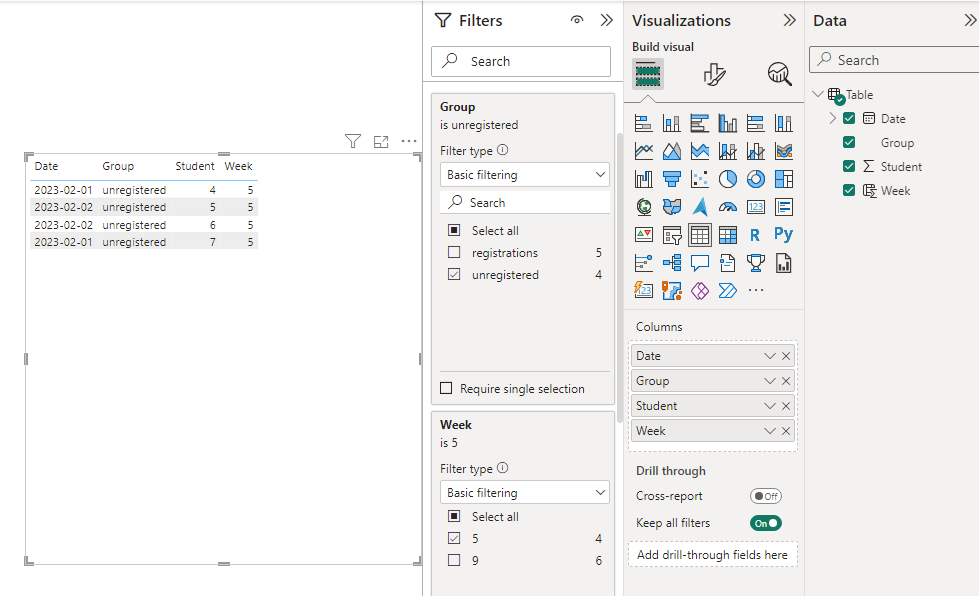
3. Result:

vyangliumsft_3-1698299350127.png


Refer to:

Add a filter to a report in Power BI - Power BI | Microsoft Learn

If it doesn't meet your expected results, can you share sample data and sample output in table format? Or a sample pbix after removing sensitive data. We can better understand the problem and help you


Best Regards,

Liu Yang

If this post helps, then please consider Accept it as the solution to help the other members find it more quickly

View solution in original post

2 REPLIES 2
Anonymous
Not applicable

Hi  @Arkalex5 ,


I created some data:

You might consider using Filters for your Visual settings:

vyangliumsft_0-1698299304664.png


Here are the steps you can follow:

1. Create calculated column.

Week =
WEEKNUM('Table'[Date],1)

vyangliumsft_1-1698299304666.png

2. After clicking Visual and selecting Filters on the right, you can filter the fields you specify.

For example, [Group] - Filter type : Basic filtering - select the data you want to display (e.g. Unregistered).

vyangliumsft_2-1698299329168.png

3. Result:

vyangliumsft_3-1698299350127.png


Refer to:

Add a filter to a report in Power BI - Power BI | Microsoft Learn

If it doesn't meet your expected results, can you share sample data and sample output in table format? Or a sample pbix after removing sensitive data. We can better understand the problem and help you


Best Regards,

Liu Yang

If this post helps, then please consider Accept it as the solution to help the other members find it more quickly

amitchandak
Super User
Super User

@Arkalex5 , Try this


Registered  = count(Table[Student])


Not Registered =  countX(Values(Table[Student]), if(isbalnk([Registered]), [Student], blank()) )


or try this approach of disconnected table

Need of an Independent Table in Power BI - Exclude: https://youtu.be/lOEW-YUrAbE

Share with Power BI Enthusiasts: Full Power BI Video (20 Hours) YouTube
Microsoft Fabric Series 60+ Videos YouTube
Microsoft Fabric Hindi End to End YouTube

Helpful resources

Announcements
Power BI DataViz World Championships

Power BI Dataviz World Championships

The Power BI Data Visualization World Championships is back! Get ahead of the game and start preparing now!

December 2025 Power BI Update Carousel

Power BI Monthly Update - December 2025

Check out the December 2025 Power BI Holiday Recap!

FabCon Atlanta 2026 carousel

FabCon Atlanta 2026

Join us at FabCon Atlanta, March 16-20, for the ultimate Fabric, Power BI, AI and SQL community-led event. Save $200 with code FABCOMM.