cancel
Showing results for 
Search instead for 
Did you mean: 

Get Fabric certified for FREE! Don't miss your chance! Learn more

Reply
azakir
Resolver I
Resolver I

Reporting Lines - Matrix Visual

Hello everyone. Got a bit of an interesting issue. 


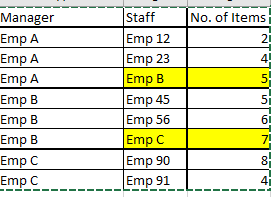
I have a table that has a manager name in one column, and staff reporting to that manager in the second column. I am after a way to display this in Matrix visual so that once the manager is expanded, it shows the staff reporting to the manager. Problem is, there are examples where the staff are themselves manager of other staff. 


For example, consider the following table: 

azakir_0-1701664735868.png


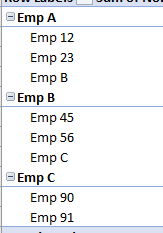
It is giving me a result in this manner: 

azakir_1-1701664781258.png

Ideally, I would like Emp A to be further expanded to Emp B and then in the same row, Emp B to be expanded to their relevant staff. so that when I collapse it, Emp A should also show the sum of items for Emp B staff. 


1 ACCEPTED SOLUTION
Jihwan_Kim
Super User
Super User

Hi,

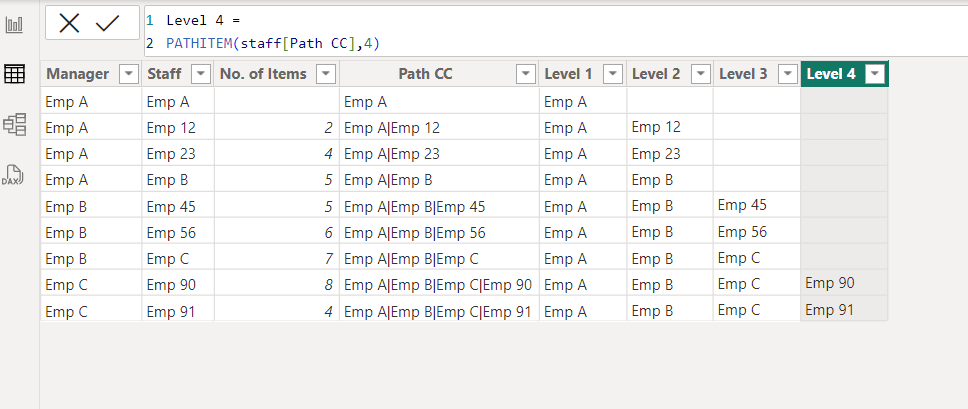
I am not sure how your semantic model looks like, but you can try to use below DAX functions as a starting point of your solution.

Please check the below picture and the attached pbix file.


PATH function (DAX) - DAX | Microsoft Learn


PATHITEM function (DAX) - DAX | Microsoft Learn


Jihwan_Kim_0-1701666175162.png


If this post helps, then please consider accepting it as the solution to help other members find it faster, and give a big thumbs up.


Click here to visit my LinkedIn page

View solution in original post

2 REPLIES 2
Jihwan_Kim
Super User
Super User

Hi,

I am not sure how your semantic model looks like, but you can try to use below DAX functions as a starting point of your solution.

Please check the below picture and the attached pbix file.


PATH function (DAX) - DAX | Microsoft Learn


PATHITEM function (DAX) - DAX | Microsoft Learn


Jihwan_Kim_0-1701666175162.png


If this post helps, then please consider accepting it as the solution to help other members find it faster, and give a big thumbs up.


Click here to visit my LinkedIn page

Hi @Jihwan_Kim Thank you so much mate. I never knew about the path function. This has done the trick for me cheers for that. 

Helpful resources

Announcements
Sticker Challenge 2026 Carousel

Join our Community Sticker Challenge 2026

If you love stickers, then you will definitely want to check out our Community Sticker Challenge!

January Power BI Update Carousel

Power BI Monthly Update - January 2026

Check out the January 2026 Power BI update to learn about new features.

FabCon Atlanta 2026 carousel

FabCon Atlanta 2026

Join us at FabCon Atlanta, March 16-20, for the ultimate Fabric, Power BI, AI and SQL community-led event. Save $200 with code FABCOMM.