Join us at FabCon Atlanta from March 16 - 20, 2026, for the ultimate Fabric, Power BI, AI and SQL community-led event. Save $200 with code FABCOMM.
Register now!The Power BI Data Visualization World Championships is back! Get ahead of the game and start preparing now! Learn more
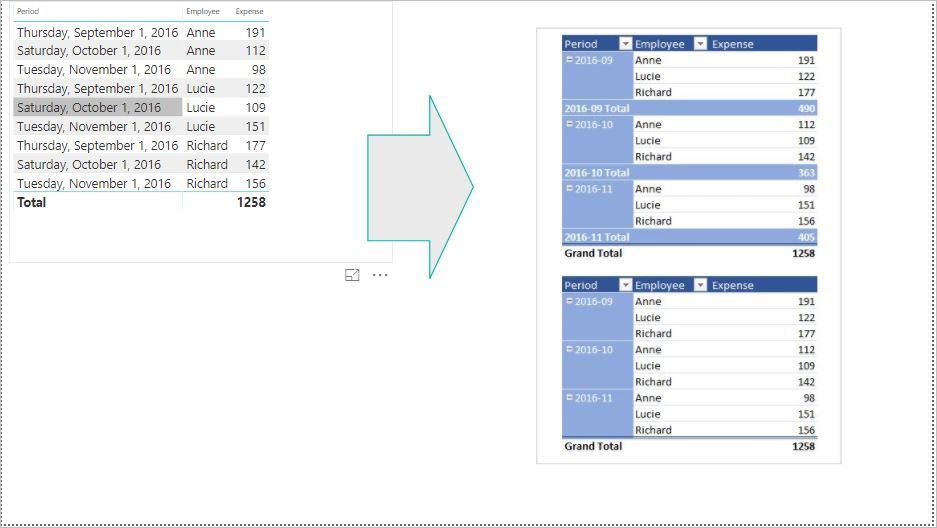
In Power BI, I want to create a report table same pivot table in Excel
See the picture
How to be like that, with the format same pivot table in excel
Seet Attach file
Thank you
Solved! Go to Solution.
Hey @nmhung49
I tried and almost got as yours.
Steps Below:
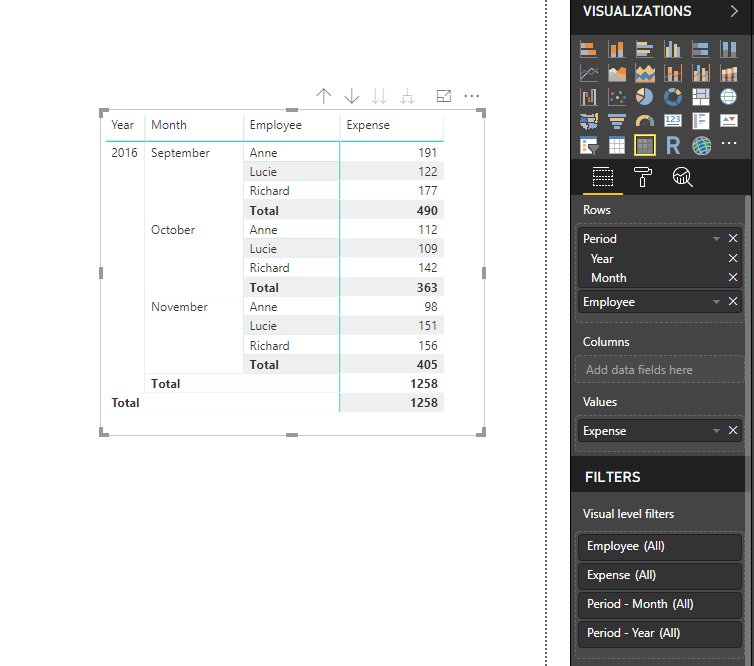
1. I have used Matrix Table.
2. Arranged data as like in the First Image.
3. make sure to OFF Stepped Layout from Visual Formats.
4. Play with Values/subtotals etc..
My qustion is similar to this issue, but one more step.
What should I do if I want to do more calculations from the pivot tables. For example,
I want to compute Anne Oct expense over Sep Expense, that is 112/191
Lucie Oct expense over Sep Expense, that is 109/122
Richard Oct expense over Sep Expense, that is 142/147
...
How can I do it in Power BI?
Thanks
Hey @nmhung49
I tried and almost got as yours.
Steps Below:
1. I have used Matrix Table.
2. Arranged data as like in the First Image.
3. make sure to OFF Stepped Layout from Visual Formats.
4. Play with Values/subtotals etc..
The Power BI Data Visualization World Championships is back! Get ahead of the game and start preparing now!
Check out the November 2025 Power BI update to learn about new features.
| User | Count |
|---|---|
| 59 | |
| 43 | |
| 42 | |
| 23 | |
| 17 |
| User | Count |
|---|---|
| 190 | |
| 122 | |
| 96 | |
| 66 | |
| 47 |