FabCon is coming to Atlanta
Join us at FabCon Atlanta from March 16 - 20, 2026, for the ultimate Fabric, Power BI, AI and SQL community-led event. Save $200 with code FABCOMM.
Register now!- Power BI forums
- Get Help with Power BI
- Desktop
- Service
- Report Server
- Power Query
- Mobile Apps
- Developer
- DAX Commands and Tips
- Custom Visuals Development Discussion
- Health and Life Sciences
- Power BI Spanish forums
- Translated Spanish Desktop
- Training and Consulting
- Instructor Led Training
- Dashboard in a Day for Women, by Women
- Galleries
- Data Stories Gallery
- Themes Gallery
- Contests Gallery
- QuickViz Gallery
- Quick Measures Gallery
- Visual Calculations Gallery
- Notebook Gallery
- Translytical Task Flow Gallery
- TMDL Gallery
- R Script Showcase
- Webinars and Video Gallery
- Ideas
- Custom Visuals Ideas (read-only)
- Issues
- Issues
- Events
- Upcoming Events
Get Fabric Certified for FREE during Fabric Data Days. Don't miss your chance! Request now
- Power BI forums
- Forums
- Get Help with Power BI
- Desktop
- Re: Report Refresh getting "stuck"
- Subscribe to RSS Feed
- Mark Topic as New
- Mark Topic as Read
- Float this Topic for Current User
- Bookmark
- Subscribe
- Printer Friendly Page


- Mark as New
- Bookmark
- Subscribe
- Mute
- Subscribe to RSS Feed
- Permalink
- Report Inappropriate Content
Report Refresh getting "stuck"
Hello,
I am trying to refresh my report in Power BI Desktop and after loading data for awhile, it appears to get stuck.
The table contains data from a combination of queries that are all imported into the model. It previews fine in the Query Editor. After loading data from several of the queries (Excel, Oracle, SQL), the refresh window shows that it is at "183 KB from Spreadsheet.xlsx" and stays there (it has been several hours). It used to refresh just fine, I made a few edits (but not to that spreadsheet), and now it is no longer working.
I recreated that spreadsheet from scratch in case the file might have been broken, but no difference.
Any idea what might be happenign?
Thank you 🙂


- Mark as New
- Bookmark
- Subscribe
- Mute
- Subscribe to RSS Feed
- Permalink
- Report Inappropriate Content
I have encountered this issue multiple times in different companies I have worked and it's a pain... sometimes i have to rebuild or download a copy from the server again and pray.

- Mark as New
- Bookmark
- Subscribe
- Mute
- Subscribe to RSS Feed
- Permalink
- Report Inappropriate Content
Anyone with a solution yet? Got the same issue (both with Power Query in Excel and in Power BI) and also just gotten in the habit of hitting refresh, then cancel on the pop up, then refresh again. But that's not really a solution... 🤔
- Mark as New
- Bookmark
- Subscribe
- Mute
- Subscribe to RSS Feed
- Permalink
- Report Inappropriate Content
Found something that seems to work: https://community.powerbi.com/t5/Power-Query/Long-time-quot-Evaluating-quot-for-no-apparent-reason-d...

- Mark as New
- Bookmark
- Subscribe
- Mute
- Subscribe to RSS Feed
- Permalink
- Report Inappropriate Content
I get the same issue, stuck refreshing its been over an hour, and its is a fairly small spreadsheet. I believe it has to do with older excel spreadsheets and older PBI desktop versions. I opened a new Excel copy and pasted values and column header and used a new excel file with pasted values information.
Good Luck
- Mark as New
- Bookmark
- Subscribe
- Mute
- Subscribe to RSS Feed
- Permalink
- Report Inappropriate Content
I've just gotten in the habit of hitting refresh, then cancel on the pop up, then refresh again. It works every time. I'm here because I was trying to find out a way to fix it, but looks like no one else has figured it out either 😞

- Mark as New
- Bookmark
- Subscribe
- Mute
- Subscribe to RSS Feed
- Permalink
- Report Inappropriate Content
Hi @huguest,
It sounds like you have reference other queries in query editor, it may caused stuck loading.(the referenced query not finish loading, current query are wait for reference query finish load)
If this is a case, I'd like to suggest you turn on the 'Parallel loading' in options menu.
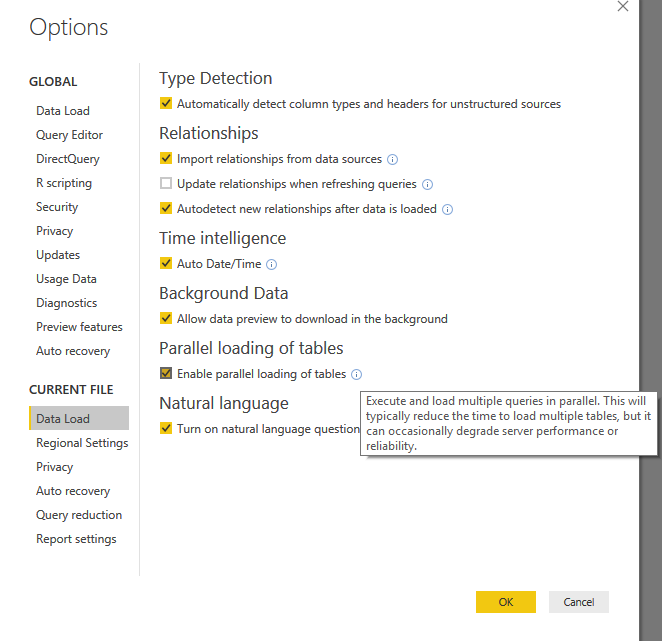
Regards,
Xiaoxin Sheng
- Mark as New
- Bookmark
- Subscribe
- Mute
- Subscribe to RSS Feed
- Permalink
- Report Inappropriate Content
Hello Xiaoxin Sheng, thank you for your suggestion but that feature was already activated in my report.
- Mark as New
- Bookmark
- Subscribe
- Mute
- Subscribe to RSS Feed
- Permalink
- Report Inappropriate Content
HI @huguest,
Is there any connection to external datasource in your excel file? Or your use link table function to import excel workbooks?
Regards,
Xiaoxin Sheng
- Mark as New
- Bookmark
- Subscribe
- Mute
- Subscribe to RSS Feed
- Permalink
- Report Inappropriate Content
None of these. It is a very basic spreadsheet with 2 columns of values an no formula (about 100 rows).
- Mark as New
- Bookmark
- Subscribe
- Mute
- Subscribe to RSS Feed
- Permalink
- Report Inappropriate Content
HI @huguest,
I'd like to suggest you to turn off load option of queries to confirm which query caused the stuck issue.
Regards,
Xiaoxin
- Mark as New
- Bookmark
- Subscribe
- Mute
- Subscribe to RSS Feed
- Permalink
- Report Inappropriate Content
I'm having the same issue. Did you find a solution?
- Mark as New
- Bookmark
- Subscribe
- Mute
- Subscribe to RSS Feed
- Permalink
- Report Inappropriate Content
Unfortunately not really. Sometimes I feel like it is the report itself, sometimes I feel like it is something else (connection or other). I tried to simplify my report as much as possible (eliminating uncessary transformations, combining some steps, etc.) and it is much better but I am still running into the same issue at times.
Good luck!
Helpful resources

Power BI Monthly Update - November 2025
Check out the November 2025 Power BI update to learn about new features.

Fabric Data Days
Advance your Data & AI career with 50 days of live learning, contests, hands-on challenges, study groups & certifications and more!

FabCon Atlanta 2026
Join us at FabCon Atlanta, March 16-20, for the ultimate Fabric, Power BI, AI and SQL community-led event. Save $200 with code FABCOMM.


