cancel
Showing results for 
Search instead for 
Did you mean: 

July 7 - July 17 | Round 2 of the Power BI Dataviz World Championships. Don't miss your chance! Learn more

Reply
Anonymous
Not applicable

Report Level Filter - missing?

Hello!


Where can I find the filter for REPORT LEVEL?


Everytime I refresh, my model queries the data for 5 years of Salesforce and it's driving me crazy. 


The filter pane only shows THIS PAGE and ALL PAGES. 


Thank you! 

1 ACCEPTED SOLUTION
edhans
Community Champion
Community Champion

All Pages is Report Level. THere are three filters:

  1. Report Level - all pages
  2. Page Level - this page
  3. Visual level - this visual (only when you have a visual selected)

EDIT: I see you are talking about refreshes.


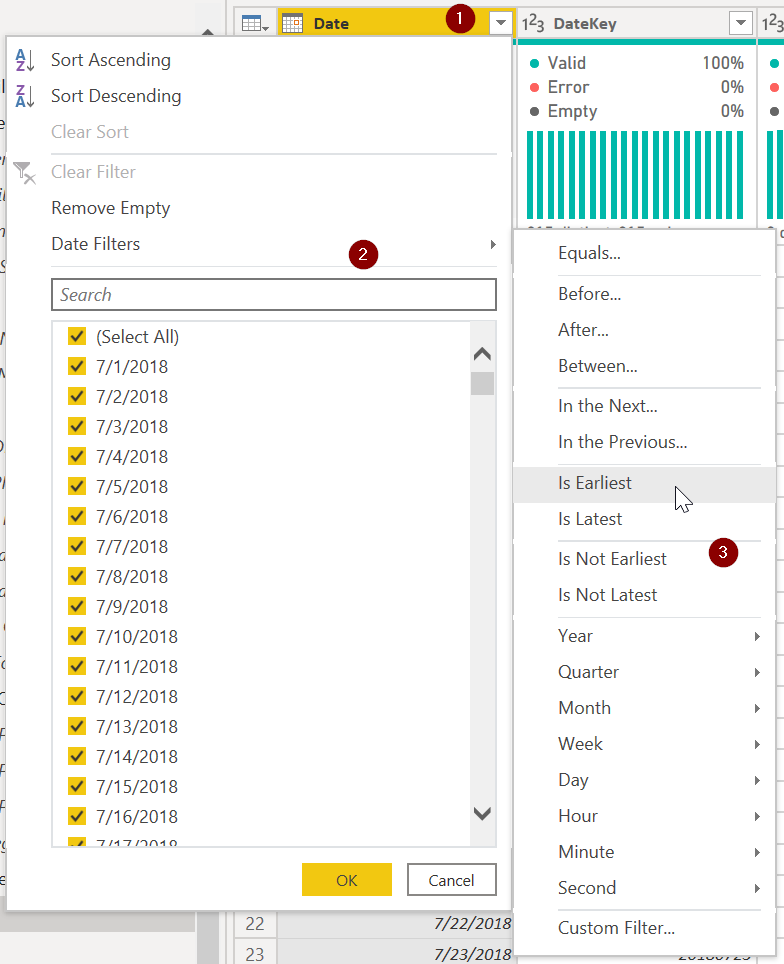
All DAX Filters only filter the existing data. You have to go into Power Query and filter the data as it comes in to exclude records. You need to go into Power Query and:

  1. select the column you want to filter and hit the dropdown
  2. Select Date Filters (or number filters if the date is in the YYYYMMDD format)
  3. Select how far back you want to go.

edhans_0-1594415877985.png


Did I answer your question? Mark my post as a solution!
Did my answers help arrive at a solution? Give it a kudos by clicking the Thumbs Up!

DAX is for Analysis. Power Query is for Data Modeling


Proud to be a Super User!

MCSA: BI Reporting

View solution in original post

4 REPLIES 4
edhans
Community Champion
Community Champion

All Pages is Report Level. THere are three filters:

  1. Report Level - all pages
  2. Page Level - this page
  3. Visual level - this visual (only when you have a visual selected)

EDIT: I see you are talking about refreshes.


All DAX Filters only filter the existing data. You have to go into Power Query and filter the data as it comes in to exclude records. You need to go into Power Query and:

  1. select the column you want to filter and hit the dropdown
  2. Select Date Filters (or number filters if the date is in the YYYYMMDD format)
  3. Select how far back you want to go.

edhans_0-1594415877985.png


Did I answer your question? Mark my post as a solution!
Did my answers help arrive at a solution? Give it a kudos by clicking the Thumbs Up!

DAX is for Analysis. Power Query is for Data Modeling


Proud to be a Super User!

MCSA: BI Reporting
Anonymous
Not applicable

THANK YOU!!!! This works!!

edhans
Community Champion
Community Champion

Excellent @Anonymous - glad I was able to help out.


Did I answer your question? Mark my post as a solution!
Did my answers help arrive at a solution? Give it a kudos by clicking the Thumbs Up!

DAX is for Analysis. Power Query is for Data Modeling


Proud to be a Super User!

MCSA: BI Reporting
Anonymous
Not applicable

Thank you. 


Is there a way to limit the amount of data that is queried when I refresh?


Everytime I chnage a column header - it pulls the entire instance of salesforce. How can I prevent this? 


Thank you! 

Helpful resources

Announcements
FabCon and SQLCon Barcelona 2026

FabCon & SQLCon – Barcelona 2026

Join us in Barcelona for FabCon and SQLCon, the Fabric, Power BI, SQL, and AI community event. Save €200 with code FABCMTY200.

60 days of Data Days Carousel

Data Days 2026

Join Fabric Data Days 2026: 60 days of free live/on-demand sessions, challenges, study groups, and certification opportunities.

Power BI DataViz World Championships carousel

Power BI DataViz World Championships - June 2026

A new Power BI DataViz World Championship is coming this June! Don't miss out on submitting your entry.