cancel
Showing results for 
Search instead for 
Did you mean: 

The Power BI Data Visualization World Championships is back! Get ahead of the game and start preparing now! Learn more

Reply
lrockwell
Frequent Visitor

Report Filter

I am trying to filter all of a report by a Site Name. then within the report i will utilize Asset Numbers for that site to chart various things. I create a filter under the Report filter and check the Site Name I want to filter. Then add the chart and then add the Asset Number as a slicer to be able to choose which of the 75+ machines for a given site i want to show data for, but it is not limiting the asset numbers it to that site only.. it is still grabbing Asset Numbers from all 12 Sites. What am i doing wrong. 

6 REPLIES 6
v-yulgu-msft
Microsoft Employee
Microsoft Employee

Hi @lrockwell,


Please elaborate your scenario with some detailed data and examples. According to current description, it's not very clear about  what your report looks like and what you want to achieve.


Best regards,
Yuliana Gu

Community Support Team _ Yuliana Gu
If this post helps, then please consider Accept it as the solution to help the other members find it more quickly.

1.PNG2.PNG


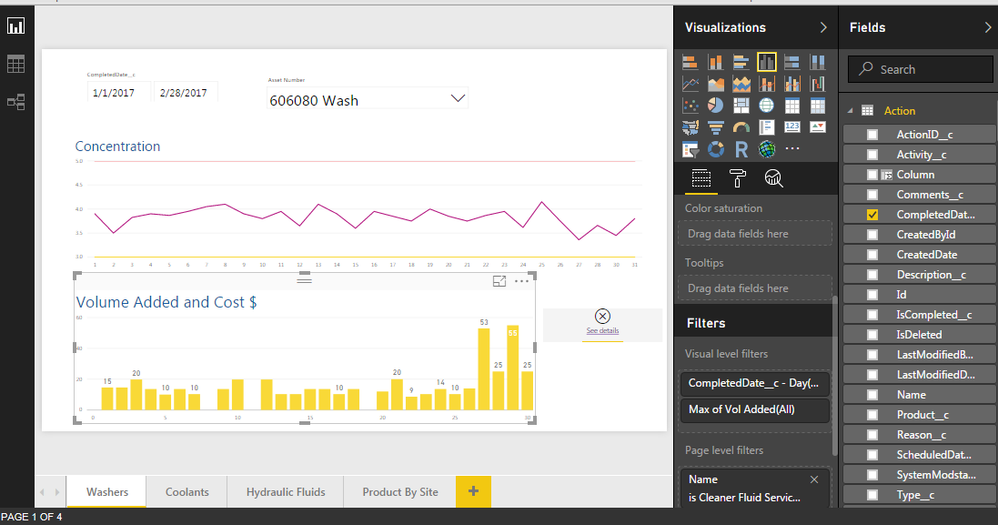
I have a report that I am trying to take the volume added of a chemical (by asset number) and calculate the costs of the chemical by the volume added. I have been unable to make the connection between the two. Often times there are more than one chemical used on a single asset so somehow i have to tell it which chemical cost to relate to that volume added. Any help is appreciated. 

Hi @lrockwell,


You want to distinguish chemical cost between multiple types of chemical because of the multi-selected values from a slicer, right?


What if adding the asset number into legend section of the chart visual?


Regards,
Yuliana Gu

Community Support Team _ Yuliana Gu
If this post helps, then please consider Accept it as the solution to help the other members find it more quickly.

There are upwards of 140 + machines in each location. we are needing to select whichever machine and see the costs for each on a seperate tab as well as by area or groups of machines

Hi @lrockwell,


Do you want to show data of each location(site name) on each tab (report page)? Unfortunately, this cannot be achieved automatically. You should create same report on multiple tabs(pages) and add site name into page level filter. Then select different site name for each page.


If what I mentioned above is not your requirement, do you mean you want to show the Site Name/Asset Number which has been selected currrent on report body to tell users which chemical cost to relate to that volume added? If so, you could create a measure like below, and add this measure in a card visual:

Asset Number selected=Max(Table_name[Asset Number])


Regards,
Yuliana Gu

Community Support Team _ Yuliana Gu
If this post helps, then please consider Accept it as the solution to help the other members find it more quickly.
KHorseman
Community Champion
Community Champion

Without knowing anything about how your data is structured, it's hard to say.


Did I answer your question? Mark my post as a solution!

Proud to be a Super User!


Helpful resources

Announcements
Power BI DataViz World Championships

Power BI Dataviz World Championships

The Power BI Data Visualization World Championships is back! Get ahead of the game and start preparing now!

December 2025 Power BI Update Carousel

Power BI Monthly Update - December 2025

Check out the December 2025 Power BI Holiday Recap!

FabCon Atlanta 2026 carousel

FabCon Atlanta 2026

Join us at FabCon Atlanta, March 16-20, for the ultimate Fabric, Power BI, AI and SQL community-led event. Save $200 with code FABCOMM.

Top Solution Authors