Join us at FabCon Atlanta from March 16 - 20, 2026, for the ultimate Fabric, Power BI, AI and SQL community-led event. Save $200 with code FABCOMM.
Register now!The Power BI Data Visualization World Championships is back! Get ahead of the game and start preparing now! Learn more
I am new to SSRS and have a SUM(IIF question.
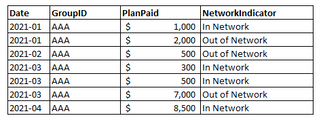
My data set contains four columns: Date, GroupID, PlanPaid, and NetworkIndicator.
Here is an example of the data set:
I am trying to SUM the [PlanPaid] amount when [NetworkIndicator] = "In Network".
However, I need this amount broken up by the [Date]. I tried accomplishing this by creating the expression:
=Sum(IIf(Fields!NetworkIndicator.Value = "In Network" , Fields!PlanPaid.Value , Nothing) , "Claims_Rolling12")
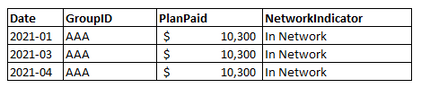
But this expression returns the same amount across all [Dates]:
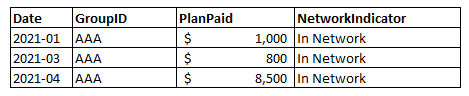
How do I break it up so that it is grouped by the correct [Date]? I want it to return this:
Solved! Go to Solution.
Hi @Anonymous ,
I think you can try this code to achieve your goal.
=sum(VAL(IIF( Fields!NetworkIndicator.Value = "In Network", Fields!PlanPaid.Value, Nothing)))
Result is as below.
Best Regards,
Rico Zhou
If this post helps, then please consider Accept it as the solution to help the other members find it more quickly.
Hi @Anonymous ,
I think you can try this code to achieve your goal.
=sum(VAL(IIF( Fields!NetworkIndicator.Value = "In Network", Fields!PlanPaid.Value, Nothing)))
Result is as below.
Best Regards,
Rico Zhou
If this post helps, then please consider Accept it as the solution to help the other members find it more quickly.
The Power BI Data Visualization World Championships is back! Get ahead of the game and start preparing now!
| User | Count |
|---|---|
| 37 | |
| 36 | |
| 33 | |
| 31 | |
| 29 |
| User | Count |
|---|---|
| 132 | |
| 86 | |
| 85 | |
| 68 | |
| 64 |