cancel
Showing results for 
Search instead for 
Did you mean: 

Learn from the best! Meet the four finalists headed to the FINALS of the Power BI Dataviz World Championships! Register now

Reply
Anonymous
Not applicable

Replicating a Tableau Visual

Hi There, I am trying to replicate a visualization on PowerBi:


Here's a picture of it:

https://drive.google.com/open?id=1WHpG2ng-7w1LhoAV6pvr6qwEtFCjsu_T

The data is very simple. We have on particular item sold at $21.60 at a quantity of 35. That same item is also sold at $22.45 at a quantity of 10. That item is also sold at $23.50 at a quantity of 20. The "Unit Price - Invoices" is the field that contains the price data while the "Quantity" field (not shown in picture) contains the quantity.


The Average Selling Price, OP, COGS, Full Margin, and Standard Cost are all dynamic fields that vary based on the Material. The OP, COGS, Full Margin, and Standard Cost are all related to the specific product's cost.


I plot the price points on the Y axis and make sure to put the quantity as the size. Then I add the dynamic reference lines that give a reference of where that material is priced relative to the other costs.


That's all I do on Tableau, and I get this nice visual. Is there any way to duplicate/re-perform this analysis in PowerBi? It is essential to have the reference lines.


Thank you

3 REPLIES 3
v-cherch-msft
Microsoft Employee
Microsoft Employee

Hi @Anonymous


You may have a look at below articles to create the lines. If you need further help, please list your sample data and explain more about your expected output.

https://docs.microsoft.com/en-us/power-bi/desktop-analytics-pane

https://docs.microsoft.com/en-us/power-bi/service-analytics-pane


Regards,

Cherie

Community Support Team _ Cherie Chen
If this post helps, then please consider Accept it as the solution to help the other members find it more quickly.
Anonymous
Not applicable

Below is the data:


  Price  Quantity
Sale 1 $    21.6035
Sale 2 $    22.4510
Sale 3 $    23.5020
   
Average Selling Price: $    22.32 
OP $    20.32 
COGS $    16.32 
Full Margin $    14.20 
Standard Cost $    12.30 


I don't want to manually imput the Average Selling Price, OP, COGS, Full Margin, and Standard Cost, as they all change based on the material and are formulas/fields in PowerBi.


I need the expected output to plot those 3 sales with prices on the Y axis and the Material (item) on the X axis. This item is called Material "XYZ". I need there to be horizontal lines that are the same values as the Average Selling Price, OP, COGS, Full Margin, and Standard Cost. These lines need to change based on the material that is depicted. Another material would have different prices and costs. I also need the size of the bubble to be proportional to the quantity sold.

Hi @Anonymous


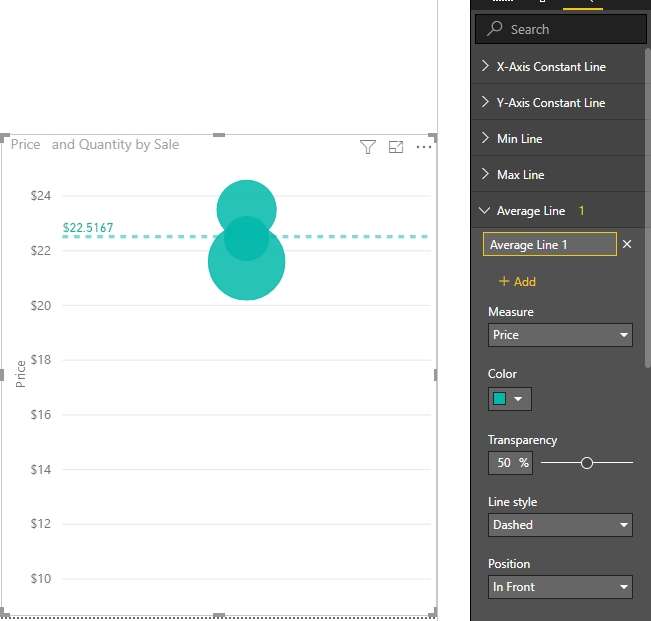
I'm afraid you may not add so many dynamic lines for scatter chart. Please vote for this similar idea and wait for this feature.

1.png

Regards,

Cherie


Community Support Team _ Cherie Chen
If this post helps, then please consider Accept it as the solution to help the other members find it more quickly.

Helpful resources

Announcements
Join our Fabric User Panel

Join our Fabric User Panel

Share feedback directly with Fabric product managers, participate in targeted research studies and influence the Fabric roadmap.

February Power BI Update Carousel

Power BI Monthly Update - February 2026

Check out the February 2026 Power BI update to learn about new features.

FabCon Atlanta 2026 carousel

FabCon Atlanta 2026

Join us at FabCon Atlanta, March 16-20, for the ultimate Fabric, Power BI, AI and SQL community-led event. Save $200 with code FABCOMM.