cancel
Showing results for 
Search instead for 
Did you mean: 

The Power BI Data Visualization World Championships is back! Get ahead of the game and start preparing now! Learn more

Reply
S_M_
Frequent Visitor

Replicate this excel chart/heatmap with percentage bar in PowerBI

Hi,


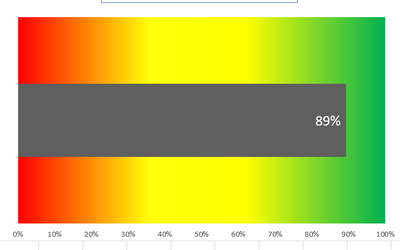
How can I replicate this Excel chart in Power BI. The gray bar is the overall percentage for a given vendor.


S_M__0-1696356648935.png


Any help is appreciated.


Thanks,

1 REPLY 1
amitchandak
Super User
Super User

@S_M_ , You can get the bar,  using a measure like


divide([current measure], calculate([current measure], removefilter(Table[Vendor]) ) )


If the background is conditional formatting, you can not get 3 colors


Percent of Total and Percent of SubTotal https://www.youtube.com/watch?v=6jTildcV2ho
https://www.youtube.com/watch?v=cN8AO3_vmlY&t=24270s

Share with Power BI Enthusiasts: Full Power BI Video (20 Hours) YouTube
Microsoft Fabric Series 60+ Videos YouTube
Microsoft Fabric Hindi End to End YouTube

Helpful resources

Announcements
Power BI DataViz World Championships

Power BI Dataviz World Championships

The Power BI Data Visualization World Championships is back! Get ahead of the game and start preparing now!

November Power BI Update Carousel

Power BI Monthly Update - November 2025

Check out the November 2025 Power BI update to learn about new features.

FabCon Atlanta 2026 carousel

FabCon Atlanta 2026

Join us at FabCon Atlanta, March 16-20, for the ultimate Fabric, Power BI, AI and SQL community-led event. Save $200 with code FABCOMM.