Get Fabric certified for FREE!
Don't miss your chance to take the Fabric Data Engineer (DP-700) exam on us!
Learn more- Power BI forums
- Get Help with Power BI
- Desktop
- Service
- Report Server
- Power Query
- Mobile Apps
- Developer
- DAX Commands and Tips
- Custom Visuals Development Discussion
- Health and Life Sciences
- Power BI Spanish forums
- Translated Spanish Desktop
- Training and Consulting
- Instructor Led Training
- Dashboard in a Day for Women, by Women
- Galleries
- Data Stories Gallery
- Themes Gallery
- Contests Gallery
- QuickViz Gallery
- Quick Measures Gallery
- Visual Calculations Gallery
- Notebook Gallery
- Translytical Task Flow Gallery
- TMDL Gallery
- R Script Showcase
- Webinars and Video Gallery
- Ideas
- Custom Visuals Ideas (read-only)
- Issues
- Issues
- Events
- Upcoming Events
Next up in the FabCon + SQLCon recap series: The roadmap for Microsoft SQL and Maximizing Developer experiences in Fabric. All sessions are available on-demand after the live show. Register now
- Power BI forums
- Forums
- Get Help with Power BI
- Desktop
- Re: Replacing blank values with zero
- Subscribe to RSS Feed
- Mark Topic as New
- Mark Topic as Read
- Float this Topic for Current User
- Bookmark
- Subscribe
- Printer Friendly Page


- Mark as New
- Bookmark
- Subscribe
- Mute
- Subscribe to RSS Feed
- Permalink
- Report Inappropriate Content
Replacing blank values with zero
Hi everyone, having a hard time trying to figuring out this one and appreciated the help!
Question: How can I replace the blank/empty rows with zero? I highlighted the empty rows with grey for the meantime and wanted to replace it by zero.
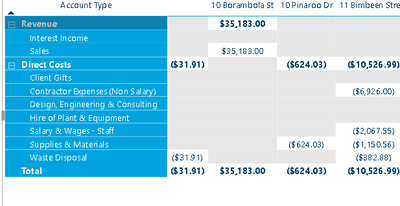
This measure removes the columns that has empty values
P&L (No Blanks) = CALCULATE( IF( [P&L] = 0, BLANK(), [P&L]))These are the measures of P&L
P&L =
(
    CALCULATE (
        SUM ( 'Invoices'[Line Amount FX Calculation] ),
        FILTER (
            'Accounts',
            Accounts[Class] = "Revenue"
                || Accounts[Class] = "Expense"
        ), USERELATIONSHIP( Invoices[Invoice Line ID], 'Tracking Category CONNECTIONS'[ID])
    )
) - [P&L - Credit Notes] + [P&L (Journals)]
P&L - Credit Notes =
CALCULATE (
SUM ( 'Credit Notes'[Line Amount Credit Note Calculation FX] ),
FILTER (
'Accounts',
'Accounts'[Class] = "Revenue"
|| Accounts[Class] = "Expense"
), USERELATIONSHIP( 'Credit Notes'[Credit Note Line ID], 'Tracking Category CONNECTIONS'[ID])
)P&L (Journals) =
CALCULATE ( 0 - ( SUM ( 'Journals'[Net Amount FX] ) ),
FILTER ( 'Journals', 'Journals'[Split] = "JOURNALS" ),
FILTER (
'Accounts',
'Accounts'[Class] = "Revenue"
|| Accounts[Class] = "Expense"
), USERELATIONSHIP( Journals[ID], 'Tracking Category CONNECTIONS'[ID])
)
Solved! Go to Solution.


- Mark as New
- Bookmark
- Subscribe
- Mute
- Subscribe to RSS Feed
- Permalink
- Report Inappropriate Content
@ronaldbalza2023 You're converting the 0s to blanks with the P&L (no blanks) measure. Are you saying you want that back to 0? Can you simply use the P&L measure?
The problem is, that you have a matrix so it will replace ALL rows with zero - how do you specify which rows you want to show or not?
You may be able to work with an IF() statement, but we need to know which columns you're using in that matrix visual please and you could use that context to filter out rows where the total row is blank, otherwise put 0 - is that what you mean?
Please @mention me in your reply if you want a response.
Copying DAX from this post? Click here for a hack to quickly replace it with your own table names
Has this post solved your problem? Please Accept as Solution so that others can find it quickly and to let the community know your problem has been solved.
If you found this post helpful, please give Kudos C
I work as a Microsoft trainer and consultant, specialising in Power BI and Power Query.
www.excelwithallison.com
- Mark as New
- Bookmark
- Subscribe
- Mute
- Subscribe to RSS Feed
- Permalink
- Report Inappropriate Content
@ronaldbalza2023 Sorry, I was trying with a simplified version of [P&L] but you're right it doesn't work in your measures.
Try updating the [P&L (No Blanks)] measure and use that in your visual instead:
Please @mention me in your reply if you want a response.
Copying DAX from this post? Click here for a hack to quickly replace it with your own table names
Has this post solved your problem? Please Accept as Solution so that others can find it quickly and to let the community know your problem has been solved.
If you found this post helpful, please give Kudos C
I work as a Microsoft trainer and consultant, specialising in Power BI and Power Query.
www.excelwithallison.com
- Mark as New
- Bookmark
- Subscribe
- Mute
- Subscribe to RSS Feed
- Permalink
- Report Inappropriate Content
@ronaldbalza2023 I thought your [P&L] measure already had the $0 included in it? So the $0 should display if you've got the ColSubtotal part correct....
You could try adding the zero back in:
Please @mention me in your reply if you want a response.
Copying DAX from this post? Click here for a hack to quickly replace it with your own table names
Has this post solved your problem? Please Accept as Solution so that others can find it quickly and to let the community know your problem has been solved.
If you found this post helpful, please give Kudos C
I work as a Microsoft trainer and consultant, specialising in Power BI and Power Query.
www.excelwithallison.com
- Mark as New
- Bookmark
- Subscribe
- Mute
- Subscribe to RSS Feed
- Permalink
- Report Inappropriate Content
That's because they are blank for that account type. Do you have a DimAccount table?
Can try replacing the ALL filters with just
ALL(DimAccount)
Please @mention me in your reply if you want a response.
Copying DAX from this post? Click here for a hack to quickly replace it with your own table names
Has this post solved your problem? Please Accept as Solution so that others can find it quickly and to let the community know your problem has been solved.
If you found this post helpful, please give Kudos C
I work as a Microsoft trainer and consultant, specialising in Power BI and Power Query.
www.excelwithallison.com
- Mark as New
- Bookmark
- Subscribe
- Mute
- Subscribe to RSS Feed
- Permalink
- Report Inappropriate Content
Hi @AllisonKennedy , hooray! after a gruelling nights spending time with this 🙂 Thanks so much for your help.
- Mark as New
- Bookmark
- Subscribe
- Mute
- Subscribe to RSS Feed
- Permalink
- Report Inappropriate Content
That's because they are blank for that account type. Do you have a DimAccount table?
Can try replacing the ALL filters with just
ALL(DimAccount)
Please @mention me in your reply if you want a response.
Copying DAX from this post? Click here for a hack to quickly replace it with your own table names
Has this post solved your problem? Please Accept as Solution so that others can find it quickly and to let the community know your problem has been solved.
If you found this post helpful, please give Kudos C
I work as a Microsoft trainer and consultant, specialising in Power BI and Power Query.
www.excelwithallison.com
- Mark as New
- Bookmark
- Subscribe
- Mute
- Subscribe to RSS Feed
- Permalink
- Report Inappropriate Content
Hi @AllisonKennedy , hooray! after a gruelling nights spending time with this 🙂 Thanks so much for your help.
- Mark as New
- Bookmark
- Subscribe
- Mute
- Subscribe to RSS Feed
- Permalink
- Report Inappropriate Content
@ronaldbalza2023 You're converting the 0s to blanks with the P&L (no blanks) measure. Are you saying you want that back to 0? Can you simply use the P&L measure?
The problem is, that you have a matrix so it will replace ALL rows with zero - how do you specify which rows you want to show or not?
You may be able to work with an IF() statement, but we need to know which columns you're using in that matrix visual please and you could use that context to filter out rows where the total row is blank, otherwise put 0 - is that what you mean?
Please @mention me in your reply if you want a response.
Copying DAX from this post? Click here for a hack to quickly replace it with your own table names
Has this post solved your problem? Please Accept as Solution so that others can find it quickly and to let the community know your problem has been solved.
If you found this post helpful, please give Kudos C
I work as a Microsoft trainer and consultant, specialising in Power BI and Power Query.
www.excelwithallison.com

Helpful resources

New to Fabric Survey
If you have recently started exploring Fabric, we'd love to hear how it's going. Your feedback can help with product improvements.

Power BI DataViz World Championships - June 2026
A new Power BI DataViz World Championship is coming this June! Don't miss out on submitting your entry.

Join our Fabric User Panel
Share feedback directly with Fabric product managers, participate in targeted research studies and influence the Fabric roadmap.

Power BI Community Update - March 2026
Check out the March 2026 Power BI update to learn about new features.

| User | Count |
|---|---|
| 50 | |
| 44 | |
| 42 | |
| 19 | |
| 19 |


| User | Count |
|---|---|
| 69 | |
| 68 | |
| 33 | |
| 32 | |
| 32 |


