Don't miss your chance to take the Fabric Data Engineer (DP-700) exam on us!
Learn moreNext up in the FabCon + SQLCon recap series: The roadmap for Microsoft SQL and Maximizing Developer experiences in Fabric. All sessions are available on-demand after the live show. Register now
A table imported from PDF has negative values denoted with one right bracket, like this "6,964.68)". (The left bracket has been placed in a separate column due to the way Power Bi does text to table translation.)
I'm trying to replace all values containing ")" with a cleaned and negative version of the value. (ie. "6,964.68)" would become "-6,964.68".
Importantly, because this is for a large data set, I'm trying to achieve this:
A: Without creating a helper column and
B. Without referring to specific column names
This code works:
= Table.ReplaceValue(#"Filtered Rows",
each [Column9],
each if Text.Contains([Column9],")")
then "-" & Text.Replace([Column9],")","")
else [Column9],
Replacer.ReplaceText,
Table.ColumnNames(#"Filtered Rows"))
This doesn't:
= Table.ReplaceValue(#"Filtered Rows",
each Table.ColumnNames(#"Filtered Rows"),
each if Text.Contains(Table.ColumnNames(#"Filtered Rows"),")")
then "-" & Text.Replace(Table.ColumnNames(#"Filtered Rows"),")","")
else Table.ColumnNames(#"Filtered Rows"),
Replacer.ReplaceText,
Table.ColumnNames(#"Filtered Rows"))
Solved! Go to Solution.
Hi @powerqueryquest ,
Table.ColumnNames(#"Filtered Rows") returns a list contains all column names, not the value of the columns. So these parts won't work:
Text.Contains(Table.ColumnNames(#"Filtered Rows"),")"),
Text.Replace(Table.ColumnNames(#"Filtered Rows"),")","")
Just add one Index column and use UnPivot and Pivot, then what you want appears:
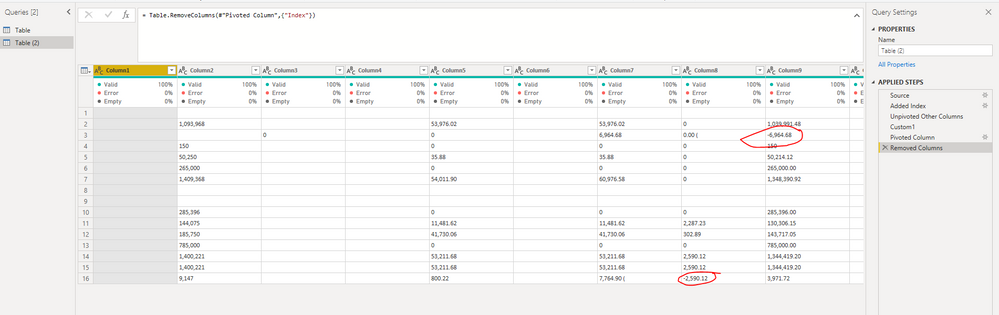
let
Source = Table.FromRows(Json.Document(Binary.Decompress(Binary.FromText("xVRbjsMgDLxK1a9dybL8AuOzVL3/NdZ5EJEmm6r7sx8RMdjDeBh4PO63O3z4PWGpYqBQiNqG1ZITXpHkJKalRgMiGK2XGYYesG9r/jjW3Mtw3o6Q6PY1zH2/5A4sCw38RkzarR4rC4HsirVgay//tCayIfemk50f0KQWILrismYg/U6JwShA95IbEDPGJhPNkpfOjkGtgQZhdIKGei755yb4W5W0kozqlRhLxqUYlp17GUA49WmMVU5iAWmOMvXNSqBUkXttYKlH+GTgu/M3Btc8n3oSKwm2mFkpODtSBxfBelTb2zs7rBnv7JDeEx7toGlGxs0iYyxQ0gazTydXGBgHSsdVjPiPLQLYfIBv2bT0I3TwvOCx3PYOPt326WFh9O2hWR2/Qj9/AA==", BinaryEncoding.Base64), Compression.Deflate)), let _t = ((type nullable text) meta [Serialized.Text = true]) in type table [Column1 = _t, Column2 = _t, Column3 = _t, Column4 = _t, Column5 = _t, Column6 = _t, Column7 = _t, Column8 = _t, Column9 = _t, Column10 = _t, Column11 = _t, Column12 = _t, Column13 = _t]),
#"Added Index" = Table.AddIndexColumn(Source, "Index", 1, 1, Int64.Type),
#"Unpivoted Other Columns" = Table.UnpivotOtherColumns(#"Added Index", {"Index"}, "Attribute", "Value"),
Custom1 = Table.ReplaceValue(#"Unpivoted Other Columns",
each [Value],
each if Text.Contains([Value],")")
then "-" & Text.Replace([Value],")","")
else [Value],
Replacer.ReplaceText,
Table.ColumnNames(#"Unpivoted Other Columns")),
#"Pivoted Column" = Table.Pivot(Custom1, List.Distinct(Custom1[Attribute]), "Attribute", "Value"),
#"Removed Columns" = Table.RemoveColumns(#"Pivoted Column",{"Index"})
in
#"Removed Columns"
Best Regards,
Icey
If this post helps, then please consider Accept it as the solution to help the other members find it more quickly.
Hi @powerqueryquest ,
Table.ColumnNames(#"Filtered Rows") returns a list contains all column names, not the value of the columns. So these parts won't work:
Text.Contains(Table.ColumnNames(#"Filtered Rows"),")"),
Text.Replace(Table.ColumnNames(#"Filtered Rows"),")","")
Just add one Index column and use UnPivot and Pivot, then what you want appears:
let
Source = Table.FromRows(Json.Document(Binary.Decompress(Binary.FromText("xVRbjsMgDLxK1a9dybL8AuOzVL3/NdZ5EJEmm6r7sx8RMdjDeBh4PO63O3z4PWGpYqBQiNqG1ZITXpHkJKalRgMiGK2XGYYesG9r/jjW3Mtw3o6Q6PY1zH2/5A4sCw38RkzarR4rC4HsirVgay//tCayIfemk50f0KQWILrismYg/U6JwShA95IbEDPGJhPNkpfOjkGtgQZhdIKGei755yb4W5W0kozqlRhLxqUYlp17GUA49WmMVU5iAWmOMvXNSqBUkXttYKlH+GTgu/M3Btc8n3oSKwm2mFkpODtSBxfBelTb2zs7rBnv7JDeEx7toGlGxs0iYyxQ0gazTydXGBgHSsdVjPiPLQLYfIBv2bT0I3TwvOCx3PYOPt326WFh9O2hWR2/Qj9/AA==", BinaryEncoding.Base64), Compression.Deflate)), let _t = ((type nullable text) meta [Serialized.Text = true]) in type table [Column1 = _t, Column2 = _t, Column3 = _t, Column4 = _t, Column5 = _t, Column6 = _t, Column7 = _t, Column8 = _t, Column9 = _t, Column10 = _t, Column11 = _t, Column12 = _t, Column13 = _t]),
#"Added Index" = Table.AddIndexColumn(Source, "Index", 1, 1, Int64.Type),
#"Unpivoted Other Columns" = Table.UnpivotOtherColumns(#"Added Index", {"Index"}, "Attribute", "Value"),
Custom1 = Table.ReplaceValue(#"Unpivoted Other Columns",
each [Value],
each if Text.Contains([Value],")")
then "-" & Text.Replace([Value],")","")
else [Value],
Replacer.ReplaceText,
Table.ColumnNames(#"Unpivoted Other Columns")),
#"Pivoted Column" = Table.Pivot(Custom1, List.Distinct(Custom1[Attribute]), "Attribute", "Value"),
#"Removed Columns" = Table.RemoveColumns(#"Pivoted Column",{"Index"})
in
#"Removed Columns"
Best Regards,
Icey
If this post helps, then please consider Accept it as the solution to help the other members find it more quickly.
Thank you!
| Column1 | Column2 | Column3 | Column4 | Column5 | Column6 | Column7 | Column8 | Column9 | Column10 | Column11 | Column12 | Column13 |
| 1,093,968 | 53,976.02 | 53,976.02 | 0 | 1,039,991.48 | 4.93 | |||||||
| 0 | 0 | 6,964.68 | 0.00 ( | 6,964.68) | 0 | |||||||
| 150 | 0 | 0 | 0 | 150 | 0 | |||||||
| 50,250 | 35.88 | 35.88 | 0 | 50,214.12 | 0.07 | |||||||
| 265,000 | 0 | 0 | 0 | 265,000.00 | 0 | |||||||
| 1,409,368 | 54,011.90 | 60,976.58 | 0 | 1,348,390.92 | 4.33 | |||||||
| 285,396 | 0 | 0 | 0 | 285,396.00 | 0 | |||||||
| 144,075 | 11,481.62 | 11,481.62 | 2,287.23 | 130,306.15 | 9.56 | |||||||
| 185,750 | 41,730.06 | 41,730.06 | 302.89 | 143,717.05 | 22.63 | |||||||
| 785,000 | 0 | 0 | 0 | 785,000.00 | 0 | |||||||
| 1,400,221 | 53,211.68 | 53,211.68 | 2,590.12 | 1,344,419.20 | 3.99 | |||||||
| 1,400,221 | 53,211.68 | 53,211.68 | 2,590.12 | 1,344,419.20 | 3.99 | |||||||
| 9,147 | 800.22 | 7,764.90 ( | 2,590.12) | 3,971.72 | 56.58 |
If you have recently started exploring Fabric, we'd love to hear how it's going. Your feedback can help with product improvements.
A new Power BI DataViz World Championship is coming this June! Don't miss out on submitting your entry.
Share feedback directly with Fabric product managers, participate in targeted research studies and influence the Fabric roadmap.
| User | Count |
|---|---|
| 53 | |
| 45 | |
| 44 | |
| 20 | |
| 19 |
| User | Count |
|---|---|
| 73 | |
| 71 | |
| 34 | |
| 33 | |
| 31 |