Join us at FabCon Atlanta from March 16 - 20, 2026, for the ultimate Fabric, Power BI, AI and SQL community-led event. Save $200 with code FABCOMM.
Register now!The Power BI Data Visualization World Championships is back! Get ahead of the game and start preparing now! Learn more
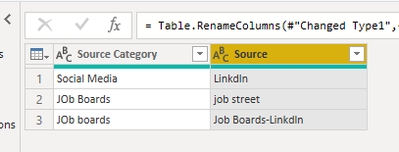
I have table like below
when i try to replace value From Source field- Linkdln, it is changing social media- Linkdln also. How can i change only jobboards-linkdln name?
| Source Category | Source |
| Social Media | Linkdln |
| JOb Boards | job street |
| JOb boards | Linkdln |
How can i show below table in power query?
| Source Category | Source |
| Job Boards | Job Boards-Linkdln |
| Social Media | Linkdln |
| Job Boards | Job Street |
Solved! Go to Solution.
@mithiladas02 , A new column in power query
if [Source Category] = "Job Boards" and [Source]="Linkdln" then [Source Category] & "-" & [Source] else [Source Category]
Hi @mithiladas02 ,
Try something as follows in Power Query editor in Power BI.
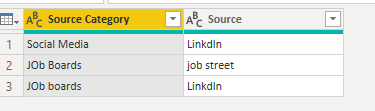
This is the data:
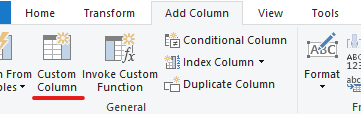
Now under Add Column:
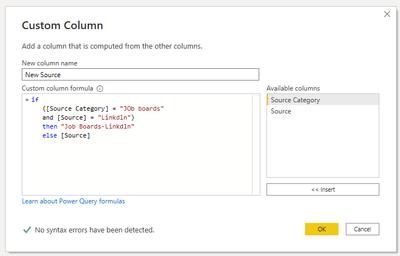
Then a new window appears:
Formula that I have written can be seen below in editor window:
if
([Source Category] = "JOb boards"
and [Source] = "Linkdln")
then "Job Boards-Linkdln"
else [Source]
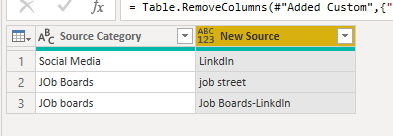
You will get following:
Just remove the Source column:
Modify data-type of New Source to text and rename it to Source. You will get required results:
Thanks,
Pragati
Hi @mithiladas02 ,
Try something as follows in Power Query editor in Power BI.
This is the data:
Now under Add Column:
Then a new window appears:
Formula that I have written can be seen below in editor window:
if
([Source Category] = "JOb boards"
and [Source] = "Linkdln")
then "Job Boards-Linkdln"
else [Source]
You will get following:
Just remove the Source column:
Modify data-type of New Source to text and rename it to Source. You will get required results:
Thanks,
Pragati
@mithiladas02 , A new column in power query
if [Source Category] = "Job Boards" and [Source]="Linkdln" then [Source Category] & "-" & [Source] else [Source Category]
The Power BI Data Visualization World Championships is back! Get ahead of the game and start preparing now!
| User | Count |
|---|---|
| 38 | |
| 35 | |
| 33 | |
| 32 | |
| 29 |
| User | Count |
|---|---|
| 134 | |
| 96 | |
| 78 | |
| 67 | |
| 65 |