cancel
Showing results for 
Search instead for 
Did you mean: 

The Power BI Data Visualization World Championships is back! Get ahead of the game and start preparing now! Learn more

Reply
Anonymous
Not applicable

Replace value entire cell

Hi Power BI Community!

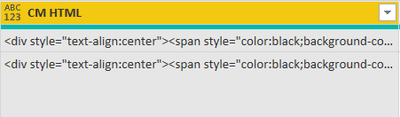
At first the subject sounds easy: Power Query - replace value - advanced options - match entire cell - done but I have this value: 

Beginner_2020_0-1626879468398.png

Unique HTML Values 😐 I have 1000+ Rows but I want to know in which html values have  "green", "red" and "yellow" in their code.

I can filter with TEXT Filter "green", "red" and "yellow" but the replacing the entire cell is not possible and to change every single cell (again all html values are unique). 

Should I copy and filter with text but how can I do this without affecting the other data. Do you have a better solution?

1 ACCEPTED SOLUTION
BA_Pete
Super User
Super User

Hi @Anonymous ,


In Power Query you should be able to edit the default replace code.

I'm not sure I understand exactly what you want to replace the whole value with, but somethin glike this might work for you:


//Default code
= Table.ReplaceValue(#"Changed Type","abcde","edcba",Replacer.ReplaceText,{"EVENT_TYPE"})

//Change to
= Table.ReplaceValue(#"Changed Type", each [CM HTML], each if Text.Contains([CM HTML], "Green") or Text.Contains([CM HTML], "Red") then "Replace the cell with this text" else [CM HTML], Replacer.ReplaceText, {"EVENT_TYPE"})


If this doesn't work, try changing Replacer.ReplaceText to Replacer.ReplaceValue


Pete


Now accepting Kudos! If my post helped you, why not give it a thumbs-up?

Proud to be a Datanaut!


View solution in original post

2 REPLIES 2
fhill
Resident Rockstar
Resident Rockstar


How's something like this?  I've broken it up into seperate code peices to show the process, but you can likely combine together if needed.  It's a New Colmn, not Measure (only matters if using Direct Query)


1.   This will come in handy later, but we need to know which color we are working with...

Color Found = IF ( SEARCH("green", 'Color Shift'[HTML Data],,0) <> 0,"green",
IF ( SEARCH("yellow", 'Color Shift'[HTML Data],,0) <> 0,"yellow",
IF ( SEARCH("black", 'Color Shift'[HTML Data],,0) <> 0,"black")))


2. Next we need to know the position of hte color we are working with, in case it's not always uniform inthe HTML

Color Position = IFERROR(SEARCH("green",'Color Shift'[HTML Data]),
IFERROR(SEARCH("black",'Color Shift'[HTML Data]),
IFERROR(SEARCH("yellow",'Color Shift'[HTML Data])
,0)))
 
 3.  Now, take everything from the LEFT of the found color position & whatever new text you need (this is assuming you are changing everything to one uniform color - add IF/Then if needing multiple colors based on original color) & everything from the RIGHT of the found color position.  (Some funky math looking at total length - position found - length of color name + 1 back in because 0's exist in the world)
New HTML = LEFT('Color Shift'[HTML Data], 'Color Shift'[Color Position] - 1) & "New Color" & RIGHT('Color Shift'[HTML Data], LEN('Color Shift'[HTML Data]) - 'Color Shift'[Color Position] - LEN('Color Shift'[Color Found]) + 1)

 

fhill_0-1626883379883.png


Did I answer your question, or help you along the way?
Please give Kudos or Mark as a Solution!


https://www.linkedin.com/in/forrest-hill-04480730/

Proud to give back to the community!
Thank You!


BA_Pete
Super User
Super User

Hi @Anonymous ,


In Power Query you should be able to edit the default replace code.

I'm not sure I understand exactly what you want to replace the whole value with, but somethin glike this might work for you:


//Default code
= Table.ReplaceValue(#"Changed Type","abcde","edcba",Replacer.ReplaceText,{"EVENT_TYPE"})

//Change to
= Table.ReplaceValue(#"Changed Type", each [CM HTML], each if Text.Contains([CM HTML], "Green") or Text.Contains([CM HTML], "Red") then "Replace the cell with this text" else [CM HTML], Replacer.ReplaceText, {"EVENT_TYPE"})


If this doesn't work, try changing Replacer.ReplaceText to Replacer.ReplaceValue


Pete


Now accepting Kudos! If my post helped you, why not give it a thumbs-up?

Proud to be a Datanaut!


Helpful resources

Announcements
Power BI DataViz World Championships

Power BI Dataviz World Championships

The Power BI Data Visualization World Championships is back! Get ahead of the game and start preparing now!

November Power BI Update Carousel

Power BI Monthly Update - November 2025

Check out the November 2025 Power BI update to learn about new features.

FabCon Atlanta 2026 carousel

FabCon Atlanta 2026

Join us at FabCon Atlanta, March 16-20, for the ultimate Fabric, Power BI, AI and SQL community-led event. Save $200 with code FABCOMM.