Don't miss your chance to take the Fabric Data Engineer (DP-600) exam for FREE! Find out how by attending the DP-600 session on April 23rd (pacific time), live or on-demand.
Learn moreNext up in the FabCon + SQLCon recap series: The roadmap for Microsoft SQL and Maximizing Developer experiences in Fabric. All sessions are available on-demand after the live show. Register now
Hi all, I recieve a CSV in with different headings and sub headings.
the are a varrying number of headings and a varrying number of subheadings for each heading
column1 column2
heading1
subheading1 data
subheading2 data
subheading3 data
heading2
subheading4 data
subheading5 data
subheading6 data
subheading7 data
I need to extract the headings and append them as the first column of each row
column1 column2 column3
heading1 subheading1 data
heading1 subheading2 data
heading1 subheading3 data
heading2 subheading4 data
heading2 subheading5 data
heading2 subheading6 data
heading2 subheading7 data
In the edit query stage i have tried to do this by:
#"Add Heading Column" = Table.AddColumn(Source, "Heading", each
if [Column2] = ""
then [Column1]
else ""),
column1 column2 column3
heading1 subheading1 data
subheading2 data
subheading3 data
heading2 subheading4 data
subheading5 data
subheading6 data
subheading7 data
I then tried to replace the blank values with the row aboves value. Im struggling to find out how to reference this.
#"Replaced Value" = Table.ReplaceValue(#"Add Heading Column","",{Previous Rows Value],Replacer.ReplaceValue,{"Heading"})Is there a way to refernce the previous rows value like this?
Is there possibly a better way to do this ?
Any help would be much appreciated.
Solved! Go to Solution.
Not exact how to refer to the previous row but at least it works for the expected result.
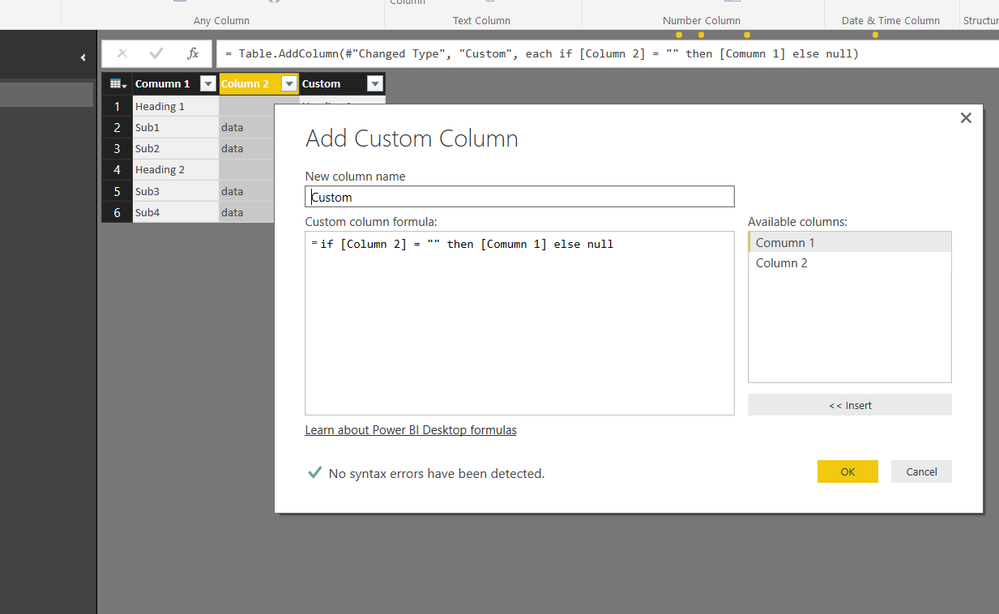
Add a custom column
= Table.AddColumn(#"Changed Type", "Custom", each if [Column 2] = "" then [Comumn 1] else null)
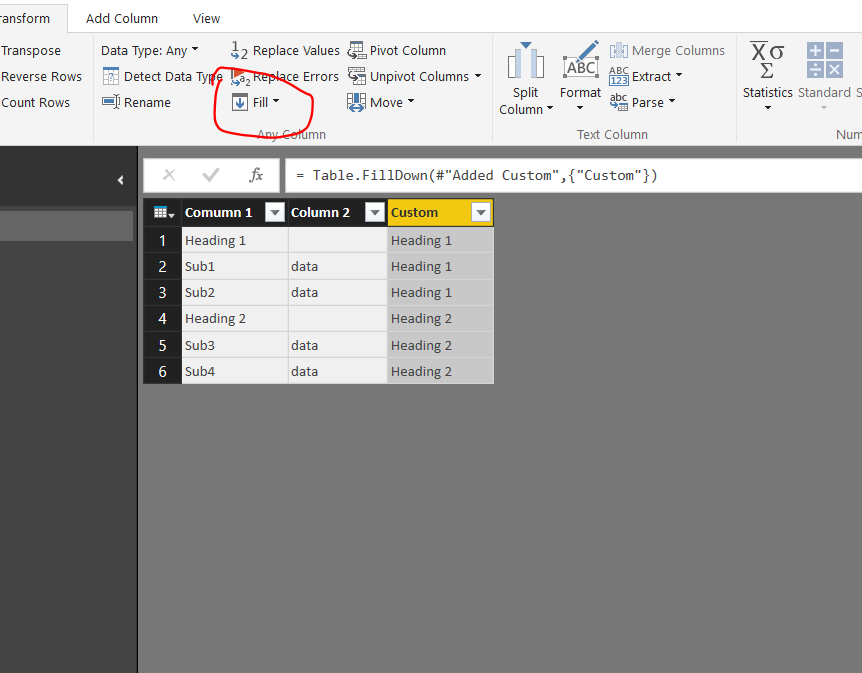
Then select the custom column and Fill down from transform ribbon
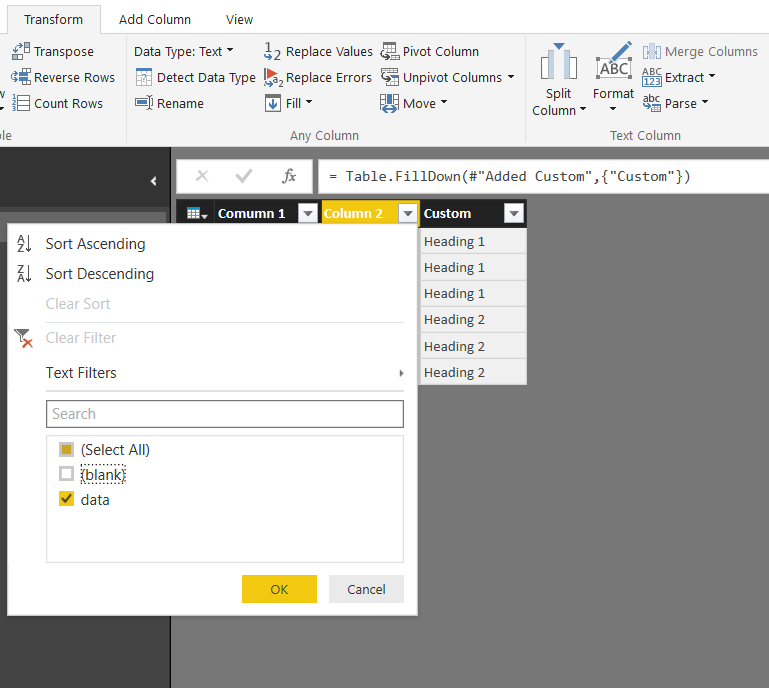
Remove the blanks in the data column 2
You end up with the table you needed
Full M code
let
Source = Table.FromRows(Json.Document(Binary.Decompress(Binary.FromText("i45W8khNTMnMS1cwVNJRUorViVYKLk0CsVMSSxJhfCNkPkyDEZIGYzQNJnB+LAA=", BinaryEncoding.Base64), Compression.Deflate)), let _t = ((type text) meta [Serialized.Text = true]) in type table [#"Comumn 1" = _t, #"Column 2" = _t]),
#"Changed Type" = Table.TransformColumnTypes(Source,{{"Comumn 1", type text}, {"Column 2", type text}}),
#"Added Custom" = Table.AddColumn(#"Changed Type", "Custom", each if [Column 2] = "" then [Comumn 1] else null),
#"Filled Down" = Table.FillDown(#"Added Custom",{"Custom"}),
#"Filtered Rows" = Table.SelectRows(#"Filled Down", each ([Column 2] = "data"))
in
#"Filtered Rows"
Not exact how to refer to the previous row but at least it works for the expected result.
Add a custom column
= Table.AddColumn(#"Changed Type", "Custom", each if [Column 2] = "" then [Comumn 1] else null)
Then select the custom column and Fill down from transform ribbon
Remove the blanks in the data column 2
You end up with the table you needed
Full M code
let
Source = Table.FromRows(Json.Document(Binary.Decompress(Binary.FromText("i45W8khNTMnMS1cwVNJRUorViVYKLk0CsVMSSxJhfCNkPkyDEZIGYzQNJnB+LAA=", BinaryEncoding.Base64), Compression.Deflate)), let _t = ((type text) meta [Serialized.Text = true]) in type table [#"Comumn 1" = _t, #"Column 2" = _t]),
#"Changed Type" = Table.TransformColumnTypes(Source,{{"Comumn 1", type text}, {"Column 2", type text}}),
#"Added Custom" = Table.AddColumn(#"Changed Type", "Custom", each if [Column 2] = "" then [Comumn 1] else null),
#"Filled Down" = Table.FillDown(#"Added Custom",{"Custom"}),
#"Filtered Rows" = Table.SelectRows(#"Filled Down", each ([Column 2] = "data"))
in
#"Filtered Rows"
If you have recently started exploring Fabric, we'd love to hear how it's going. Your feedback can help with product improvements.
A new Power BI DataViz World Championship is coming this June! Don't miss out on submitting your entry.
| User | Count |
|---|---|
| 44 | |
| 43 | |
| 38 | |
| 19 | |
| 15 |
| User | Count |
|---|---|
| 67 | |
| 66 | |
| 31 | |
| 28 | |
| 24 |