FabCon is coming to Atlanta
Join us at FabCon Atlanta from March 16 - 20, 2026, for the ultimate Fabric, Power BI, AI and SQL community-led event. Save $200 with code FABCOMM.
Register now!- Power BI forums
- Get Help with Power BI
- Desktop
- Service
- Report Server
- Power Query
- Mobile Apps
- Developer
- DAX Commands and Tips
- Custom Visuals Development Discussion
- Health and Life Sciences
- Power BI Spanish forums
- Translated Spanish Desktop
- Training and Consulting
- Instructor Led Training
- Dashboard in a Day for Women, by Women
- Galleries
- Data Stories Gallery
- Themes Gallery
- Contests Gallery
- QuickViz Gallery
- Quick Measures Gallery
- Visual Calculations Gallery
- Notebook Gallery
- Translytical Task Flow Gallery
- TMDL Gallery
- R Script Showcase
- Webinars and Video Gallery
- Ideas
- Custom Visuals Ideas (read-only)
- Issues
- Issues
- Events
- Upcoming Events
The Power BI Data Visualization World Championships is back! Get ahead of the game and start preparing now! Learn more
- Power BI forums
- Forums
- Get Help with Power BI
- Desktop
- Re: Replace Number by text
- Subscribe to RSS Feed
- Mark Topic as New
- Mark Topic as Read
- Float this Topic for Current User
- Bookmark
- Subscribe
- Printer Friendly Page

- Mark as New
- Bookmark
- Subscribe
- Mute
- Subscribe to RSS Feed
- Permalink
- Report Inappropriate Content
Replace Number by text
Hello,
I'm replace the Numbers os one Month column by Text (replane 1 by January, 2 by February...).
When I try replace 10 by October, 11 by November and 12 by December, appear attachment error.

Can help me?
Solved! Go to Solution.


- Mark as New
- Bookmark
- Subscribe
- Mute
- Subscribe to RSS Feed
- Permalink
- Report Inappropriate Content
Hi @ana_cordeiro ,
To create a custom column as below.
Date.MonthName(#datetime(2011, [monthno], 1, 5, 0, 0), "en-US")
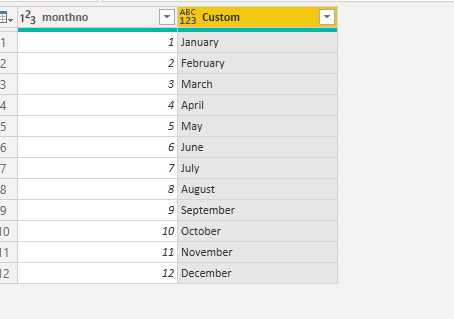
M code for your reference.
let
    Source = Table.FromRows(Json.Document(Binary.Decompress(Binary.FromText("i45WMlSK1YlWMgKTxmDSBEyagkkzMGkOJi3ApCWYNDSAUBDdhkDtsQA=", BinaryEncoding.Base64), Compression.Deflate)), let _t = ((type text) meta [Serialized.Text = true]) in type table [monthno = _t]),
    #"Changed Type" = Table.TransformColumnTypes(Source,{{"monthno", Int64.Type}}),
    #"Added Custom" = Table.AddColumn(#"Changed Type", "Custom", each Date.MonthName(#datetime(2011, [monthno], 1, 5, 0, 0), "en-US"))
in
    #"Added Custom"
If this post helps, then please consider Accept it as the solution to help the others find it more quickly.


- Mark as New
- Bookmark
- Subscribe
- Mute
- Subscribe to RSS Feed
- Permalink
- Report Inappropriate Content
another option
Date.ToText(#date(2022, [MonthNumber], 1), "MMMM", " en-US")

- Mark as New
- Bookmark
- Subscribe
- Mute
- Subscribe to RSS Feed
- Permalink
- Report Inappropriate Content
Hi Ahmedx,
Your suggested code works for me. Thank you so much!
And thanks for the very quick response too.
- Mark as New
- Bookmark
- Subscribe
- Mute
- Subscribe to RSS Feed
- Permalink
- Report Inappropriate Content
Hi @ana_cordeiro ,
To create a custom column as below.
Date.MonthName(#datetime(2011, [monthno], 1, 5, 0, 0), "en-US")
M code for your reference.
let
    Source = Table.FromRows(Json.Document(Binary.Decompress(Binary.FromText("i45WMlSK1YlWMgKTxmDSBEyagkkzMGkOJi3ApCWYNDSAUBDdhkDtsQA=", BinaryEncoding.Base64), Compression.Deflate)), let _t = ((type text) meta [Serialized.Text = true]) in type table [monthno = _t]),
    #"Changed Type" = Table.TransformColumnTypes(Source,{{"monthno", Int64.Type}}),
    #"Added Custom" = Table.AddColumn(#"Changed Type", "Custom", each Date.MonthName(#datetime(2011, [monthno], 1, 5, 0, 0), "en-US"))
in
    #"Added Custom"
If this post helps, then please consider Accept it as the solution to help the others find it more quickly.
- Mark as New
- Bookmark
- Subscribe
- Mute
- Subscribe to RSS Feed
- Permalink
- Report Inappropriate Content
Hi @ana_cordeiro ,
Its quite unknown which formula you are using to map month number with month name. I suggest you to use the SWITCH expression to accomplish your requirement.

Please take a quick glance at newly created dashboards : Restaurant Management Dashboard , HR Analytics Report , Hotel Management Report, Sales Analysis Report , Fortune 500 Companies Analysis , Revenue Tracking Dashboard
- Mark as New
- Bookmark
- Subscribe
- Mute
- Subscribe to RSS Feed
- Permalink
- Report Inappropriate Content
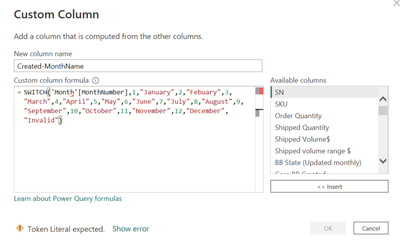
Hi, I copied in the string of code, but there is error in the code. Can someone help?


- Mark as New
- Bookmark
- Subscribe
- Mute
- Subscribe to RSS Feed
- Permalink
- Report Inappropriate Content
Hello,
Could you please share some sample data & the expression you have written to get the required text?
This will give anyone who wants to help you to get more insight & guide you further.
Thanks!

Helpful resources

Power BI Dataviz World Championships
The Power BI Data Visualization World Championships is back! Get ahead of the game and start preparing now!

Power BI Monthly Update - November 2025
Check out the November 2025 Power BI update to learn about new features.

FabCon Atlanta 2026
Join us at FabCon Atlanta, March 16-20, for the ultimate Fabric, Power BI, AI and SQL community-led event. Save $200 with code FABCOMM.

| User | Count |
|---|---|
| 59 | |
| 43 | |
| 42 | |
| 23 | |
| 17 |


| User | Count |
|---|---|
| 190 | |
| 122 | |
| 96 | |
| 66 | |
| 47 |


