Join us at FabCon Atlanta from March 16 - 20, 2026, for the ultimate Fabric, Power BI, AI and SQL community-led event. Save $200 with code FABCOMM.
Register now!The Power BI Data Visualization World Championships is back! Get ahead of the game and start preparing now! Learn more
Hello,
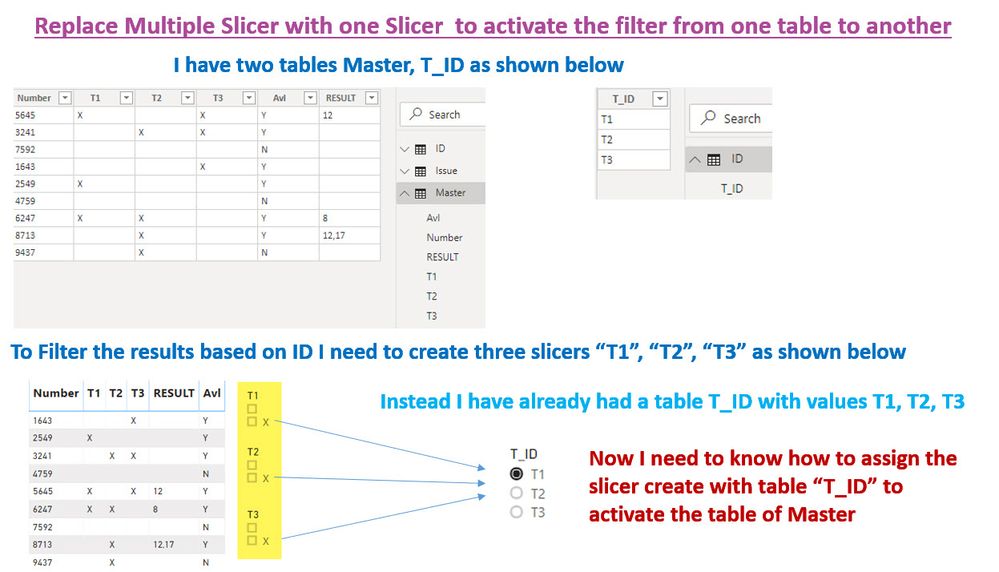
I need one more help on slicer, find the below snap for your ref.
BR
Mechi 🔧
Hi @Mechi ,
If the value can only be one of three (T1, T2 or T3).
1. Manually create a table in DAX (answering your other question - I do not know how to transpose column names to a list in DAX 😔😞
Table 2 = DATATABLE("T_ID", STRING, "Index", INTEGER, {{"T1",2}, {"T2", 4}, {"T3", 8}})or add "power of two" values to T_IDs in PQ:
let
Source = Table.FromRows(Json.Document(Binary.Decompress(Binary.FromText("i45WCjFUitUBUkYQylgpNhYA", BinaryEncoding.Base64), Compression.Deflate)), let _t = ((type text) meta [Serialized.Text = true]) in type table [T_ID = _t]),
#"Changed Type" = Table.TransformColumnTypes(Source,{{"T_ID", type text}}),
#"Added Index" = Table.AddIndexColumn(#"Changed Type", "I", 1, 1),
#"Added Custom" = Table.AddColumn(#"Added Index", "Index", each Number.Power([I],2), Int64.Type),
#"Removed Columns" = Table.RemoveColumns(#"Added Custom",{"I"})
in
#"Removed Columns"
2. Add Measure to the T_ID table in DAX (Table2 is your T_ID table):
FilterSet = AVERAGEX('Table 2','Table 2'[Index])
3. Add Measure to the main table (Table = your main table):
IndexSum = AVERAGEX('Table', if ([T1]="X", 2, 0) + if ([T2]="X", 4, 0) + if ([T3]="X", 8, 0))
4. Add another measure to the main table:
Filter =
var FilterID = MAXX('Table', [IndexSum])
return if (FilterID = 0, 0, int(mod(FilterID, [FilterSet] * 2) / [FilterSet]))
5. Add Filter (measure) to your table visual as a filter and set to "is not 0".
6. Add T_ID from the T_IDs table as slicer visual. Switching values in the slicer will change the table.
I have not tested it, but my gut feeling is that this can be modified to an alternative and, possibly, simpler solution:
https://community.powerbi.com/t5/Power-Query/How-to-Use-Slicer-for-Measure-Values/m-p/844449#M28338
Kind regards,
JB
Please provide sample data to work on
Hi,
I can't able to upload the files in the forum
Instead if possible you can use this list and paste it in an excel, to load in power bi
| Number | T1 | T2 | T3 | Avl |
| 5645 | X | X | Y | |
| 3241 | X | X | Y | |
| 7592 | N | |||
| 1643 | X | Y | ||
| 2549 | X | Y | ||
| 4759 | N | |||
| 6247 | X | X | Y | |
| 8713 | X | Y | ||
| 9437 | X | N |
| T_ID |
| T1 |
| T2 |
| T3 |
BR
Mechi
Hi Mechi,
(for some reason I can't reply as a message).
Sorry for the delay. This is a working version of the PBI model:
https://drive.google.com/open?id=1CNPyJM2SsGw2v39x7PuWr5KyK0uM63cu
The magic happens in the measures. The main functionality that you are interested in is in the FilterEx measure.
...
return CONCATENATEx(IndexTable,
var FilterFunc = if (FilterID = 0, 0, int(mod([FilterSet], POWER(2, [Value]) * 2) / POWER(2, [Value])))
var FilterSum = if (FilterID = 0, 0, int(mod([IndexSum], POWER(2, [Value]) * 2) / POWER(2, [Value])))
return if (AND(FilterSum,FilterFunc),if([Value]=1, "T1", if([Value]=2, "T2", "T3"))))
For your formula, you most likely would use SUMX instead of CONCATENATEX and some numbers/formulas instead of "T1", "T2" and "T3".
FilterFunc returns 1 or 0 depending on if the value/column name is selected in the slicer. FilterSum returns 1 or 0 depending on if there is the "X" in the relevant column or not.
If you need to change the number of columns, please add/remove ifs in the IndexSum with Power(2,[Index]). E.g. if ([T4]="X", 16, 0) + if ([T5]="X", 32, 0).
Also, alter the IndexTable in the FilterEx. The second argument of the GENERATESERIES() should be equal to the number of columns.
And, of course, the return if (AND(FilterSum,FilterFunc),if([Value]=1, "T1", if([Value]=2, "T2", "T3")))) bit.
This version works with multiple selections on the slicer.
Please do not hesitate to ask questions. I will have more time closer to the end of this week.
Kind regards,
JB
The Power BI Data Visualization World Championships is back! Get ahead of the game and start preparing now!
Check out the November 2025 Power BI update to learn about new features.
| User | Count |
|---|---|
| 59 | |
| 43 | |
| 42 | |
| 23 | |
| 17 |
| User | Count |
|---|---|
| 190 | |
| 122 | |
| 96 | |
| 66 | |
| 47 |