Don't miss your chance to take the Fabric Data Engineer (DP-600) exam for FREE! Find out how by watching the DP-600 session on-demand now through April 28th.
Learn moreJoin the FabCon + SQLCon recap series. Up next: Power BI, Real-Time Intelligence, IQ and AI, and Data Factory take center stage. All sessions are available on-demand after the live show. Register now
Hello partners!
I am performing the following calculation:
CFO BCP = CALCULATE(SUM(TBL_Patrimonio[MTO_CONCEPTO]),TBL_Patrimonio[DESC_CONCEPTO] IN {"CROSLAND CFO","FAMILY OFFICE BCP"})
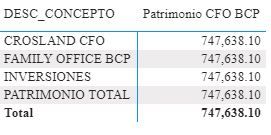
But, when I put my matrix with the data it is repeating the same values for each description.
What should I modify to achieve what I am putting in the formula is fulfilled? The data is in a single table.
Thank you!
Reggards.
DC
Solved! Go to Solution.
Since you are filtering the same column in your measure that is used in your visual, the measure filters are overwriting the one from the visual. If you want to only show results for those two values, you can modify your measure like this.
CFO BCP = CALCULATE(SUM(TBL_Patrimonio[MTO_CONCEPTO]),KEEPFILTERS(TBL_Patrimonio[DESC_CONCEPTO] IN {"CROSLAND CFO","FAMILY OFFICE BCP"}))
If that is not what you are looking for, please show your desired output.
Regards,
Pat
To learn more about Power BI, follow me on Twitter or subscribe on YouTube.
Hi,
Does this work?
CFO BCP = CALCULATE(SUM(TBL_Patrimonio[MTO_CONCEPTO]),filter(TBL_Patrimonio,TBL_Patrimonio[DESC_CONCEPTO] ="CROSLAND CFO"&&TBL_Patrimonio[DESC_CONCEPTO] ="FAMILY OFFICE BCP"))
Hope this helps.
@DanCasSan When you use a CALCULATE it modifies the filter context of your report and gives the same value. You can either use a visual level filter or try a SUMX instead. The SUMX will keep the current filter context of your table and add the additional filter context you apply to it.
CFO BCP = SUMX( FILTER(TBL_Patrimonio, ,TBL_Patrimonio[DESC_CONCEPTO] IN {"CROSLAND CFO","FAMILY OFFICE BCP"} ), TBL_Patrimonio[MTO_CONCEPTO])
Copying DAX from this post? Click here for a hack to quickly replace it with your own table names
Has this post solved your problem? Please Accept as Solution so that others can find it quickly and to let the community know your problem has been solved.
If you found this post helpful, please give Kudos C
I work as a Microsoft trainer and consultant, specialising in Power BI and Power Query.
www.excelwithallison.com
Since you are filtering the same column in your measure that is used in your visual, the measure filters are overwriting the one from the visual. If you want to only show results for those two values, you can modify your measure like this.
CFO BCP = CALCULATE(SUM(TBL_Patrimonio[MTO_CONCEPTO]),KEEPFILTERS(TBL_Patrimonio[DESC_CONCEPTO] IN {"CROSLAND CFO","FAMILY OFFICE BCP"}))
If that is not what you are looking for, please show your desired output.
Regards,
Pat
To learn more about Power BI, follow me on Twitter or subscribe on YouTube.
Check out the April 2026 Power BI update to learn about new features.
If you have recently started exploring Fabric, we'd love to hear how it's going. Your feedback can help with product improvements.
A new Power BI DataViz World Championship is coming this June! Don't miss out on submitting your entry.
| User | Count |
|---|---|
| 48 | |
| 40 | |
| 38 | |
| 20 | |
| 17 |
| User | Count |
|---|---|
| 68 | |
| 65 | |
| 30 | |
| 26 | |
| 25 |