cancel
Showing results for 
Search instead for 
Did you mean: 

The Power BI Data Visualization World Championships is back! Get ahead of the game and start preparing now! Learn more

Reply
Gangula
Advocate II
Advocate II

Reorder columns based on column headers

I have created a function which renames my columns based on the criteria I need with numbers in all the column headers.

So I need to order these columns based on these numbers in ascending order. See the below code where I manually ordered the columns.


Table.ReorderColumns(RemoveColumns,{"Viewfolder 1", "Viewfolder 2", "View 2", "Viewfolder 3", "View 3"})

This is a sample case with just 5 columns, but I have excel files with 100's of columns to order.

I prefer it if "viewfolder" is placed before "view", but it's not mandatory. Is there any way to achieve this using "M"

1 ACCEPTED SOLUTION
Anonymous
Not applicable

@Gangula,

This post should have the solution you are looking for. 

View solution in original post

3 REPLIES 3
jhauff77060
Advocate II
Advocate II

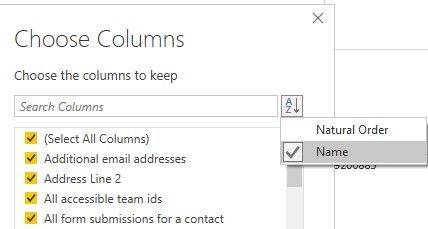
You should be able to add a new step in Power Query as follows:

Home > Choose Columns > Select All Columns > Sort A-Z > Name

as shown in the YouTube video Easy Trick for Sorting Columns in Power Query 

Sort.jpg

Anonymous
Not applicable

@Gangula,

This post should have the solution you are looking for. 

Thank you, that helped.

Helpful resources

Announcements
November Power BI Update Carousel

Power BI Monthly Update - November 2025

Check out the November 2025 Power BI update to learn about new features.

Fabric Data Days Carousel

Fabric Data Days

Advance your Data & AI career with 50 days of live learning, contests, hands-on challenges, study groups & certifications and more!

FabCon Atlanta 2026 carousel

FabCon Atlanta 2026

Join us at FabCon Atlanta, March 16-20, for the ultimate Fabric, Power BI, AI and SQL community-led event. Save $200 with code FABCOMM.