Join us at FabCon Atlanta from March 16 - 20, 2026, for the ultimate Fabric, Power BI, AI and SQL community-led event. Save $200 with code FABCOMM.
Register now!The Power BI Data Visualization World Championships is back! Get ahead of the game and start preparing now! Learn more
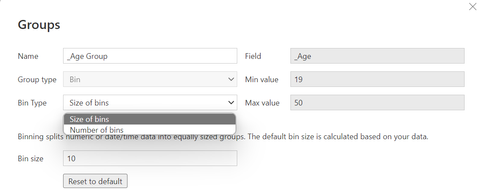
I am grouping the age using Data Groups function in Power BI. In its setting, I have selected Size of bins and Power BI auto detected the minimum and maximum values of the age column are 19 and 50 respectively. So, it will decide the number of group.
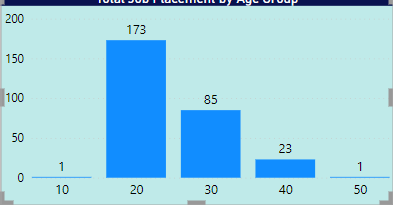
I have the output in the bar chart below. My question is how can I rename the X-axis. For example the first bar is name as 1-19, second bar is 20-29, and etc.
Solved! Go to Solution.
Something like this as a new column...
Age Range =
SWITCH(
TRUE(),
'Table'[Age] < 19, "0 - 19",
'Table'[Age] < 39, "20 - 39",
'Table'[Age] < 59, "40 - 59",
"60+"
)
Substitute your table name and column name.
| Have I solved your problem? Please click Accept as Solution so I don't keep coming back to this post, oh yeah, others may find it useful also ;). |
It might be possible to create a custom label for the axis as a new column based on the bin values, but, to be honest, it is probably easier to just control the grouping yourself. This could be done in Power Query or DAX depending on your preference.
This is a good article to explain one way to approach it...
https://radacad.com/create-customized-age-bins-or-groups-in-power-bi
There are a number of links in there showing how to make it controllable with measures also.
| Have I solved your problem? Please click Accept as Solution so I don't keep coming back to this post, oh yeah, others may find it useful also ;). |
Something like this as a new column...
Age Range =
SWITCH(
TRUE(),
'Table'[Age] < 19, "0 - 19",
'Table'[Age] < 39, "20 - 39",
'Table'[Age] < 59, "40 - 59",
"60+"
)
Substitute your table name and column name.
| Have I solved your problem? Please click Accept as Solution so I don't keep coming back to this post, oh yeah, others may find it useful also ;). |
The Power BI Data Visualization World Championships is back! Get ahead of the game and start preparing now!
| User | Count |
|---|---|
| 39 | |
| 37 | |
| 33 | |
| 32 | |
| 29 |
| User | Count |
|---|---|
| 133 | |
| 88 | |
| 85 | |
| 68 | |
| 64 |