
cancel
Showing results for 
Search instead for 
Did you mean: 

Get Fabric Certified for FREE during Fabric Data Days. Don't miss your chance! Request now

Reply
m_roussakis
Helper III
Helper III

Removing dupes in a column based on another column's value

I have duplicate values in column B.

I only want to keep the values in column B if Column A is NOT null. Column A is a date field. 


So how I did it was sort column A to Descending. Then I removed dupes in Column B. 


Will this do the trick? My dataset is massive to it's hard for me to know if this worked or not. 


Thanks

1 ACCEPTED SOLUTION

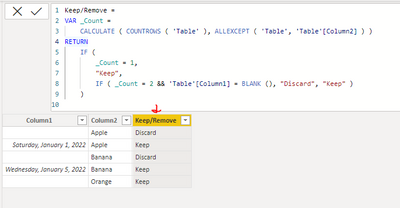
Try to add a new column with this DAX code, then use that to set the filter:

Keep/Remove = 
VAR _Count =
    CALCULATE ( COUNTROWS ( 'Table' ), ALLEXCEPT ( 'Table', 'Table'[Column2] ) )
RETURN
    IF (
        _Count = 1,
        "Keep",
        IF ( _Count = 2 && 'Table'[Column1] = BLANK (), "Discard", "Keep" )
    )


Output:

VahidDM_0-1666010436496.png


If this post helps, please consider accepting it as the solution to help the other members find it more quickly.

Appreciate your Kudos!! 

Badges.jpg

LinkedIn | Twitter | Blog | YouTube 

View solution in original post

5 REPLIES 5
m_roussakis
Helper III
Helper III

I can't do that as there are some nulls in Column A I need to keep (these are not dupes).

Can you post sample data as text and expected output?

Appreciate your Kudos!!
LinkedIn:www.linkedin.com/in/vahid-dm/

Column A | Column B

null           | apple     <---dupe discard
Jan 1         | apple     <---dupe keep 
null           | banana   <--dupe discard
Jan 5         | banana   <---dupe keep
null           | orange    <---not a dupe keep


etc etc etc


Try to add a new column with this DAX code, then use that to set the filter:

Keep/Remove = 
VAR _Count =
    CALCULATE ( COUNTROWS ( 'Table' ), ALLEXCEPT ( 'Table', 'Table'[Column2] ) )
RETURN
    IF (
        _Count = 1,
        "Keep",
        IF ( _Count = 2 && 'Table'[Column1] = BLANK (), "Discard", "Keep" )
    )


Output:

VahidDM_0-1666010436496.png


If this post helps, please consider accepting it as the solution to help the other members find it more quickly.

Appreciate your Kudos!! 

Badges.jpg

LinkedIn | Twitter | Blog | YouTube 

VahidDM
Super User
Super User

Hi @m_roussakis 


I think if you set a filter on Column A in Power Query to exclude all blank/null values that would solve your issue.

If this post helps, please consider accepting it as the solution to help the other members find it more quickly.

Appreciate your Kudos!! 

Badges.jpg

LinkedIn | Twitter | Blog | YouTube 


Helpful resources

Announcements
November Power BI Update Carousel

Power BI Monthly Update - November 2025

Check out the November 2025 Power BI update to learn about new features.

Fabric Data Days Carousel

Fabric Data Days

Advance your Data & AI career with 50 days of live learning, contests, hands-on challenges, study groups & certifications and more!

FabCon Atlanta 2026 carousel

FabCon Atlanta 2026

Join us at FabCon Atlanta, March 16-20, for the ultimate Fabric, Power BI, AI and SQL community-led event. Save $200 with code FABCOMM.

Top Solution Authors
Top Kudoed Authors