FabCon is coming to Atlanta
Join us at FabCon Atlanta from March 16 - 20, 2026, for the ultimate Fabric, Power BI, AI and SQL community-led event. Save $200 with code FABCOMM.
Register now!- Power BI forums
- Get Help with Power BI
- Desktop
- Service
- Report Server
- Power Query
- Mobile Apps
- Developer
- DAX Commands and Tips
- Custom Visuals Development Discussion
- Health and Life Sciences
- Power BI Spanish forums
- Translated Spanish Desktop
- Training and Consulting
- Instructor Led Training
- Dashboard in a Day for Women, by Women
- Galleries
- Data Stories Gallery
- Themes Gallery
- Contests Gallery
- QuickViz Gallery
- Quick Measures Gallery
- Visual Calculations Gallery
- Notebook Gallery
- Translytical Task Flow Gallery
- TMDL Gallery
- R Script Showcase
- Webinars and Video Gallery
- Ideas
- Custom Visuals Ideas (read-only)
- Issues
- Issues
- Events
- Upcoming Events
The Power BI Data Visualization World Championships is back! Get ahead of the game and start preparing now! Learn more
- Power BI forums
- Forums
- Get Help with Power BI
- Desktop
- Re: Removing Row Sub Totals from Matrix and Leavin...
- Subscribe to RSS Feed
- Mark Topic as New
- Mark Topic as Read
- Float this Topic for Current User
- Bookmark
- Subscribe
- Printer Friendly Page


- Mark as New
- Bookmark
- Subscribe
- Mute
- Subscribe to RSS Feed
- Permalink
- Report Inappropriate Content
Removing Row Sub Totals from Matrix and Leaving the Row Grand Total
Hi,
i have a matrix with 3 row fields, 1 column field and 2 measures.
i want to have a grand total row but it seems that i can't have a grand total row without having all the sub total rows in between.
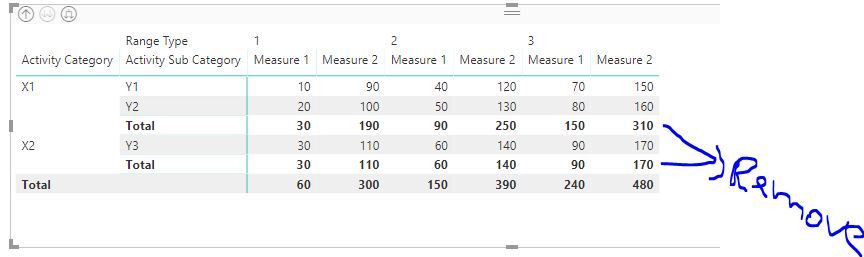
Is there a way to achieve this?
Thanks!
Solved! Go to Solution.

- Mark as New
- Bookmark
- Subscribe
- Mute
- Subscribe to RSS Feed
- Permalink
- Report Inappropriate Content
@udian,
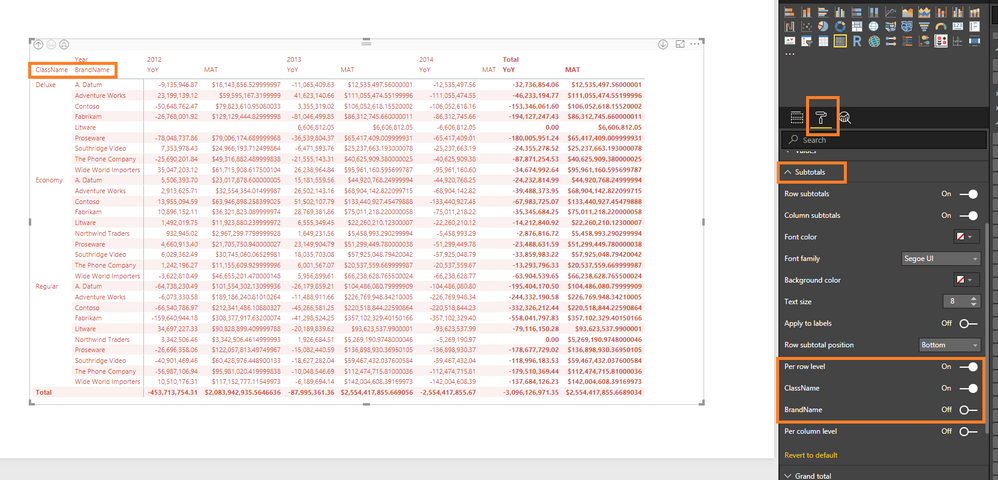
In the Matrix visual, go to Format->Subtotals, turn on per row level, then turn on total for "Active Category" , and turn off total for "Active Sub Category". There is an example for your reference.
Regards,
Lydia
- Mark as New
- Bookmark
- Subscribe
- Mute
- Subscribe to RSS Feed
- Permalink
- Report Inappropriate Content
@udian,
In the Matrix visual, go to Format->Subtotals, turn on per row level, then turn on total for "Active Category" , and turn off total for "Active Sub Category". There is an example for your reference.
Regards,
Lydia

- Mark as New
- Bookmark
- Subscribe
- Mute
- Subscribe to RSS Feed
- Permalink
- Report Inappropriate Content
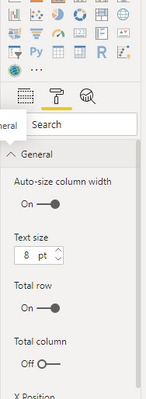
What version of Power BI Desktop are you using that shows this option? In the Format pane, even though I have the Total Rown marked as 'On', I don't see a Subtotal section as you have in your screenshot. Any ideas why? Thanks a lot for the help!

- Mark as New
- Bookmark
- Subscribe
- Mute
- Subscribe to RSS Feed
- Permalink
- Report Inappropriate Content
Thank you both for your help!


- Mark as New
- Bookmark
- Subscribe
- Mute
- Subscribe to RSS Feed
- Permalink
- Report Inappropriate Content
Pleasse Give it a shot
New Measure =
IF (
    HASONEFILTER ( Table1[Activity Sub Category] )
        && NOT ( HASONEFILTER ( Table1[Activity Category] ) ),
    [Measure2]
)
Regards
Zubair
Please try my custom visuals
- Mark as New
- Bookmark
- Subscribe
- Mute
- Subscribe to RSS Feed
- Permalink
- Report Inappropriate Content
Please try this one instead of one above
New Measure =
SWITCH (
    TRUE (),
    HASONEFILTER ( Table1[Activity Sub Category] )
        && HASONEFILTER ( Table1[Activity Category] ), [Measure2],
    NOT ( HASONEFILTER ( Table1[Activity Sub Category] ) )
        && NOT ( HASONEFILTER ( Table1[Activity Category] ) ), [Measure2]
)
Regards
Zubair
Please try my custom visuals
- Mark as New
- Bookmark
- Subscribe
- Mute
- Subscribe to RSS Feed
- Permalink
- Report Inappropriate Content
Hi Muhammad,
I get the following error message:
The value for Measure 2 Cannot be determined. Either Measure 2 doesn't exist, or there is no current row for a column named Measure 2.
Thanks!
- Mark as New
- Bookmark
- Subscribe
- Mute
- Subscribe to RSS Feed
- Permalink
- Report Inappropriate Content
is measure2 a COLUMN in your data or a MEASURE that you have created?
Regards
Zubair
Please try my custom visuals
- Mark as New
- Bookmark
- Subscribe
- Mute
- Subscribe to RSS Feed
- Permalink
- Report Inappropriate Content
I see what you were saying. I was using the original column with the default aggregation that PBI applied on the column.
I created 2 measures based on the original columns and now i don' t get the error message.
In my original post you cant see the third column so i tried modifiying your measures accordingly.
These are the measures :
New Measure11 =
SWITCH (
    TRUE (),
    HASONEFILTER ( Sheet1[Activity Sub Category] )
        && HASONEFILTER ( Sheet1[Activity Category] )
        && HASONEFILTER ( Sheet1[Is In Network] ), [Column1],
    NOT ( HASONEFILTER ( Sheet1[Activity Sub Category] ) )
        && NOT ( HASONEFILTER ( Sheet1[Activity Category] ) )
        && NOT ( HASONEFILTER ( Sheet1[Is In Network] ) ), [Column1]
)
New Measure22 =
SWITCH (
    TRUE (),
    HASONEFILTER ( Sheet1[Activity Sub Category] )
        && HASONEFILTER ( Sheet1[Activity Category] )
        && HASONEFILTER ( Sheet1[Is In Network] ), [Column2],
    NOT ( HASONEFILTER ( Sheet1[Activity Sub Category] ) )
        && NOT ( HASONEFILTER ( Sheet1[Activity Category] ) )
        && NOT ( HASONEFILTER ( Sheet1[Is In Network] ) ), [Column2]
)
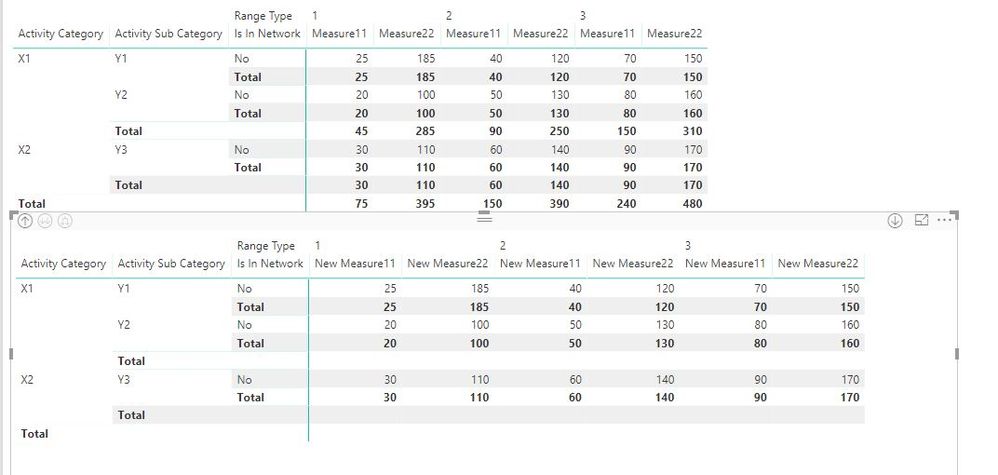
This is the matrix with the old measures and the new measures. As you can see some of the sub total numbers disappeared but the Total header is still there. Also, the grand total numbers were removed as well and the 3rd level sub totals still remain (i guess this is due to the change i made to your measure) .
- Mark as New
- Bookmark
- Subscribe
- Mute
- Subscribe to RSS Feed
- Permalink
- Report Inappropriate Content
Could you share your file with me?
Regards
Zubair
Please try my custom visuals
- Mark as New
- Bookmark
- Subscribe
- Mute
- Subscribe to RSS Feed
- Permalink
- Report Inappropriate Content
Is there a way to share it in this thread?
- Mark as New
- Bookmark
- Subscribe
- Mute
- Subscribe to RSS Feed
- Permalink
- Report Inappropriate Content
You can upload the file to Onedrive or GoogleDrive and share the link here
Regards
Zubair
Please try my custom visuals
Helpful resources

Power BI Dataviz World Championships
The Power BI Data Visualization World Championships is back! Get ahead of the game and start preparing now!

Power BI Monthly Update - December 2025
Check out the December 2025 Power BI Holiday Recap!

FabCon Atlanta 2026
Join us at FabCon Atlanta, March 16-20, for the ultimate Fabric, Power BI, AI and SQL community-led event. Save $200 with code FABCOMM.

| User | Count |
|---|---|
| 41 | |
| 38 | |
| 36 | |
| 30 | |
| 28 |


| User | Count |
|---|---|
| 128 | |
| 88 | |
| 79 | |
| 67 | |
| 62 |


